Update on Auburn’s iPads in Kindergarten

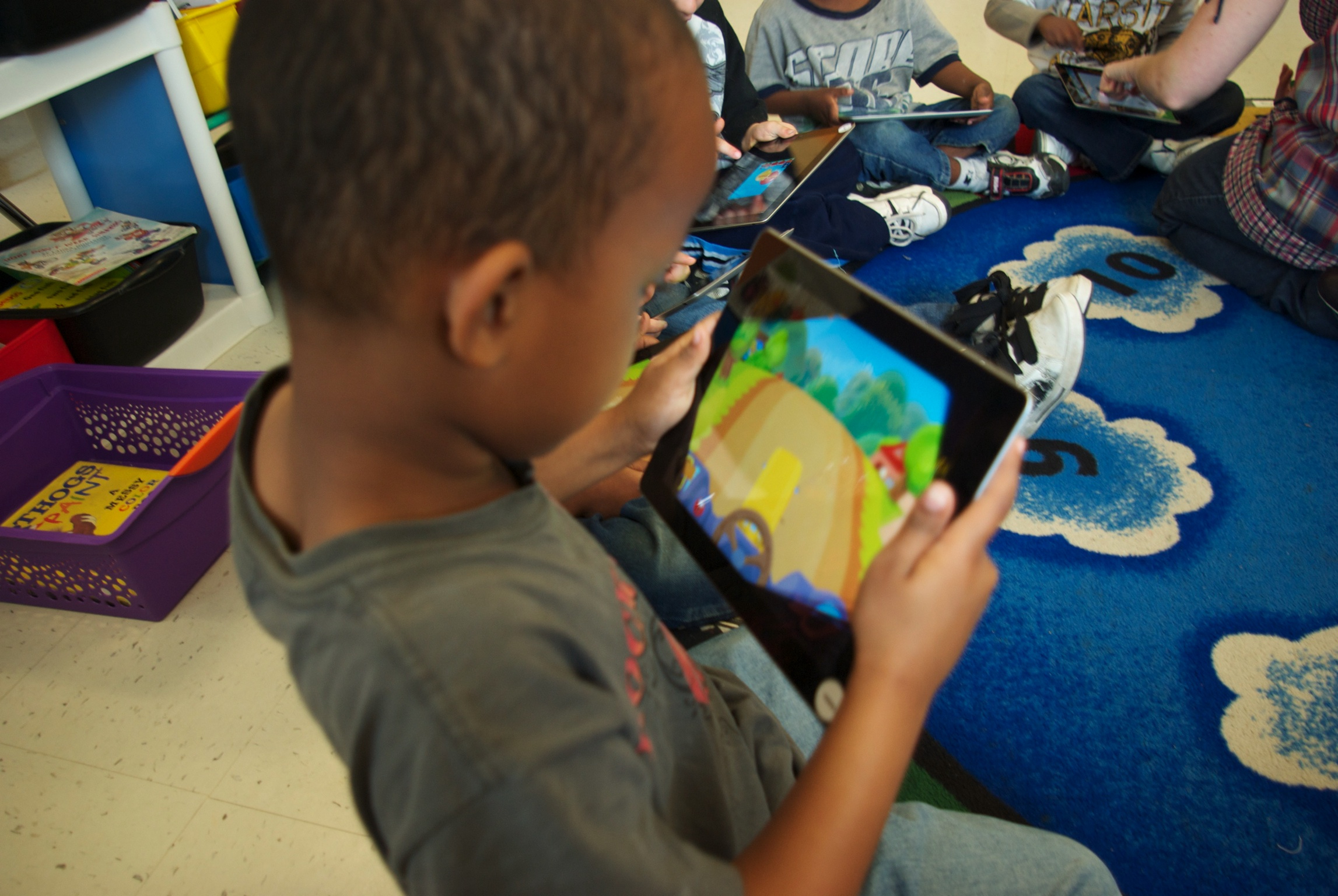
Auburn Kindergartener with his iPad

Well, we’ve had Kindergarteners with iPads since mid May, and it has been awesome!

We rolled out iPads to 5 Exploration Classrooms (about 100 students) so those teachers could help us find apps that helped us meet our curricular goals, establish classroom procedures for working with the iPads, and generally help us test out our program before beginning the pilot with all 16 kindergarten classrooms in the fall.

Recall that Advantage 2014 is Auburn School Department’s k-3 literacy and numeracy initiative.

Watch the Spring update.

Leadership for Change – Part 2 – A Model for Large-Scale School Change

In Leadership for Change – Part 1, I introduced the idea that large scale school change, change that really redefines the way things are done in school, requires careful attention to implementing the right components in a thoughtful way.

In this post, I’d like to introduce a model for large scale school change: the Lead4Change Model. It tries to make clear the desired outcome, the critical components, and the supporting but necessary componenets.

The overarching goal within the Lead4Change model is Learning. Although this may seem obvious, it is surprising how many times the goal of an initiative becomes (either officially or in practice) about some other aspect: about the technology involved, about a program, about an organizational structure, or about a new curricular resource. There is no doubt that these might be important pieces or contributors to the initiative, but in and of themselves, they are not sufficient reason to do any initiative. Why bother implementing anything within schools if it does not help to move the mission forward, to further the learning of young people? Keeping this key desired outcome in the forefront of their minds will help change leaders make the right decisions while working on each of the other components.

Probably the best evidence of Learning are the future accomplishments of students. Unfortuately, schools don’t have the decade or more it takes gather this evidence. We can fall back on more conventional measures, such as assessments, grades, or student work. Other secondary indicators can be equally as useful: attendance, behavior, engagement, and attitude.

There are two Critical Components to the Lead4Change model: Leadership and Teacher Practice. These are the most important components of the school change model and need the most careful attention. All other components of the model are there to help these two be effectively implemented.

As pointed out in the Part 1 post, leadership is everything when it comes to school change. This critical role doesn’t necessarily need to be played by the superintendent or the principal, but the pieces of the Leadership component need to be evident within the initiative. These include building a common vision, expectancy, supervision for level of implementation, policies and procedures, a safe environment, and that change is someone’s job.

Where Leadership creates the necessary conditions at the school or district level for implementing the change, the classroom is where the rubber meets the road. Teacher Practice is the second Critical Component of the Lead4Change model. It’s pieces include engaging teaching, classroom management and planning, and level of implementation.

There are five Supporting But Necessary Components within the Lead4Change model: Funding, Partnerships, Resource Management, Branding and Buzz, and PD for Paradigm Shift. Each of these is important to a well implemented initiative, one that successfully changes how schools work and therefore the amount of learning that takes place there. But it is important to remember that each of these five is in service to the Critical Components.

Making large-scale school change requires schools o think differently about funding. As a component of this model, Funding includes these pieces: seed money, “we’ll find a way” attitude, savings from avoided costs, and sustainable and integrated funding.

Partnerships are key to successfully implementing change initiatives. There are three types of partners that assist with this work: cheerleading partners, pedagogical partners, and implementation partners.

Resource Management is all about providing teachers and leaders with what they need to successfully implement the change. This component includes having what folks need when they need it, “we’ll find a way” support, and that “stuff just works.”

Public schools aren’t good at marketing. They have rarely had to do it in the past; the really prestigious private schools are much better at it. But in this era of competing for shrinking resources, and needing to make some fairly substantial changes, schools need to focus on Branding and Buzz. Branding and Buzz includes naming the initiative, stating your case, communicating with your community and beyond, telling your stories, presenting your evidence, and dealing with controversy.

Large-scale school change often includes having educators do things that are outside their experienced base and that they have never done themselves. That’s why large-scale school change involves paradigm shifting and why professional development needs to be different than the kinds of training schools are used to conducting. PD for Paradigm Shifting includes models, play-debrief-replay, coaching, just-in-time support, and building a human network.

So there it is, the Lead4Change model. Learning is the key desired outcome. Leadership and Teacher Practice are the critical components. And the Supporting But Necessary Components include Funding, Partnerships, Resource Management, Branding and Buzz, and PD for Paradigm Shift.

In the future, I’ll blog about these components and some of their pieces. But in the meantime, does this model make sense? Have I missed someone important? What are your thoughts?

What are my favorite apps for a teacher?

As soon as my friends and family recall that I’m an iPad guy, they often ask me what the best apps are. Just last night, a fellow educator asked on Facebook, “Hi Mike! Any iPad apps that I absolutely must have to help make my life easier in the classroom?”

I started to respond in Facebook when I realized both it wasn’t going to be a short response, and that Stephanie isn’t the first to ask, and certainly won’t be the last. So I decided to respond through the blog

So here is what I would say to Stephanie:

I have lots of ideas for apps, but they might not all just be focused on “the classroom…” although they would certainly each be good for a teacher.

The first app I recommend to anyone is AppStart. It’s free, and kind of asks you how you want to use your iPad and then gives you reviews of apps that work toward that goal. The iPad is a different enough paradigm from a desktop or laptop that I found this app incredibly helpful, even after I’d had my iPad for nearly a year.

I love Keynote. I’ve leaned toward Keynote on my laptop over PowerPoint for some time, but I like Keynote on iPad even better (well, maybe I like presenting with my iPad better than I do with my laptop…). It doesn’t have as many features as the desktop/laptop version, but is slick, none the less. I hardly ever even create a Keynote on my laptop anymore. I just create my presentations right on my iPad. You’ll need a dongle so you can connect to your projector or to a HDTV. The major thing that the desktop version will do that the iPad version will not is play imbedded movies in the presentation.

You can even share your presos between your regular computer and your iPad using a couple of different approaches (iDisk, if you’re a MobileMe subscriber, but also through iWorks.com, and email -although some are really too large to email).

Get a Dropbox account (think hard drive on the internet – free for 5Gig) and the Dropbox app. A lot of apps will let you share and open documents via Dropbox. I’m hardly using my real hard drive any more at all (except as an archive). Also, it is a great way to move documents between your iPad and your desktop/laptop (any of your devices that connect to the internet can use your Dropbox space).

Pages is a terrific word processor. But I’ve tried a bunch of different writing tools and think I have decided that my favorite is PlainText. It will save your documents in a special Dropbox folder. I’ll even use this first for drafting, even if I’ll have to copy/paste it into another program to format it later.

If you get a lot of Word or Excel documents, you might not want to use Pages or Numbers all the time. I find Quickoffice helpful for that. It’s more limited that Office (but generally iPad apps are simpler versions of the full blown software on a desktop). In addition to DropBox, I save things on my iDisk (another Internet hard drive, this one available through your MobileMe account). Quickoffice works with iDisk, so I save a lot of my current Word and Excel documents on my iDisk so I can use them both in Office on my laptop and Quickoffice on my iPad.

I have done my pleasure reading on Palm or iPhone for over a decade (and ever since I started, I have liked it better than a print book because of backlighting, adjustable font, and smaller size.). I have continued this on my iPad. I love the reading experience on iBooks (Apple’s own ereader) the best. But just like with the music companies when they started the iPod, not all publishers have signed on to the iBookstore yet, so, although they have a pretty big collection, some other ereaders have more. My second choice for ereaders is the Kindle app. The reading experience isn’t as good (although there are more ways to customize the page, the page layout isn’t as pleasant – which really does impact how nice it is – or not – to read – and the syncing is not reliable, so when you stop reading on your iPad and then a little while later try to pick up reading on your iPhone, you aren’t in the right place. This has only been an issue with iBooks when one or the other of the devices you’re switching between isn’t connected to the internet).

I used to buy electronic books for pleasure reading, but print for my professional books. But Amazon offers Kindle versions of many of the professional books I’ve wanted recently, so I have been buying in that format. I can still bookmark, make notes, and highlight text (and it’s much easier to go back and find later!). Also, the Kindle version has been at most the same price as the print version, but often less. And I can be reading in a minute or two and not have to wait for delivery (what do they mean “expedited” shipping?! They should just call it “not quite so slow shipping”!)

Another awesome app is Evernote. It’s a note taking app. Nothing fancy, but it saves the notes on the Internet. I used to take notes of meetings at school on my iPad, but when it was time to write the monthly reports, could easily open it on my Mac…

Do you subscribe to RSS feeds (Like with Google Reader)? I like River of News for reading those posts. Lots of folks like Flipboard, which is kind of cool, but it groups all your feeds together and sorts by date, but I sometimes want to look at the feeds from a single feed and that’s pretty easy with River of News.

I like Things for my To Do list. It’s available for both iPad and my Mac (probably other operating systems, too) and I can sync my lists if both devices have Things open and are on the same network.

I like SplashID for keeping track of all my passwords and personal information. There are versions for iPad, iPhone, and Mac (PC and others, I’m sure), and now the latest versions will all sync together – so my laptop, iPad, and iPhone all have the same list of passwords, etc.

I use Dragon Dictation for turning my dictation into text. Far from the quality seen in Sci Fi movies, but really quite good. I’ve used it before for quickly drafting an article or other piece of writing. Even with the time needed for fixing speech-to-text errors, it was much quicker than typing from scratch.

Other personal favorites? Zinio for magazines. eBay (other than for posting things for sale, I like the app better than going to the website). Solitaire (there are a gazillion of them, but I like Solitaire City. Netflix (your regular home subscription is good for all your devices). ABC Player – watch all of ABCs prime time shows. TWC Max+ (the Weather Channel’s weather app – my favorite weather app). Pandora for music (you name a song and then they create a “radio station” for you with music just like it). Instapaper for saving blog posts and other web articles for reading later. Blogsie for blogging. My bank has a good app for online banking – I think lots of large banks do and so far I like the iPad one better than using the website.

And although I’ve said a couple times that I like this app or that app better than going on the webpage, I have to say that Safari is a great browser and I really love how it works on the iPad. And I didn’t really mention Mail or Contacts or Photos or Maps or Calendar, because they are all included in the iPad, but I very much like how they work on the iPad and how seamlessly they integrate with the Mac desktop versions (especially using MobileMe, Apple’s syncing service).

So, my stepson looks at me and says, “Mike, you don’t have a short answer for anything!” I think maybe he’s right… But hopefully I’ve given you some good ideas…

(And for those of you who are interested in what apps we’re using in Advantage2014, Auburn, Maine’s early learning initiative that includes giving iPads to kindergartners, our list of standard apps is here.)

Leadership for Change – Part 1

I was just starting my education career when the Nation at Risk report came out (Wikipedia provides a good overview – including a link to the full report). (Wow! Have I really been an educator that long!?) It was the report (or at least the first “modern” report) that warned that America’s schools weren’t doing the job they needed to to adequately prepare students, and seems to be the impetous for so many of the changes that schools have gone through in the last couple decades.

Since then, there has certainly been a variety of reasons named as to why we need schools to change. These include improving achievement, better preparing students for a future (or present!) that is significantly different from our past, increasing engagement and decreasing the number of dropouts, and being able to better compete in a global economy. And there have been quite a few approaches targeted at addressing these needs, such as increased accountability (testing and state and national standards), NCLB’s Highly Qualified Teachers, the introduction of computers and other new learning tools, and various pedagogies, such as curriculum integration, project-based learning, online learning, and massively customized learning.

Despite there being seemingly limited agreement on the why or how of school change (although there seem to be plenty of pundits for each – and that probably includes yours truly), there does at least seem to be consensus that schools need to change.

Over the years, I have come to believe several truths about educational change (and especially large scale school change).

Clearly, we only talk school change because we want something to be better than it has been. School Change Truth 1 is that successfully attaining those improvements hinges on making the right change, implemented consistently and with fidelity.

School Change Truth 2 is that human nature seems to abhor change. I don’t believe this one is about “bad teachers” trying to get out of something. I think we’re preprogramed to like a certain amount of routine and that making change goes against the grain. I’ve known really great people, including great teachers, who put twice as much energy into avoiding the change than it would have taken to simply make the change (ok, maybe not so simply…).

My third School Change Truth is that when people do accept change, it seems to be human nature that, if you arent careful, people will try to implement it in the way that is most like the ways they have always done things. For example, have you ever wondered why, with all the exciting capabilities and educational possibilities of technology, that interactive smart boards seem to be a favorite in schools? I can’t help but be reminded of the slightly tongue-in-cheek definition of “insanity”: doing the same thing over and over, but expecting different results.

School Change Truth #4 is that, large scale school change is significantly different than the kinds of changes that schools are used to. Schools are used to changing staff or administrators. Schools are used to changing which textbook series or curricular materials they use. And schools are used to changing the grade configuration of a building, or the configuration of the building itself and how teachers themselves are grouped and distributed throughout.

But these are really only just tweaks to a system that essentially allow the system to continue to work as it always has. Large scale school change requires really doing things differently. Because schools aren’t really that different than they were 150 years ago, “really doing things differently” means that most of the school’s educators haven’t experienced for themselves anything similar to the innovation. That means at the root of large scale school change is paradigm shifting, something that requires techniques quite different from the usual “how to” and informational trainings teachers are used to.

School Change Truth 5: For school change, leadership is everything. This was an initial lesson in the early days of MLTI (the Maine Learning Technology Initiative – the first statewide learning with laptops initiative). While working for a group that designed and implemented engaging school programs to motivate students, I learned the hard way that when the leadership was not in place (or was no longer in place), even the best programs couldn’t continue or move forward.

And my last School Change Truth is that leadership is what you do, not what job or position you have. So, as a corollary to School Change Truth #1, not only does the school have to implement the the right change with consistency and fidelity, but the school leader(s) needs to put the right components into place, thoughtfully and skillfully.

For quite some time, I’ve been thinging about a model for effective large scale school change, something that would help define what those key components were. It started back in the early days of MLTI, with a model I called “Doing 1to1 Right.” Since then, I’ve had the opportunity to evaluate 1to1 learning with laptop initiatives, and to collaborate in creating a career academy, a magnet school program, a non-traditional middle and high school, and a statewide virtual project-based program for at risk kids, and have realized that the model generalizes nicely (with some updates, modifications, and additions) to other kinds of large scale school change.

So, if you might be a school leader, and you really want to see the kinds of improvements that can only come about, not by tweaking the system, but through large scale school change, then you might want to subscribe to the RSS feed for this blog. In addition to writing about the projects I’m currently involved in, I want to think more and write more about leadership for school change. And I can’t wait to learn more about your views, and to have the kinds of conversations around leadership that can happen with social media.

In Part 2 of this post, I’ll outline the model.

Rumors of our Locking Kindergarteners in Closets with iPads are Greatly Exaggerated

Well, we’ve created quite a furor…

Ever since we (Auburn School District, Auburn ME) announced that we planned on giving iPads to kindergarteners, we’ve been pummeled by folks who think we’re wasting our money, and damaging our students.

Diane Ravach has tweeted that “Kindergarten kids should be playing with blocks, sand, water, butterflies, musical instruments, not doing it all virtually.”

Tech director friends (friends!) have used innuendo to imply that what we are doing is developmentally inappropriate and that there are reasons that other folks haven’t done it first (as if the fact that the technology is new and growing isn’t sufficient explanation…). They have asked over and over, “are you working with any early childhood specialists?” Well, who do you think tested the idea?
I have wanted in the worst way to find an old motorcycle helmet, duck tape an iPad to it, put it on a 5-year-old’s head and take a picture, then post it with the caption: our new iPad cases have arrived!

What’s wrong with people!? (At least the gal who cuts my hair had the decency to ask, “Is that a good idea?” before making up her mind. Imagine that! Asking questions before pronouncing judgement!)

Let me set the record straight.

#1 – This is an early learning initiative, not an iPad initiative. Given our primary grades literacy rates, and the number of students who receive remedial services, we need to do something, and something big, if we want to impact kids. This initiative includes multiple components:

  • The best possible educator
  • Personalized and targeted instruction
  • Powerful instructional materials including those both on and off the iPad
  • Frequent assessment
  • Maine Literacy Partnership (University of Maine)
  • Special Ed Partnership (University of Maine at Farmington)
  • A restructuring of the K-3 classroom to encourage the individual student along their learning path while increasing their exposure to activities that build strong social skills and foster motor skill development

#2 – iPads will only be used when it is the best possible instructional approach. No duct taping kids hands to iPads until they learn the kindergarten curriculum, no automating instruction so we don’t need teachers, no locking kids in closets so the only way they can learn and the only thing they experience is the iPad. We have great teachers. They are identifying when students should be doing conventional kindergarten activities, like playing in the sand box, chasing each other around the playground, being read to, or playing pretend and dress up, and when there are electronic instructional materials that are better at helping kindergarteners learn. J. M. Holland acknowledges in his blog, the Emergent Learner, that there are aspects of the iPad interface that would make it superior for SOME early learner activities: “For example, learning to recognize letters, produce and recognize letter sounds, memorize and produce simple patterns, comparing sets of images, iPads would be very good at this.” I hope you noticed from #1 above, that the TEACHER is and always will be our number 1 intervention!

#3 – We’re doing this because the apps work! Folks have suggested that we’re doing this initiative because we can or just because of the iPads. First, I’m surprised at how little people think of our professional abilities. Second, they have clearly never worked a large-scale school initiative before (and we have) if they think that any gadget-based initiative or “just because we can” initiative lasts any longer than a few headline cycles. There’s only one reason to do an initiative: we have reason to believe it will improve student learning. And we do. One of our literacy interventionists had struggled with reaching a handful of reluctant kindergarten learners. She finally thought she’d try out some apps on her personal iPad, and quickly students made gains, moving from “Below Basic” in their assessments, to “Beyond the Standard.” Even when she returned them them to the regular classroom (discontinued services), they maintained their gains. That seems a pretty strong argument to give iPads a try.

#4 – This strategy is cost effective. Know the definition of “insanity”? Doing the same thing over and over and expecting different results. One of Auburn’s city councilors is insisting that students learn with pencil and paper, not iPads. But that’s insanity. For over a decade, we have been spending heavily on literacy and numeracy interventions and our results have flatlined. In fact, we need to try bold measures, such as iPads, because pencil and paper isn’t working for too many of our kids. Numerous kids enter kindergarten without the skills we often assume students should have (knowing their letters and numbers, for example). The gap just starts getting larger. Special education costs and costs for other remedial interventions just get larger through the grades and through the years, the ultimate cost being those society has to pay when a student drops out of high school… A new report points out, “Studies have shown that every dollar spent on high-quality early education programs for at-risk children can save as much as $16 in future costs to society, such as remedial education and crime.” Besides, Auburn is a frugal district. At just over $7800, Auburn’s per pupil expenditure is at least 10% less than any of it’s peer districts. The annual cost of this initiative (which will be funded through grants and donations), spread over 4 years, is less than 2% of our per pupil expenditure. Sounds like a smart investment to me.

So, instead of freaking out about this initiative, let’s ask good questions about what Auburn is actually planning on doing and have good conversations about early childhood education…

My Reaction to Initial Response to the Kindergarten IPad Program

There seems to have been tons of comment and commentary from our announcement that we plan to give kindergarten students iPads next fall. I wrote a little about it in my latest post (about it being a waste of money), and I intend to post soon about some of the misconceptions about the project.

But I need to step away from educator mode for just a minute and share my initial response (read “vent”!).

First off, WOW! I can’t believe the number of responses (and, yes, I’m responding mostly to the negative responses) expressing strong opinions with very little to no background information. They just see “iPads for kindergarteners” and go off.

I have to admit that this is quite frustrating to me. There is almost no demonstration of Stephen Covey’s “seek first to understand” and I’m amazed at the assumptions people seem to be making.

It is hard to see that people assume we are doing this because of the gadget (which we aren’t), or because “we can” (which we aren’t), instead of because we’ve had success working with students this way (which we have).

It is also frustrating to realize that so many people assume our early childhood literacy specialists don’t understand developmentally appropriate use of learning aids, rather than ask the question, “Wow, if they’re doing this, they must have some interesting results and experiences; I wonder what those are?”

So, thanks for the chance to vent, and I’ll get back to reflecting on our exciting early childhood initiative and sharing information and resources.

– Posted using BlogPress from my iPad

Folks Who Think Our Program is a Waste of Money Might be Right

In looking over comments on my Facebook post, comments on online newspaper articles, emails to school board members, and statements at city council meetings, it is clear that one opinion held by numerous people is that we’re wasting our money by giving kindergarteners iPads next fall.

And they might be right.

Remember, their understanding of school, and especially primary school, is based on what they experienced as students and as parents of young children. And they are right. If we were going to continue to do school the same way we always have (meaning using the iPads to do what we have always done) then we definitely will be wasting our money.

Remember the definition of “insanity”? It is, “Doing the same thing over and over, but expecting different results.” And frankly, if we were going to use the iPads to do the “same thing,” we clearly could use much less expensive resources.

But this project, like Auburn’s other projects, are about doing things differently, so we have some hope of different results.

We perceive the public school system as being broken. In Auburn, our primary literacy rate is around 60%. We have one of the highest dropout rates in the state. And our kids are bored in school and attendance rates are low.

This doesn’t mean we have bad teachers. In fact, we have great teachers. They continue to do amazing work with the kids that thrive in a traditional school setting. But a traditional school setting is not sufficient for meeting all our needs anymore.

It’s the school system that is broken, because we essentially have the same school system we had in 1890, and yet the rest of the world has (of course!) changed. To fix the school system, educators must respond creatively to at least three of the major changes in the larger society: technology, jobs, and kids.

Technology has changed how all of us (including young children) work, find information, learn, communicate, and socialize. Pay phones have all but disappeared (as have video rental stores, and cable TV fears it is next!). Skype means grandparents are staying in closer touch with grand children. People come to their doctors with a wealth of information from the web (let’s hope at least some is from reliable sources, such as Web MD!). And Facebook has connected people to long forgotten friends.

Jobs have changed. They require different skills. Skills that our traditional schools aren’t good at teaching. Proctor and Gamble has a plant in Auburn, and a P&G employee recently told a group of educators and community members that they have a hard time filling positions, because the schools aren’t teaching the right skills. They’re teaching students facts and skills, but P&G needs learning and problem solving. They don’t want to hired an electrician. They want to hire someone they can train to be an electrician for this project, but then train to be something else for the next project. And if we want students to learn how to learn and problem solve then we cannot afford to start anywhere other than the beginning of our educational system: early childhood education.

Kids have changed. Schools, families, and religious institutions used to have pretty much a monopoly on what and when young people learned. Today, young people learn what they are interested in learning, when they’re interested in learning it, and how they learn best. When schools ignore this and try to teach kids what, when, and how they want to, we run the risk of students slowly and quietly starting to believe that, even if school is required, it may be irrelevant.

If we want to succeed with more students, then we need to do some things differently. And the iPad is a good tool for doing things differently. Its easy of use, large selection of developmentally appropriate apps, immediate feedback, and engaging interface make it a great learning aid for teachers to customize learning and engage young learners.

– Posted using BlogPress from my iPad

Coverage of Auburn’s Kindergarten iPad Program Announcement

Here are links to some of the coverage of Auburn’s kindergarten iPad project.

Maine’s Chanel 6 did a nice piece on the initiative. Their video includes a video that our literacy interventionist created and was part of what we showed the school board last week.

Auburn Kindergarten Students set to get iPads
http://www.wcsh6.com/news/article/154919/314/Auburn-kindergarteners-to-get-iPads

The Sun Journal is Auburn’s local paper. They’ve published several articles so far:

All Auburn kindergarten students getting iPads this fall
http://www.sunjournal.com/city/story/1011728

Opinions divided over iPads for Auburn kindergartners
http://www.sunjournal.com/city/story/1012022

Pros, cons of iPads for kindergartners discussed at budget workshop
http://www.sunjournal.com/city/story/1012316

My Favorite Headline so far is from TUAW:

The Coolest Kindergarten Ever – iPad 2s for Everyone
http://www.tuaw.com/2011/04/09/the-coolest-kindergarten-ever-ipad-2s-for-everyone/

Cult of Mac posted this:

Should Kindergarteners have iPads
http://www.cultofmac.com/should-kindergartners-have-ipads/89593

Electronista News had this:

Maine school district buys iPad 2s for every kindergartner
http://www.electronista.com/articles/11/04/08/teachers.saw.remarkable.progress.using.ipads/

And this from Omaha.com isn’t about our program, but another district that is using iPads with young students:

iPad puts tech in schools
http://www.omaha.com/article/20110330/NEWS01/703309893

iPads to Come to Auburn Kindergarden Classrooms

I just started a terrific job in Auburn School District helping the high school develop multiple approaches to learning for all students.

Well, one of the reasons that this is such a great job is that the high school isn’t the only place in this district working to change school so more students can succeed.

Tonight, a team of Auburn educators presented to the school board their plan to roll out iPads to all kindergardeners next fall, starting with five pilot classrooms this spring.

Mauri Dufour, a literacy interventionist working with primary students, discovered this year that her students, even the youngest, could make quick gains working with her personal iPad, even taking slow starters quickly go the “Exceeds the Standard” level.

The board even had a surprise visit from Governor Angus King, who reminded us that not only do students need the same modern tools for learning that they see outside of school, and commended us for the bold move, but also reminded us that a decade ago, he had come to Auburn Middle School to kick off the Maine Learning Technologyy Initiative, the first (and still only) statewide learning with laptop intitiative.

Auburn is fortunate to have a school board, superintendent, and principals that have a strong vision for engaging each student with personalized learning.

The five pilot classrooms will work to explore possibilities, identify helpful apps, and bring to light the unanticipated successes and challenges of using modern learning tools with modern youngsters, while providing their fellow kindergarden teachers a place to visit in anticipation of all kindergarden teachers and students having access to iPads next fall.

We anticipate this being a game changer for our young learners!

– Posted using BlogPress from my iPad

Writing Without Touching the Keys

I just posted about testifying to the Education Committee on a bill that I hope passes. But there is another part of this story…

I do a lot of public speaking and usually just work off an outline (I love having a Keynote or PowerPoint when I present because it’s my outline). I never write out what I’m going to say in it’s entirety.

But I got an email just a couple hours before I was leaving to head to Augusta. “Please bring 20 copies of your testimony,” it said.

20 copies…? It occurred to me that maybe I should write it out…

But writing can take a TON of time…

But I had this app that had sat on my iPhone and iPad forever, and some folks said it was cool, but I don’t think I’d ever used it before.

I just didn’t know how cool it was.

So, I fired up Dragon Dictation on my iPhone and started talking my testimony. And there it showed up as text!

It wasn’t perfect… And I need to to get better at using the commands that add punctuation and line breaks…

But oohHH MY GOODNESS!!

I ended up with the most amazing first draft in just a couple minutes!!!

I do a fair amount of writing and it is clear that Dragon Dictation will be a great way for me to pound out drafts! (Although I have to admit that I did write this one using the keyboard…)

And now that I have a long commute each day, I’m anxious to see how Dragon Dictation might work in my car (a little worried about the background noise of studded snow tires – but those won’t be on much longer this season – I hope!).

– Posted using BlogPress from my iPad

Schools Trying to Solve Challenges Creatively – My testimony on LD 938

Tough times for schools (not even counting the current anti-labor climate). Budget cuts. Struggling to increase graduation rates and decrease dropout rates. Under-motivated students.

Some schools are trying to work on some of those challenges creatively. What if we could make some interesting educational opportunities for our students by recruiting some out of state students or foreign students to participate in our online learning programs while bringing a revenue stream into the district?

That’s the idea behind Maine LD 938 An Act To Permit Public School Online Learning Programs To Accept Nonresident Tuition Students.

Today, I testified to the Education Committee at the State House. Below Re my comments.

Hello. My name is Dr. Mike Muir. I am the director of Maine’s virtual project-based program for at-risk and dropout youth, and soon will be Auburn School District’s Multiple Pathways Leader, responsible for working with staff to find ways to better engage students and customize learning opportunities. I am also Director of UMF’s Maine Center for Meaningful Engaged Learning.

We live in interesting times.

If we start by looking at the student context, what probably jumps out at us first is the degree to which technology is integrated into students lives, and how technology impacts how they do their everyday work, learning, and socializing. Educators are struggling to catch up with young people so that we can teach in ways that match the world they live in outside of school. Many students “power down” to come to school, and even though we have technology in the schools and are using it in our classes, our struggle is trying to figure out how students use their technology so that we can avoid that potential problem of becoming irrelevant in the eyes of these young people.

Technology also opens up the world to students. We can give them virtual field trips, and they explore the country and the world on their own. They make friends the whole world over. Even a student who has never been south of Portland can get a feel for the world beyond their home in a way our contemporaries who never traveled south of Portland never could.

And in these interesting times, educators have a better understanding of how students learn. We understand that students learn at different times, at different rates, and in different ways. Education has had a system that forces everyone to learn the same thing, at the same time, and at the same pace for so long, that it is a challenge for us to uncover how to become flexible, and better meet the needs of students (including, of course, through online learning opportunities).

In terms of interesting times in the school context, there is enormous pressure to increase graduation rates and decrease dropout rates. We have a system that has always worked well for a portion of our student population (even a large portion), but for only a portion. That may have been fine when there were plenty of jobs for people without a high school diploma, or even a college degree, but not today. Educators realize that we need to develop ways of reaching other students.

All this within the context of enormous budget cuts. We have had repeated years of huge budget cuts, followed mid year by one or more curtailments. Schools are struggling to do more with less.

In the context of the economy and job market we also live in interesting times. Jobs are changing and employers are looking for students to be educated for different skills. At least one small part of Proctor and Gamble calls Auburn home. One of their employees recently told school officials that they are hiring differently than they ever have before, and that they have much better luck hiring outside the US than they do in the US. That’s because US schools train students to know facts or have skills, for example, to be an electrician. But Proctor and Gamble doesn’t want to hire electricians. They want to hire someone who can learn to be an electrician to accomplish that one project, and then can learn to be something else for the next project.

In the past, it may have seemed that schools have had what they needed. But that wasn’t at a time when schools needed to be successful with more students, when students are different, the job market is different, and there is less and less money to make big changes and accomplish more goals.

For the first time educators are forced into trying to be entrepreneurial in several ways:
• Inventing ways of reaching more learners:
• Inventing ways to teach the skills employers want;
• Inventing ways of teaching so that they more students can succeed;
• Inventing ways to overcome budget cuts.

This Act To Permit Public School Online Learning Programs To Accept Nonresident Tuition Students is one way the State can support schools being entrepreneurial:
• It provides students the benefit of enriched learning experiences, interacting with students from across the country and around the world.
• It provides schools the opportunity to try to recoup funding lost in numerous cutbacks and budget cuts.
• It removes an unfair competitive advantage that private schools have had, having been able to recruit and charge nonresident students for years.

This bill has several vital components:
• It allows schools to charge tuition to out-of-state students, similar to how the law currently allows schools to charge tuition to out-of-district students.
• It allows entrepreneurial schools to use the funds in an entrepreneurial fashion by not counting it again state funding for residential students.
• It allows the direct contact to students to be a learning coach working under a certified teacher, instead of requiring only a certified teacher, since most of the work is learning progress management, not curricular design.

So I implore you to please consider recommending and passing An Act To Permit Public School Online Learning Programs To Accept Nonresident Tuition Students. Thank you.

– Posted using BlogPress from my iPad

What does make a great teacher?

I first got to know Audrey Watters when she worked for ISTE. Now she’s a freelance writer and blogger. Today she wrote a tribute to her favorite teacher, Mr. Callahan. Audrey goes so far as to say that Mr. Callahan is the best teacher she ever had.

In reflecting on this wonderful teacher, she repeatedly makes the point that what made Mr. Callahan a great teacher was not the kinds of things that officials are talking about using to measure the greatness of teachers.

What if we were going to make our own rubric for measuring the greatness of a teacher… What are the criteria we would measure? What makes the best teachers we ever had the best?

Please leave your thoughts as comments.

– Posted using BlogPress from my iPad

Transitions and New Beginnings

I’ve been lucky and have had quite a career so far, having had great opportunities to do interesting work. High school and middle school teacher, technology integrator, professor, teacher educator, educational consultant. I’ve worked a lot in the fields of technology integration, 1to1 learning with laptop initiatives, middle grades education, motivating underachievers, and project-based learning.

The last three and a half years, I’ve been working with a small educational development organization. We’ve co-written a federal Magnet Schools grant for a large urban district (which we were awarded!), and supported the program for the life of the grant. We created a career academy, and a couple non-traditional middle school and high school programs, and a virtual project based program for at-risk and dropout youth. Frankly, it was like getting another graduate degree, this one in the business of education, and educational organization and leadership!

But now I have a new opportunity.

Auburn School District (ME) had been a partner in helping us get the virtual project-based program going. A couple months ago, they began working with several groups of students, educators, and community members to develop a broad-based vision for learning for the high school. They realize that if they want to reduce their dropout rate and help more students graduates, then they need to pursue multiple pathways to graduation, something few districts are working on in systemic way.

And a couple weeks ago, they asked me to help the high school and middle school and the extended educational community on developing their strategic vision of multiple pathways for all learners to be successful, exploring possibilities on how to implement that vision, and then put options into practice.

How could I say, “no”?!

So now starts a new adventure! I’ll let you know now it’s going… 🙂

– Posted using BlogPress from my iPad