We Must Invest in Our Early Learners

Throughout my career as an educator, most of the initiatives, opportunities, and concerns about public education seem to have focused on the upper grades, on high school.

And yet, if we want the biggest bang for our buck, the largest return on investment, it is the opposite end of the spectrum we should be focusing on. We need to be putting our education dollars behind pre-school and early childhood education.

And business owners know its true! Watch this video from the Maine Early Learning Investment Group (MELIG):

Three of the MELIG's key members are retired high ranking military officers: retired U.S. Army Maj. Gen. Earl Adams, retired Air Force Brig. Gen. Ralph Leonard, and retired Army Brig. Gen. Robert Carmichael.

MELIG also commissioned UMaine Economics Professor Philip Trostel’s Independent Cost-Benefit Analysis of Early Childhood Investments in Maine. The summary of the independent analysis suggests that costs for early childhood education programs would be recovered by the time a student was 14, and over the life of the child and into adulthood would continue to offer a 7.5% return on investment.


Valentines Day: Showing Love and Care of Others via Technology

The bad things kids (and adults, too) do with technology seem to get a ton of press. Kids “hacking” their school devices, playing games instead of doing learning activities, going to inappropriate sites, intentionally damaging equipment…

Platform for Good blog

So it was quite refreshing to find a post called “14 Ways People Showed Love Online This Year” (but, then again, what would you expect from a blog called A Platform For Good?!).

Besides, it's Valentines Day, and it's nice to remember that love isn't reserved for our partners and our families, but is also represented by how we show care for others.

So take a few minutes to explore this article.

And maybe think about:

  • How might we shift focus in the public from kids being bad (especially with technology), to how they can also be very, very good?
  • How do these examples give us ideas for our own classrooms?
  • How can we engage students in academic content, while they get to contribute to something they find to be of social significance?
  • How else might we leverage technology to show love and care for others?

Happy Valentines Day!


The Problem With Grades Based on Averages

Our district is working towards customized learning, which includes changes in school structures to allow students flexibility of pace and approach to learning, demonstrating proficiency in a progression of learning targets, within an environment that keeps kids interested in coming back to learn each day.

During a conversation at our School Committee meeting this evening, about why high school students had gaps in their learning, our high school principal suggested it was because of our inefficient system of basing grades on averages. He provided an analogy for why schools should move away from averaged grades and toward a proficiency based system. (Which, in my opinion, was one of the best explanations I've heard of why we need to change that.)

His example:

Imagine taking your car to be inspected. It comes out from the inspection with a new sticker, and the mechanic tells you, “Your lights work great, and your blinkers work great, and your tires are in good shape. But your breaks don't work. But when we averaged the performance of each component, you passed.”

iPads, Digital Badges, and Professional Development – Our New Project

Auburn Schools is starting a new project: the Distributed PD Project, working to support teachers leveraging iPads for teaching and learning. The project includes establishing a professional learning curriculum, modules to delver that curriculum and Digital Badges to acknowledge and document learning.

This video provides an overview:

What Can Scouting Teach Us About Proficiency-Based Learning

Scouting does pretty good work with curriculum.

I think our Customized Learning work (both for kids and the professional learning for educators) shares many characteristics with theirs: learning is customized; individuals progress at their own pace; they progress by demonstrating proficiency; learners have lots of voice and choice simultaneously with clear guidelines and expectations; learning is chunked into modules, instead of large all-encompassing courses; proficiency requires a mix of knowing and doing and applying/creating; responsibility for the teaching & learning is distributed; etc.

Auburn has a Distributed PD System Design project going on right now. They (we) just posted two activities that might help others think about curriculum organization and managing learning in a proficiency-based system:


Is Our Phases of iPad Integration Ready?

(Note: Cross posted to the Distribute PD Project)

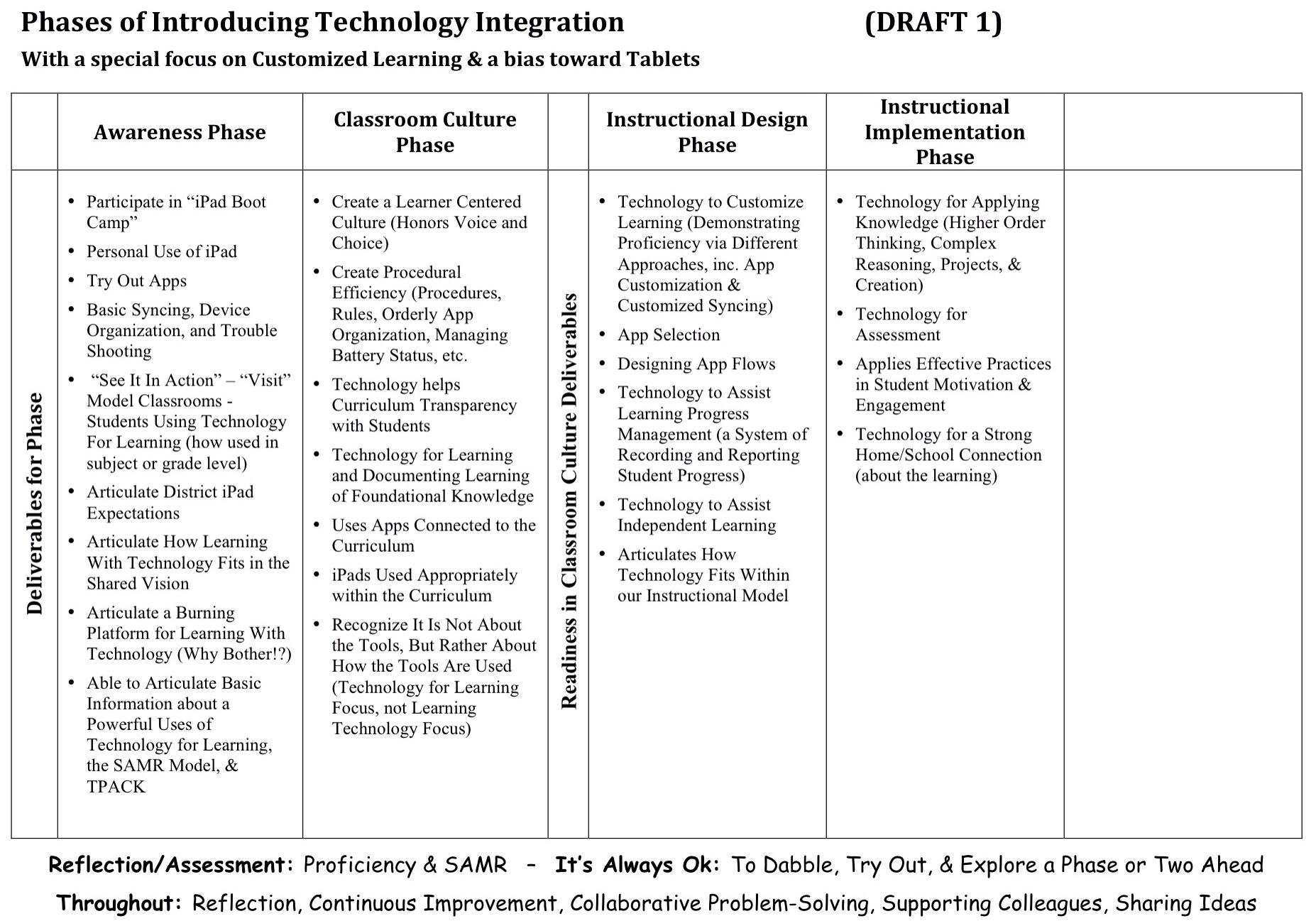
Last August, one of our Auburn-and-friends work groups developed a draft Phases of Tech integration.

Draft Phases of iPad Integration

We wanted to think about developing teachers’ skills at leveraging iPads for teaching and learning beyond just googling topics and word processing. Beyond just projecting material. Beyond just thinking about getting good at various tools. Beyond just using apps connected to the curriculum.

We wanted to think about technology as a tool to help us customize learning. We wanted to focus more on pedagogical goals than technological goals. And we wanted to think about where technology could take us that we couldn’t easily go without technology.

So we set up our professional learning continuum, our phases of implementing technology integration, to be similar to our Phases of Implementing Customized Learning, and how such a structure helps support plementation and teachers. (Driver 1)

And we based it on our current thinking about powerful uses of technology for learning. (Driver 2)

And we tried to think about how the SAMR Model might inform our work. (Driver 3)

Now, we don’t believe any of our work is permanent. We know that as we get better at what we do, we’ll figure out how to improve our models. After we use this Phases of Technology document for a while, it will be ready for a revision.

But right now, we’re wondering if our draft is developed enough to be the one we live with for 12-18 months before we revise it again…

So, as you look at our draft,

  • Does the document adequately reflect our three drivers?
  • Does the sequence of the phases seem right? Does the progression make sense?
  • Does each phase seem to have the right elements for demonstrating mastery and moving on to the next phase? Does it adequately outline advancement (recognizing there will be plenty of support documents)?
  • Is anything missing? What should be added?
  • What needs to be edited or revised?
  • How do we make it better before living with it for a while?

We don’t need “perfect.” We’ll learn a lot by living with the model for a while. But we want to kick the tires on this version a little, and insure it is “good enough” to live with for a while.

So, what do you think?


Starting to Design a Distributed PD System

A while back, I described our need for a distributed system of professional development (as part of our comprehensive plan to support professional learning, including: workshops and trainings; coaching and formative feedback; educator lesson invention and tryouts; and opportunities for educators to get together to share successes and trouble shoot challenges).

So, we've put together a work group to start designing. We will focus first on building a system that will support educators learning to better integrate iPads into teaching and learning. Frankly, we could use the same kind of distributed PD system for our Customized Learning work, as well, but we'll work out the bugs on our iPad work first.

We have 1to1 iPads in K-2 and 7-12, and various clusters of iPads in between. Our work group has K-12 representation. But we know others are interested in this work and we often partner with folks from other districts, and several are participating in the workgroup. We love it when others come to play with us!

Distributed PD Website

And, if you're interested, there is an opportunity for you to lurk, or even participate.

We have created a Distributed PD website to help organize our work. We have pages for each key component of the design work and the Updates & Activities is our blog where we'll regularly publish (yes) activities and updates.

So if you want to lurk, check back at the site periodically to see what we've been up to (and I'll occasionally cross post or post updates to this blog, too).

If you want to participate, you can leverage the comments section of any of our posts or pages.

And if you're REALLY interested in rolling up your selves and being part of the work group, shoot me an email.


MLK, Poverty, Schools, and the War Against the Poor

Today is Martin Luther King Day.

As much as we remember Dr. King’s civil rights efforts for African Americans, he was above all else a civil rights activist. A civil rights activist for all. In fact, he was in Memphis at the end, working to improve wages for garbage workers. All garbage workers, not just African American garbage workers. If there was a category of people he worked the hardest for, that category wasn’t a race. It was poverty.

And 5 decades later, the civil rights movement has widened its efforts, most recently working to insure that gay and lesbian people are treated simply as people, with all the rights of people.

But I worry we have forgotten about poverty. Or worse, that we have substituted “the war against the poor” for “the war against poverty.”

We have made poverty a scapegoat. By blaming people of poverty for their own lack of resources, we are seeing a trend toward cutting social services and programs, all while increasing support to government contractors, corporate bailouts, and tax breaks for the rich. In a country many claim to be Christian, I can think of few things less Christian.

Even if the motivation is not greed, but rather simply recognizing that programs for the poor are expensive, I would reply with a corollary to one of my favorite expressions about education, “If you think programs for the economically disadvantaged are expensive, you should try not having them!” What is the impact on society, on the economy, and on employers of not having supports in place?

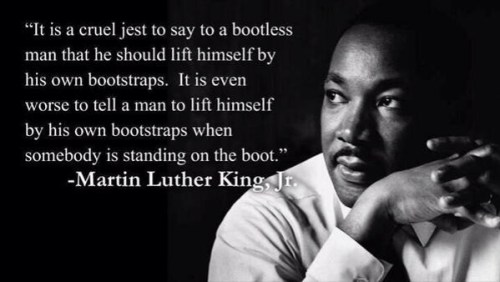
Did I hear you suggest that the poor need to take responsibility for themselves and for providing for their families (as some of Nicholas Kristof’s readers do in his editorial, “Where is the Love?“)? One of my favorite Dr. King quotes is “It’s all right to tell a man to lift himself by his own bootstraps, but it is cruel jest to say to a bootless man that he ought to lift himself by his own bootstraps.”

Dr. King Bootstrap quote

Perhaps nowhere is the war against the poor stronger that in public education. (Or maybe I just notice it more because schools are where I try to do my social justice work.)

We have known – at least since I was in my teacher preparation program in college (and my slate tablet tells me that was a VERY long time ago) – that the strongest correlate to standardized test scores was the socioeconomic status (SES) of the students. Almost no factor came close to SES. Not the curriculum. Not the educational program. Not the qualifications of the teachers. Not time on task. Not attendance rates. Not high expectations. Certainly not the level of threats of punishments and consequences for schools and teachers not raising their test scores. Just SES. Just poverty.

And yet, politicians are cutting funding to education programs that make a difference.

They are cutting early childhood funding to things like Pre-K, and Head Start, despite the evidence that each $1 spent on early childhood education returns $16 later.

They are creating school report card systems designed to “prove” our schools are failing. (Sorry, when you set the report card system up not with criteria for passing or failing, but rather to insure x% are “A” schools and y% are “F” schools – regardless of performance! – then run around proclaiming schools are failing and the school report cards prove it, you have constructed a lie to propagate a lie.) Surprise, surprise! Researchers at the University of Southern Maine found that Maine schools with higher poverty levels have lower student performance, that although poverty doesn’t explain everything, it was the single best predictor of student performance, and that SES was the strongest correlate to school report card grade.

And politicians are using the cry of school failure to shift public dollars to private schools and corporate run “public” charter schools. And where “school choice” makes good rhetoric, it ignores the fact that the poor don’t have the mobility and transportation resources to take advantage of school choice.

And politicians have set up school improvement grants so that a major evaluative component of your proposal is actually showing that your test scores are already on target (I thought the schools with struggling test scores needed the support to improve…?). And if test scores are strongly correlated to poverty, how do schools with the largest populations of low SES students ever get those supports? I guess politicians are only interested in supporting the race for those who are already at the top.

And yet, more than a 150 years ago, this country made a compact with its citizens to educate all the children of all the people.

So if we really want to address achievement and test scores (I mean, if we are serious about doing that and aren’t simply using it as an excuse to shift public dollars to private entities), or even if we simply want our schools to prepare all students to become contributing citizens, then we have to forget about the war on the poor and return to the war on poverty.

Thanks Dr. King. Thinking of you this morning.

The Good and Bad of Extrinsic Motivation: The Series

The issue of extrinsic motivation is a pretty complex one. When the motivation comes from outside the student, driven often by the desire to receive some reward or avoid some sort of punishment (such as grades, stickers, or teacher approval), the student is extrinsically motivated. The use of rewards, prizes, incentives, consequences, and punishments are certainly common practice in schools. And the work people do in the real world is often regulated by both intrinsic and extrinsic factors. But there is also evidence that a focus on punishments and rewards can be counterproductive to learning. Turns out that here are different kinds of extrinsic motivation and each can either improve learning or shut it down.

These posts explore productive and counterproductive types of extrinsic motivation:

Moving Towards Standards-Based Grading

One aspect of transitioning to Customized Learning is finding systems for tracking and monitoring student learning, as well as, ways to report learning progress, especially to parents. One piece of this is some sort of standards-based grading system.

But moving too quickly to a new system of grading (and report cards) can be problematic. For example, it takes time for parents to be ready for iconic changes like approaches to grading. They might need to see other Customized Learning changes work first (like student pacing, multiple opportunities to demonstrate mastery, etc.) before they believe that a new grading system is needed. In fact, we put making structural changes to school one of the last steps of transitioning to Customized Learning.

(Note: a colleague in another district believes that moving early to a new grading system forces important community dialog about the changes toward customizing learning. I think there is much to learn about doing school change work well by following the multiple approaches and how they evolve over time. I may write about how we are approaching school change, but that doesn't mean I believe it is the only effective way to do the work.)

Saving large scale change in grading practices until late in the Customized Learning implementation process that doesn't mean in the meantime teachers shouldn't find ways to move toward standards-based grading practices. There are a couple key intermediate steps that can be pursued:

  • Trying standards-based grading-like practices within the traditional system
  • Looking for models and examples of how others are doing standards-based grading practices
  • Getting feedback from the students on how it is going (to let you know when you are on track, or what course corrections need to be made)

I recently came across Frank Noschese's blog, Action-Reaction. Clearly, he is not only working on standards-based grading in his classroom (among other things), but he is sharing what he is learning via his blog. He may not know it, but he is addressing the three intermediate steps above:


Capacity Matrices: Examples & Overview

As Quality Learning Australia points out:

A Capacity Matrix is a tool to describe, document and monitor our learning. It allows us to clearly identify what is it we wish to learn, derived from the curriculum and student interests, and then track learning over time. It can be very effectively used with the Plan, Do, Study, Act (PDSA) cycle and supported with a portfolio that provides evidence of our learning. Capacity Matrices are also used for self-assessment as well as peer assessment.

In Auburn, we are starting to use Capacity Matrices in this way. Our teachers are wondering where they can see examples and where they can learn more. Below are a handful of resources to help address that need.

General Information about and Examples of Capacity Matrices:

Multiple Pathways Blog: Top 5 Posts From 2013 and the 5 Most Popular Posts

Top 5 Multiple Pathways posts written in 2013:

#5 – The Series on the New MLTI: Choice, Auburn, and Learning – This year, Maine's 13-year-old learning with “laptop” initiative offered schools a choice of devices. This series describes the change in approach to the state initiative, why Auburn chose iPads, and what we still hope to get from our technology, despite the changes.

#4 – The Phases of Implementing Customized Learning: The SeriesOne lesson our district has learned from working with other districts further along with implementing Customized Learning is “not all at once!”

#3 – Life-Long Habits of Mind: Curriculum for Customized Learning – Districts in the Customized Learning Consortium have expanded their curriculum model beyond simply content knowledge. Life-Long Habits of Mind is the third domain of our curriculum model.

#2 – We Need Keyboards With Our iPads. Not! – While some believe that schools should buy keyboards to make iPads useful, lessons from experienced iPad schools suggest the opposite.

#1 – How Does Auburn Select Apps? – Ever since we started Advantage 2014, our primary grades 1to1 iPads initiative, we’ve had educators and parents ask us what apps we’re using.


The 5 Most Popular Multiple Pathways posts in 2013:

#1 – What Makes for Good Learning Experiences?

#2 – 10 Key Components of Customized Learning

#3 – Tone of Voice Matters (In Surprising Ways)

#4 – Motivating Students: Focus on 5 Strategies

#5 – Student Motivation: What Level of Engagement Are Your Students At?


Instead of Banning, NYC Provides Social Media Guidelines

Lisa Nielsen writes that New York City has reached out to students, teachers and parents with social media guidelines.

According to the NYC DOE website, the guidelines are necessary because, “In an increasingly digital world, we seek to offer our students the opportunities that multi-media learning can provide, which is why we allow and encourage the appropriate use of these powerful resources. As we challenge our students with new methods of learning, we continue to ensure that these tools are used responsibly, and enrich the learning environment in our schools.”

And

This work is taken seriously. These guidelines aren’t just published and placed on a website in hopes that someone will read them. The NYC DOE provides professional development to staff interested in incorporating these guidelines into teaching and learning with classes such as “Using social media to increase teacher effectiveness,” “Supporting the common core with social media,” and “A Common Sense approach to prevent cyberbullying.”

More in the article including links the the NYC resources.


Another View on iPad Keyboards

Note: This is a guest post by Auburn Middle School (AMS) Technology Integrator, Carl Bucciantini. The article originally appeared in the Dec. 2013 Issue of the Auburn Middle School Newsletter.

Over the past few days I’ve received several phone calls from parents wondering what kind of keyboard to purchase for their children. While there are lots of options available, I find myself wondering if a keyboard really necessary and what is the driving force behind the “need” to have one?” I think decisions such as these are often made based upon perception or personal experience. Further, as adults I think we assume that our children can’t possibly “type” as well using a touch pad as they could on a keyboard, partly because of our own challenges with touchpads.

This controversy has been swirling around for a long time, so I recently posed the keyboard vs. touchpad question to Dr. Ruben Puentedura, a consultant to the MLTI project since its inception, asking if he is aware of any research which indicates that one is better than the other. Here’s what he’s found:

The research to date is pretty clear-cut: there is little to no significant difference between using a physical keyboard and a virtual keyboard, particularly as users become more experienced in the use of the iPad. Here are some relevant recent references:

Brady Cline did a nice small-scale study with students in grades 3-6, which showed no significant benefit to using the physical keyboard.

Some people criticized that study, saying that none of the students were particularly fast typists. So, it's worthwhile seeing how well an adult who is a reasonably experienced typist performs with the iPad. A 2010 study by Chaparro et al. (when the iPad had just been introduced) showed that people who had never typed on an iPad performed at around 45 words per minute (wpm) right off the bat. The same people typed about 15wpm faster on a netbook keyboard – but they had a higher error rate on the physical keyboard, and overall reported higher typing satisfaction on the iPad. A 2013 followup study by Chaparro et al., this time using a dedicated external keyboard on the Microsoft Surface, confirmed these results.

Needless to say, practice improves iPad keyboarding speeds. I don't know of any study that has final numbers on improvement, but light regular use is reported to get you to about 54wpm, and there are multiple videos on YouTube and elsewhere of people typing 60wpm to over 100wpm on an iPad without breaking a sweat.

One of the major advantages to using the iPad is that it’s so easy to use it on the go. Dr. Puentedura continues:

There are some very interesting studies coming out on using the iPad “on the go” (Trudeau et al., 2013), where using a regular keyboard is difficult or impossible. As you might expect, typing speed goes down in these scenarios (to about 23wpm on a split keyboard layout, 25wpm on a regular layout), but the split keyboard layout (mostly thumb typing) was found to be considerably more comfortable. Given that in these scenarios the physical keyboard performs at about 0wpm, I would consider those numbers quite respectable.

My personal belief is that whether they use a touchpad or a more traditional keyboard, kids have an uncanny ability to adapt. My advice is if you’re looking at purchasing a keyboard, ask your child why they think they need one, how it will make things better for them and suggest that they borrow one from the AMS library for a week or two to try it out.


How Will We Use Our Technology? – 7 Powerful Uses

Whether you have technology for your students, or you are thinking about getting technology for your students, “How will we, or should we, use our technology?” is an important question.

The answers to that question need to come from what we know about learning, more than what we know about technology. Recently, I have written about how we should focus on learning when we try to answer this question; that we should think about how technology has changed how students learn outside of school; and if we are having problems with our technology, that it might be that our vision for learning is lacking.

And I think it is important to articulate how we would like technology to be used in our classrooms partly because personal technology skill is not the same as teaching with technology skill. Because a teacher can use an iPad herself doesn't mean that she knows how to leverage that same iPad for student learning. Articulating how we might expect teachers to use those devices helps provide teachers targets for their own professional learning.

We are currently working with the idea that there are 7 powerful uses of technology:

  1. Tech for Foundational Knowledge: How can we help students learn the basics?
  2. Tech for Using Knowledge: How can we contextualize learning and make learning engaging and meaningful? How can students use their knowledge? What is the role for creating and creativity, and for project-based learning?
  3. Tech for Learning Progress Management: How do we keep track of student learning? Promote a transparent curriculum? Make learning progressions clear? Help students navigate their learning? Maintain evidence of mastery?
  4. Tech for Personalizing Learning: How does technology help us tailor the learning to the student?
  5. Tech for Supporting Independent Learning: How can technology help the student do more on their own and need the teacher less?
  6. Tech for Assessment: How can technology help us capture what students know and can do?
  7. Tech for Home/School Connection: How can technology help us stay better connected to parents?

Again, note the pedagogical focus, not a technology focus. In other words, the technology isn't the end or the desired outcome, rather the technology is in service to desirable educational outcomes.

How are you leveraging technology for each of these 7 uses?


Is the Problem Your Students, the Device, or Your Vision for Learning?

There has been a mixed bag of results for technology in schools lately. You certainly hear about districts creating exciting learning opportunities for their students by leveraging technology. But you also read about LA Unified's problems with their iPad initiative, or Miami-Dade schools putting their initiative on hold because of the troubles in LA and in North Carolina.

The blame for the failures in these districts is pointed in lots of directions, but includes students as “hackers” (although there was no hacking, just clever students figuring how how to make locked down devices function as designed), or lack of keyboards (don't get me started on how stupid that issue is – it comes from adults who haven't sat with a tablet long enough to know how easy the virtual keyboard is to use). Diane Ravich points to overly agressive timelines, poor project management, poor contract management, and a failure to evaluate curriculum resources, especially against district curriculum standards.

But I believe there is a much deeper problem at the root of these disasterous educational technology initiatives.

Let me come at this from a different direction… Recently a friend contacted me, saying she was working with a district that was trying to decide what device to invest in. Tablets? Chromebooks? Laptops?

Based on 13 years of working with 1to1 initiatves and all the lessons learned, my reply was to ask, “What's their vision for learning? Frankly, without such a vision, I'm not sure it would matter what they bought; it will be equally unsuccessful…”

How do you know what you want technology for if you haven't decided what learning should look like in your classrooms? A tool bought for no other purpose than to have the tool (or because you believe it is good to have the tool) fulfills its purpose by simply being there. Yet, later, purchasers are surprised that amazing things haven't happened by simply being in the tool's presence…

Or maybe you have what I have come to think of as a “default learning vision.” In the absence of a vision for learning driving the instructional use, the instuctional use becomes the vision for learning. The vision defaults to what you do when what you do isn't informed by a vision.

So, what may be the default vision for learning in these initiatives?

I look at these three well-publicized initiatives and I see a vision of learning that boils down to this: electronic workbooks.

There is no doubt that access to digital content and resources should be one slice of how schools leverage technology for learning. But workbooks (of any variety!) have always been wholely insufficient for quality learning programs. (If they were sufficient, we would have the best educational system in the world by simply dropping a box of textbooks and workbooks at each student's home each year…).

Or as Diane Ravich points out about this problem:

…the content of the tablets must allow for teacher creativity, not teacher scripting… The time will come when tablets replace the bulky, puffed-up textbooks that now burden students’ backpacks. The time will come when tablets contain all the contents of all the textbooks, as well as a wealth of additional resources, in multiple subjects. But they must encourage exploration and inquiry, not fidelity to a packaged program. Customized and individualized must become a reality, not a sales pitch for programmed learning.

Is it any wonder that these technology initiatives are a train wreck, given their vision for learning?


We Need Keyboards With Our iPads. Not!

This past summer, Maine's schools got the choice for the first time to purchase tablets as part of the statewide 1to1 learning with “laptop” initiative (MLTI). It has spotlighted an interesting demand related to tablets: we need to get keyboards so students can use the tablets.

I kind of understand why people might think this. The virtual keyboard on the iPad does take a little getting used to, especially if you're a pretty good typer on a regular, physical keyboard. Also, adults and students hear other adults say, “we need keyboards for our tablets.” And the idea is reinforced by the TV ads for some tablets that state theirs come with a keyboard “so you can do real work.” Locally, we even have an owner of a call center claiming (while pounding his fist on the table…) he won't hire any of our graduates because they won't be able to type on a physical keyboard.

My own experience with a full sized iPad is that it took me a couple weeks to get used to the virtual keyboard, but now I type on it as fast or faster than I do on a physical keyboard. And I have heard similar stories of parents or community leaders in other districts demanding keyboards because of the hard time they personally are having typing on the onscreen keyboard, but a couple weeks later saying “never mind” when they have developed familiarity with it.

Admittedly, if I'm doing any quantity of writing on my iPad mini, such as writing this post, I do use a bluetooth keyboard. My hands are just too big to do anything more than a modified hunt and peck on the smaller keyboard. But the core of this debate is not about the size the keyboards on the (smaller) screens, but rather about onscreen vs physical keyboards.

I do believe that some folks really do need a different keyboard or sometimes need a physical keyboard. MLTI provided keyboards in something like a 1-to-10 or 1-to-7 ratio to the number of student iPads. We have put those in a keyboard lending program in our school libraries (students can check them out as needed), and a few students with a specific need have one permanently assigned to them. We even have students and families who have bought their own keyboards or keyboard cases (but that was a personal choice rather than a universal demand).

But the real issue that keeps coming up is the question, does everyone (or even just most students) need a keyboard? Districts in Maine that have experience with 1to1 iPad initiatives had interesting things to say when the question of keyboards was posed on the state technology email list.

The Cape Elizabeth tech director reported:

In our high school, we bought around 40-50 iPad keyboards for use in English and Social Studies, and also in our Library. This was in response to concerns from teachers, rather than from students, and although they did get used, they got used primarily because the teachers wanted them to be used rather than students needing to use them. They certainly got used less and less as the year went on and even teachers who borrowed them stopped using them as they ended up finding the onscreen keyboard just more practical.

The high school in RSU 57 has had a 1to1 iPad initiative in place for about 2 years. Their tech person talked about the keyboard cases they had provided students:

This was based on concerns from the administration and staff that student's would need a keyboard especially for typing long papers. Two years later and (my opinion) most students do not use the physical keyboards. Last year's class used it less than the previous class. What I am seeing is that the more the iPad and its virtual keyboard become mainstream the more the students are used to virtual typing before they are ever issued an iPad. Had we stayed with our original plan, I was not going to purchase keyboards this year.

In South Portland, the high school has had a 1to1 initiative for about 3 years, involving about 400 iPads. They have had “almost zero 'real' keyboard use/demand for the few we had purchased to allay concerns.”

Similarly, folks from Falmouth shared:

We bought 50 keyboards for our Elementary School iPads when we started the program 2 years ago. The thought was that 5th graders were going to need them to be able to type papers. 48 of the keyboards are still sitting in a closet unopened because they just have not been needed. The other two I have loaned out to staff but they always bring them back because they don't use them.

Foxcroft Academy has had one of the first high school 1to1 iPad initatiives in Maine. Their Assistant Head of School for Academics pointed out:

We're beginning year 3 of our 1:1 iPad program for all of our grade 9-12 students. We bought a few keyboards in year 1…They've received almost no use. There are plenty of barriers to student writing, but I can assure you that the virtual keyboard is not a substantive one. And, with built-in speech-to-text on these fancy new MLTI iPads, the virtual keyboard is even less a barrier. In short – buy a few (no more than a handful) if you must, to show that you're listening, but know that they are very likely to gather dust.

The Tech Integrator from Bar Harbor responded this way:

We plan to disallow external keyboards for iPads in school, unless the school determines that a student needs one. The thinking is that students will learn the iPad quickly enough, and that we don't want to set up for “have's and have-nots,”…. also the experience of our teachers using iPads, is that even an adult can learn to process text on an iPad.

That educator went on to say that when parents inquire, they have been referencing the articles here and here.

The issue is primarily an adult issue. Surprisingly, much of the demand for keyboards came before any of the schools even had their iPads! As one educator stated in the online discussion:

Some can't understand how you can interact in an educational setting with a device that does not have a keyboard with keys on it. An English teacher here, who was using Edmodo, had a student submit a lengthy paper the student had “thumb typed” on their iPhone!! Don't worry, the kids are all ready there or they will adapt very quickly. We just need to get out of the way.

I am empathetic to folks having fears and concerns about “new” technology they have only a cursory understanding of. This keyboard issue is a common perception about iPads.

But being a common perception does not mean that we have to respond to it, especially if we have adequate reason to believe it is a MISperception. (Nor do we have to respond to a concern just because it is stated repeatedly, or loudly, or with confidence, or by condemning those who disagree, etc.)

It is on us to make the argument (politely and diplomatically) about what works (not what is perceived or guessed or intuited or philosophized…) and provide the evidence that it works (such as through the stories that have been shared here).

 

“How Is Technology Changing Schools?” is The Wrong Question

I keep hearing people ask the question “How is technology changing schools?”

But I think that's the wrong question.

I think the right question is “How is technology changing learning?”

I see technology (outside of school) playing a critical and ubiquitous role in how students learn what they want to know. (And, for that matter, how adults and organizations learn and grow.)

Maybe the real question is “Will schools respond to those changes?”

(And I worry the subtext will become, “or if we don't, will we (schools) become less and less relevant to students?”)

How will we respond?


Is “What’s the iMovie Curriculum?” the Wrong Question?

A while back, I was part of an online conversation when a tech director asked for ideas for an iMovie curriculum. His district was working to establish a course in digital video production at their high school.

Right away, I had to wonder if asking for ideas for an iMovie curriculum wasn't the wrong question. iMovie, after all, is just a tool. And you already know that I believe the real power of technology isn't having a “learning technology” focus, but rather a “technology for learning” focus.

I don't object to learning iMovie. I object to learning iMovie out of the context of a compelling purpose to use the tool.

In fact, my experience is that the lessons about the tool (iMovie) are much easier to learn (students remember the skills better) when they are taught in the larger context of being used for something. In fact, I have seen well intentioned teachers teach all the skills for a tool in advance of using it for some purpose meaningful to students, and having to reteach all those skills again when the task was at hand.The brain just really isn't wired for “just in case” learning. It's wired for “just in time” learning.

So I wondered, “Knowing their interest in students learning iMovie, what is it that they might really want students to learn?” What might be the authentic reason to learn how to use iMovie?

For example, a school could offer a course in digital storytelling. In addition to iMovie skills, the students would likely also learn interviewing; scripting and story boarding; pre-production, production, and post-production; visual communication styles, etc. (I have included some links to resources below.) But it would all start with students learning about and doing storytelling.

Or why not take it a step further and have students tell stories that they feel compelled to tell? Perhaps a documentary making class. Students could take on an issue of social significance to themselves, research it, and create a documentary that may even ask it's watchers to take action (and what action would they recommend!?).

Think of how powerful those courses could be for students!

Digital Storytelling Resources:

Documentary Making Resources


The Real Power of Technology in Schools – Focusing on the Right Thing

I worry when I hear schools talking about their (often new) technology, and simply describe the tools (word processors, blogs, social networks, apps, etc.) that they are teaching their students to use.

And I fear that they have wasted their money, because they have totally missed the point about technology's role (and potential!) in school.

The true value of technology lies not in learning to use the technology, but in using the technology to learn.

Early on in MLTI, Maine's 13 year old statewide, middle grades 1to1 initiative, there was a discussion about the focus of our PD. Should we have workshops on spreadsheets, for example. But we decided, instead, that we would do a data collection and analysis session, and participants would leave also knowing how to use spreadsheets.

After all, why bother creating spreadsheets? Certainly not just for the sake of creating spreadsheets. They are a tool in service to some other purpose.

As an aside, I have heard some make the “prerequisite argument,” that is, the need to learn spreadsheet creation in order to be able to analyze data. But that's using logic when we should be applying psychology. Because the irony is that people learn better, understand better, can apply better, and remember longer skills they learn in the context of some immediate, authentic need, rather than in the absence of any context other than the abstract (and uncertain) “you'll need it in the future.” I have had to reteach too many lessons when the students now had an actual need to know, that I had already taught once “in case” they needed to know in the future… How'd that work for me? “Need” first, “tool” second, not the other way around.

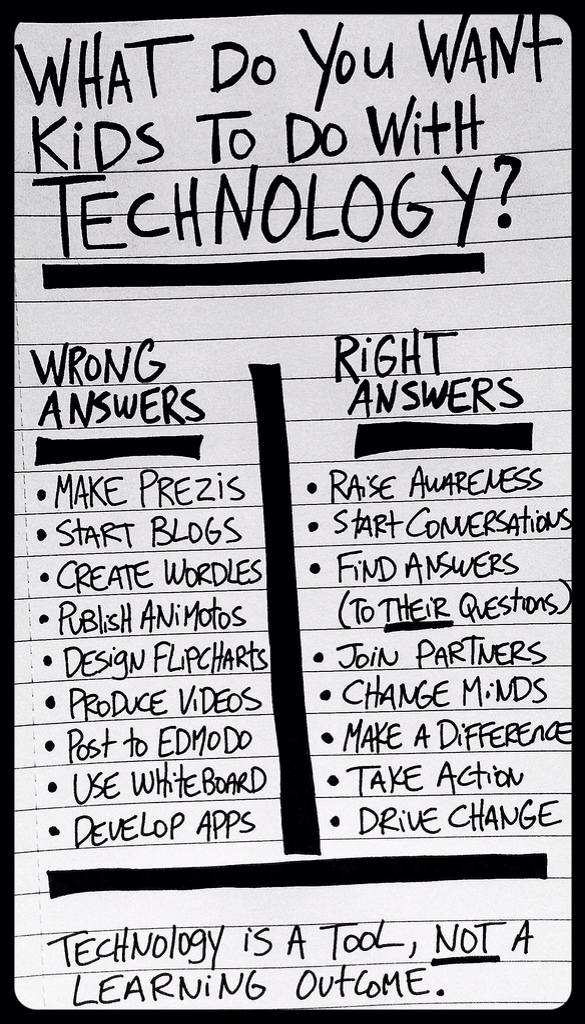
So I am thankful to kindred spirits, such as the author of Technology Is a Tool, Not a Learning Outcome, (and is credited with the image in this post) who also work to insure that we focus on the right thing when we bring technology into our schools.

So I wonder, when districts struggle with their technology, like LA Unified has recently, if they are focusing on the right thing…