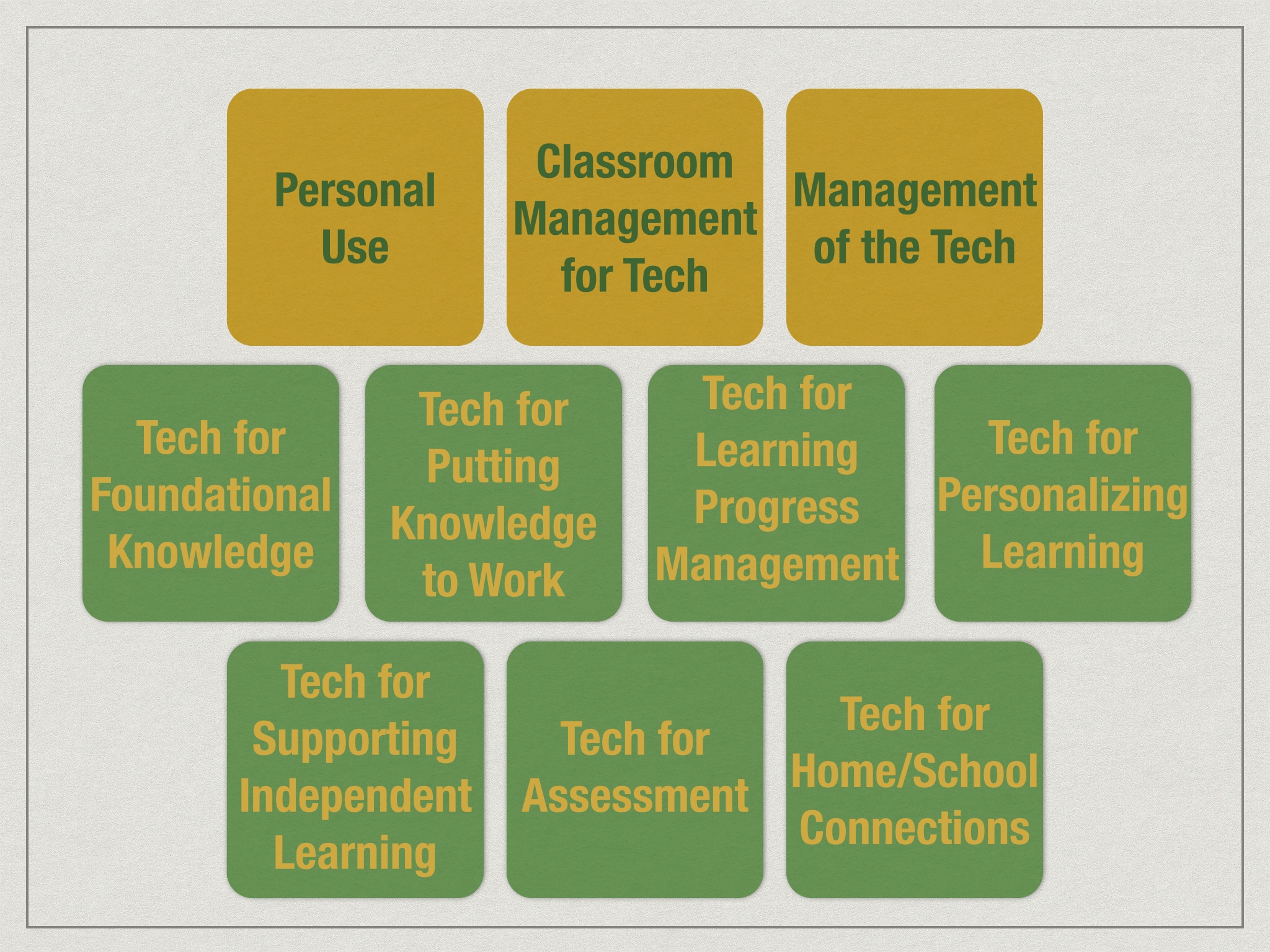
12 Professional Learning Curriculum Buckets for Teaching and Learning with Tech

What should educators know and be able to do if they are to work in technology-rich learning environments? The 12 Professional Learning Buckets describe behaviors/professional learning that have been linked to fostering a quality, learning-focused 1to1 technology initiative.

As we think about our teachers becoming highly skilled at using technology in the classroom, we could certainly generate a very long list of abilities, approaches, tools, apps, strategies, and other competences we’d like them to get good at.

But there are certain behaviors/professional learning that have been linked to fostering a quality, learning-focused 1to1 technology initiative. These become our 12 buckets that would make up a professional learning curriculum for teachers.

Four of those buckets focus on teachers’ being able to use the technology themselves and create the conditions in the classroom for students to use the technology for learning.

  1. Personal Use: Can teachers use the device themselves as their own productivity and learning tool?12 Professional Learning Buckets for Learning Through Technology
  2. Classroom Management for Tech: How can teachers insure that students are focused and on-task when using technology in the classroom (especially when every student has a device in front of them!)?
  3. Student Motivation & Engagement: How do teachers ensure that students are mentally and physically engaged? How can teachers create the conditions for student self-motivation?
  4. Teaching Digital Citizenship: How do (all) teachers help students learn how to use technology safely and appropriately? (This isn’t just the responsibility of the computer teacher!)

And 8 of those buckets are the pedagogical approaches that make up “Powerful Uses of Technology” (notice that they focus on educational goals, not technology tools):

  1. Tech for Foundational Knowledge: How can we help students learn the basics?
  2. Tech for Practice and Deepening Understanding: What tools and resources help students develop some fluency with those basics?
  3. Tech for Using Knowledge: How can we contextualize learning and make learning engaging and meaningful? How can students use their knowledge? What is the role for creating and creativity, and for project-based learning.
  4. Tech for Learning Progress Management: How do we keep track of student learning? Promote a transparent curriculum? Make learning progressions clear? Help students navigate their learning? Maintain evidence of mastery?
  5. Tech for Personalizing Learning: How does technology help us tailor the learning to the student?
  6. Tech for Supporting Independent Learning: How can technology help the student do more on their own and need the teacher less?
  7. Tech for Assessment and Evidence of Learning: How can technology help us capture what students know and can do?
  8. Tech for Home/School Connection: How can technology help us stay better connected to parents?
Remember, we’d like to promote and encourage these buckets because they focus on creating quality learning experiences for students, not simply focusing on tools, skills, and devices. This keeps learning first, ensures we are talking about learning, not the tech, and promotes the idea of “More Verbs, Fewer Nouns.”
 
How might the 12 Buckets serve your school?

Shared Visioning in Action

I recently started a new job: Policy Director of the Learning Through Technology Team (LTTT) at the Maine Department of Education. It’s essentially the state tech director position, and its largest responsibility is managing the Maine Learning Technology Initiative (MLTI – 1to1 in 7th & 8th statewide – since 2001! – and making it easy for districts to buy in at other grades), and supporting schools as they think about how technology can support learning.

I have a small (but awesome!) team of 7 colleagues that help make all this happen. If you follow this blog, you already know I’m a strong believer in “Leading Beside” which includes both shared leadership and working from a shared vision. So it won’t surprise you that one of the first things I did with my new team was set aside a morning for us to build a shared vision.

We used the same process that Bette Manchester introduced to districts at the very beginning of MLTI: To think of a preferred future for young people we care about (the Preferred Future), then think about about what students need to start doing today to get ready for that Preferred Future (the Vision for Learning), then think about what teachers, schools – and the Learning Through Technology Team – need to do today so students can do what they need to do (the Strategic Plan). (A process Bette would credit to Bruce Wellman’s work.)

Building a Preferred Future

We started by thinking about a young person we care deeply about. Then thought out into the future, beyond middle school, beyond high school, beyond college or job training or military, and then a few more years, until that person was getting settled in their jobs and, perhaps, their family.

And then we thought about three questions:

  • Where would we like them to be able to work?
  • Where would we like them to be able to live?
  • Where would we like for them to be able to learn?

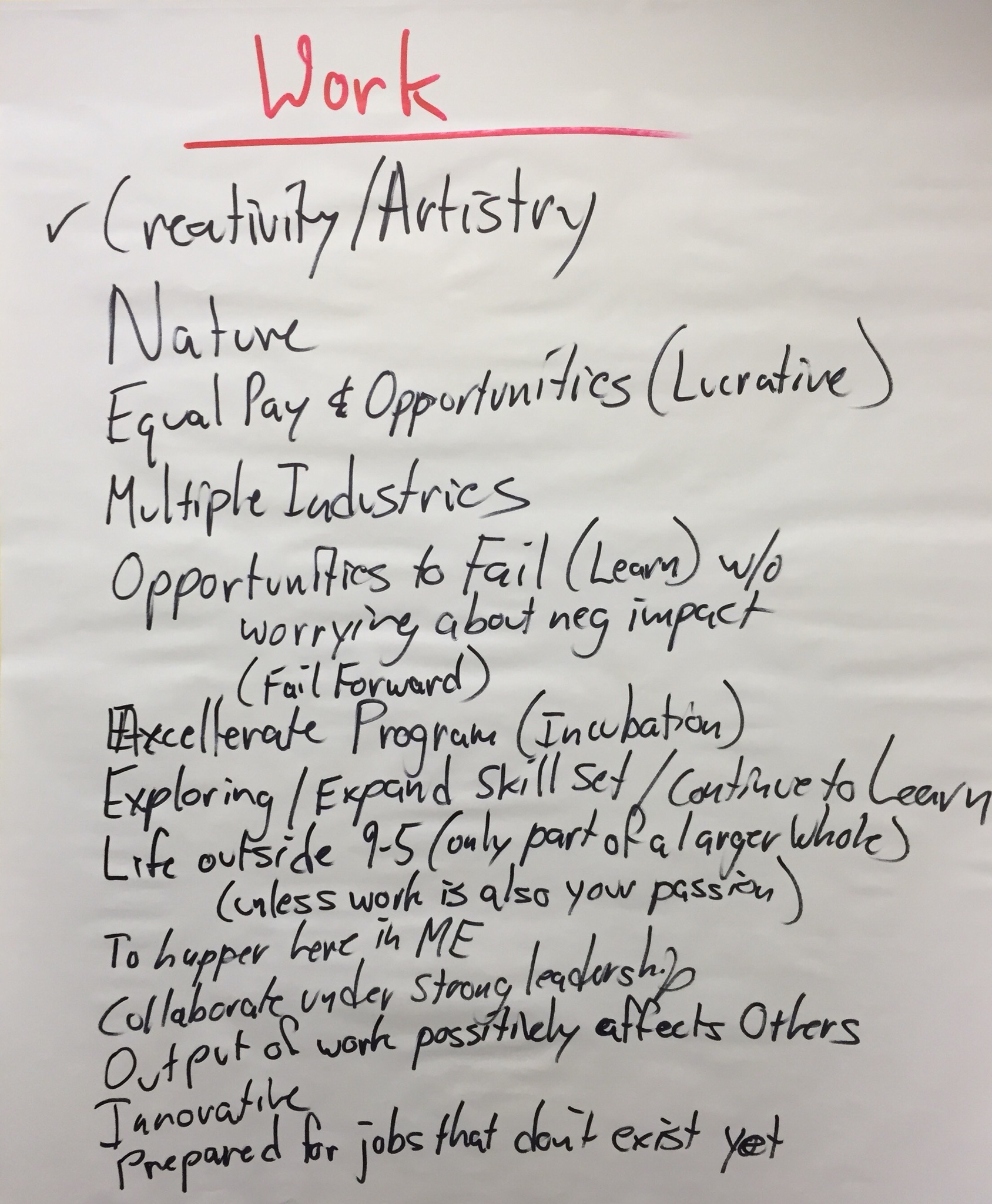
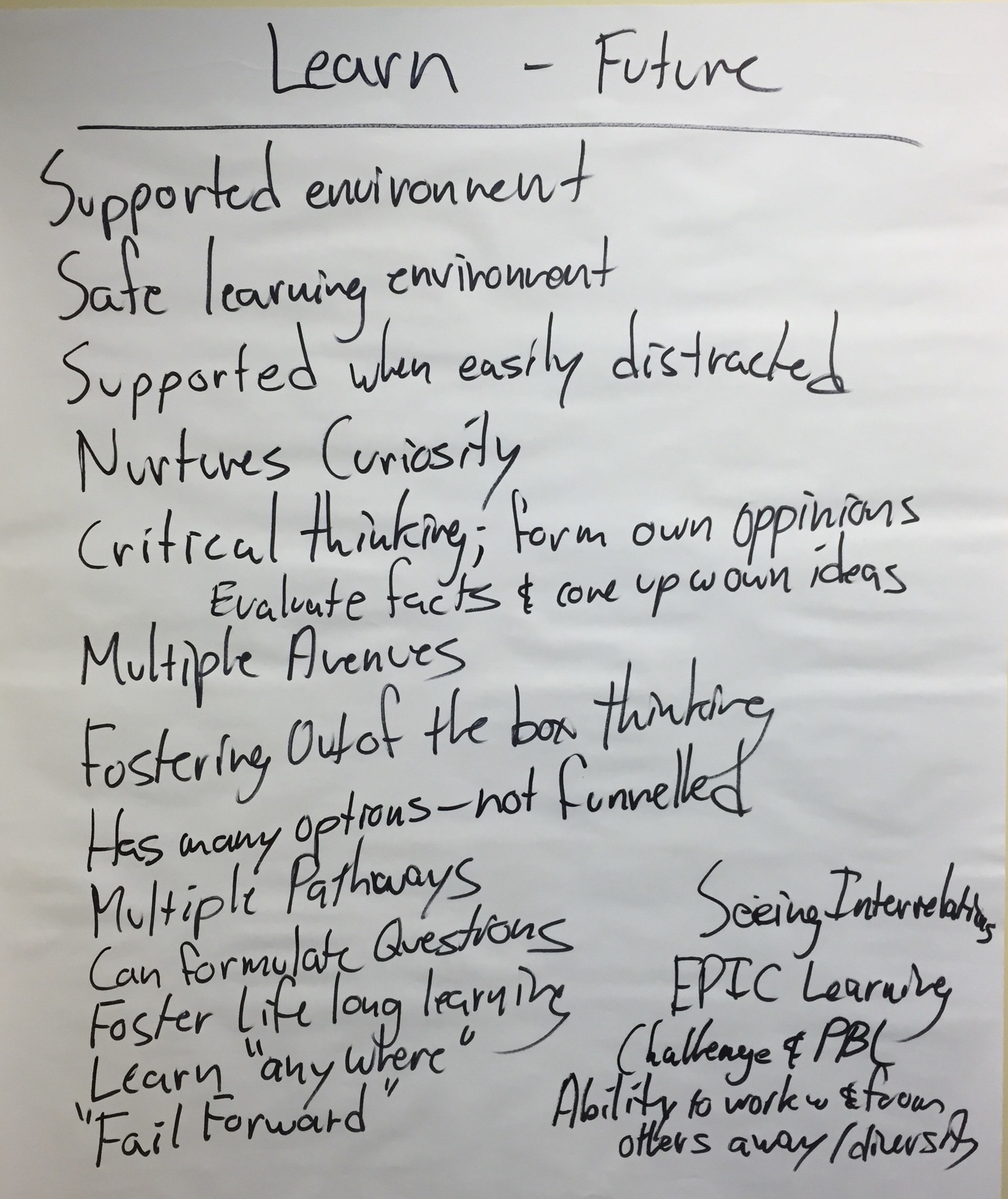
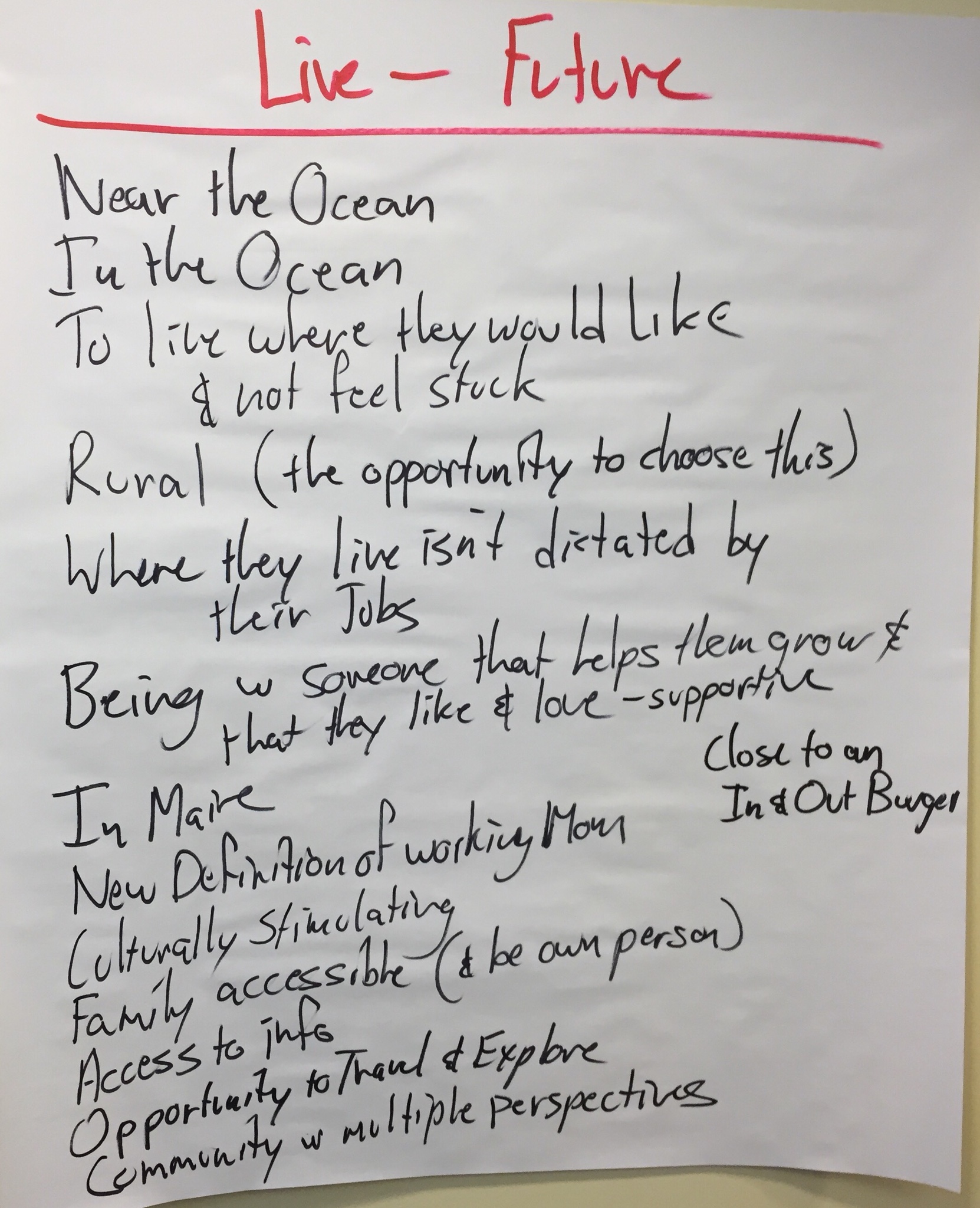
Here’s what the team generated:

These charts represent the Team’s Preferred Future.

Identifying Our Shared Vision Vision for Learning

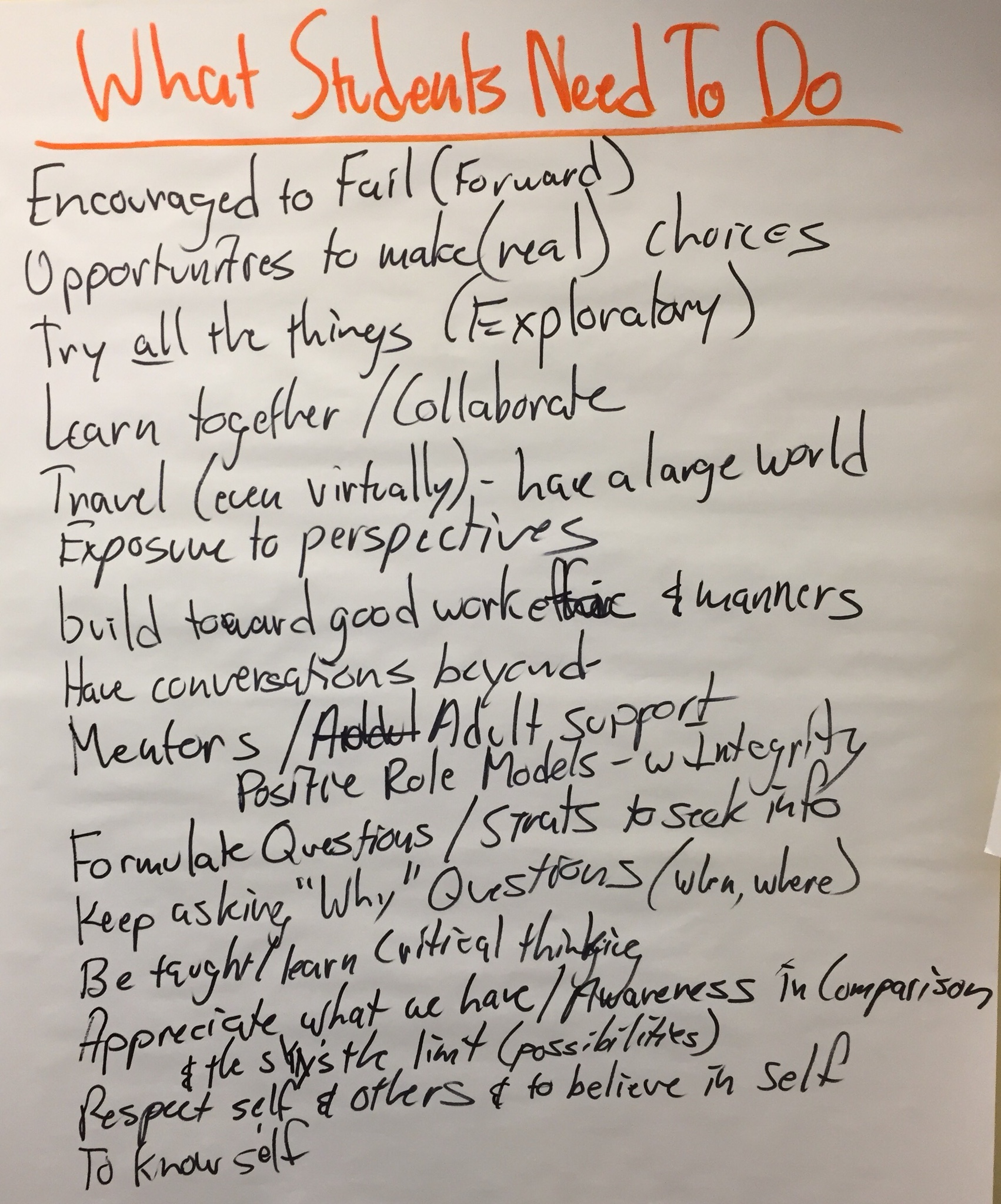
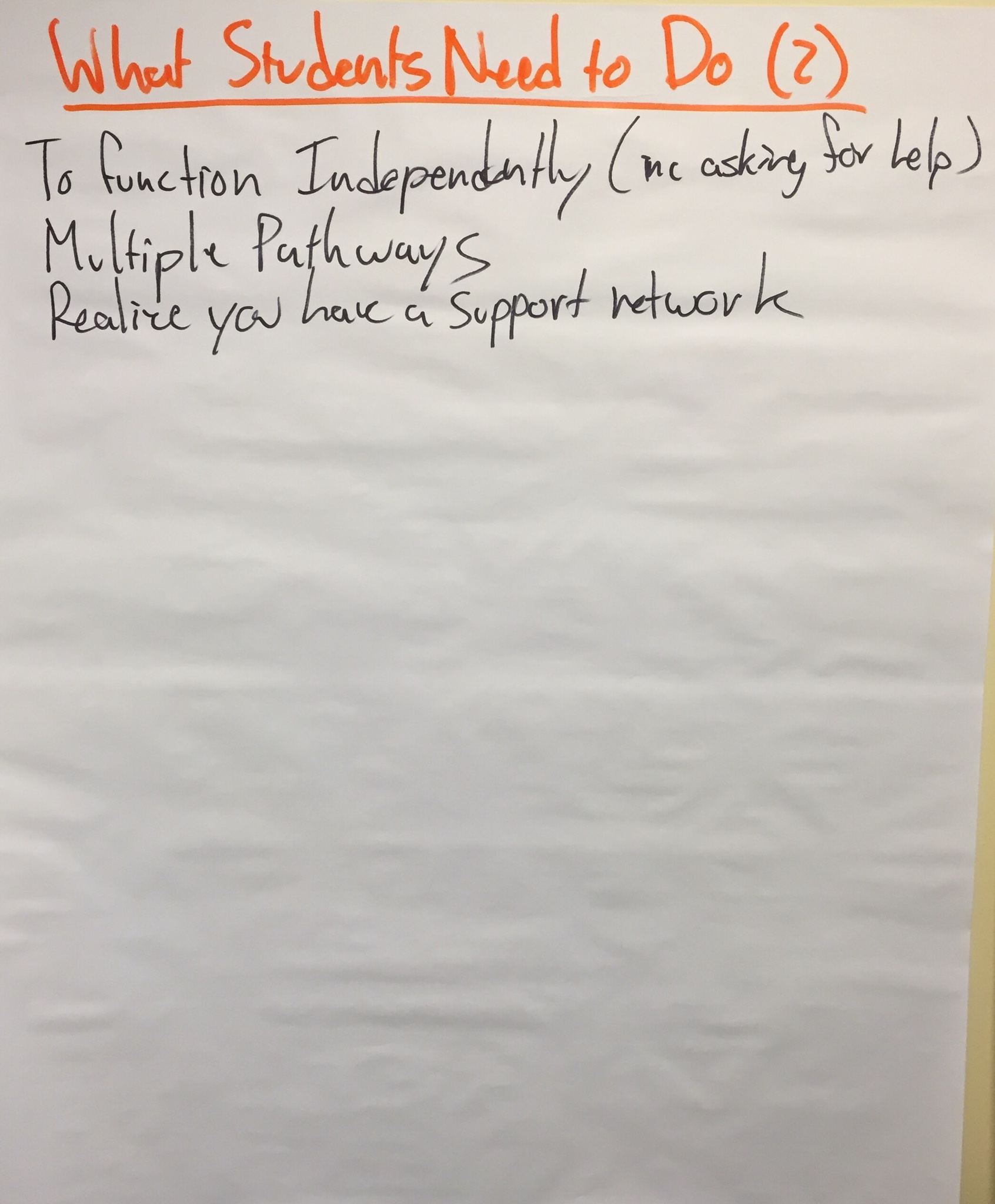
The next step was to think about these same students today. If the charts above represent our preferred future for these young people, what do they need to do today to get ready for it?

Here is what we generated:

So, these charts represent the Team’s Vision for Learning.

Creating Our Strategic Plan

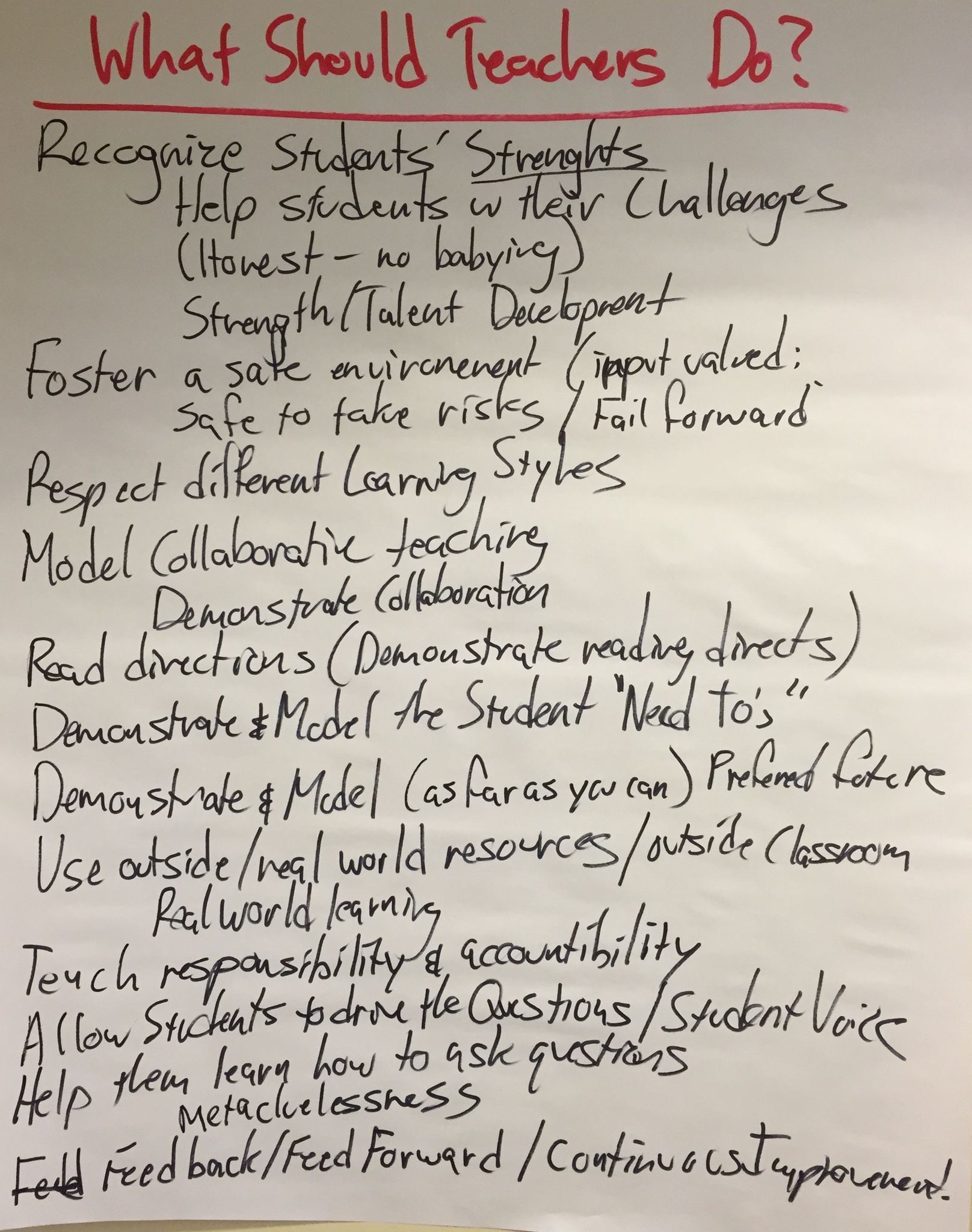
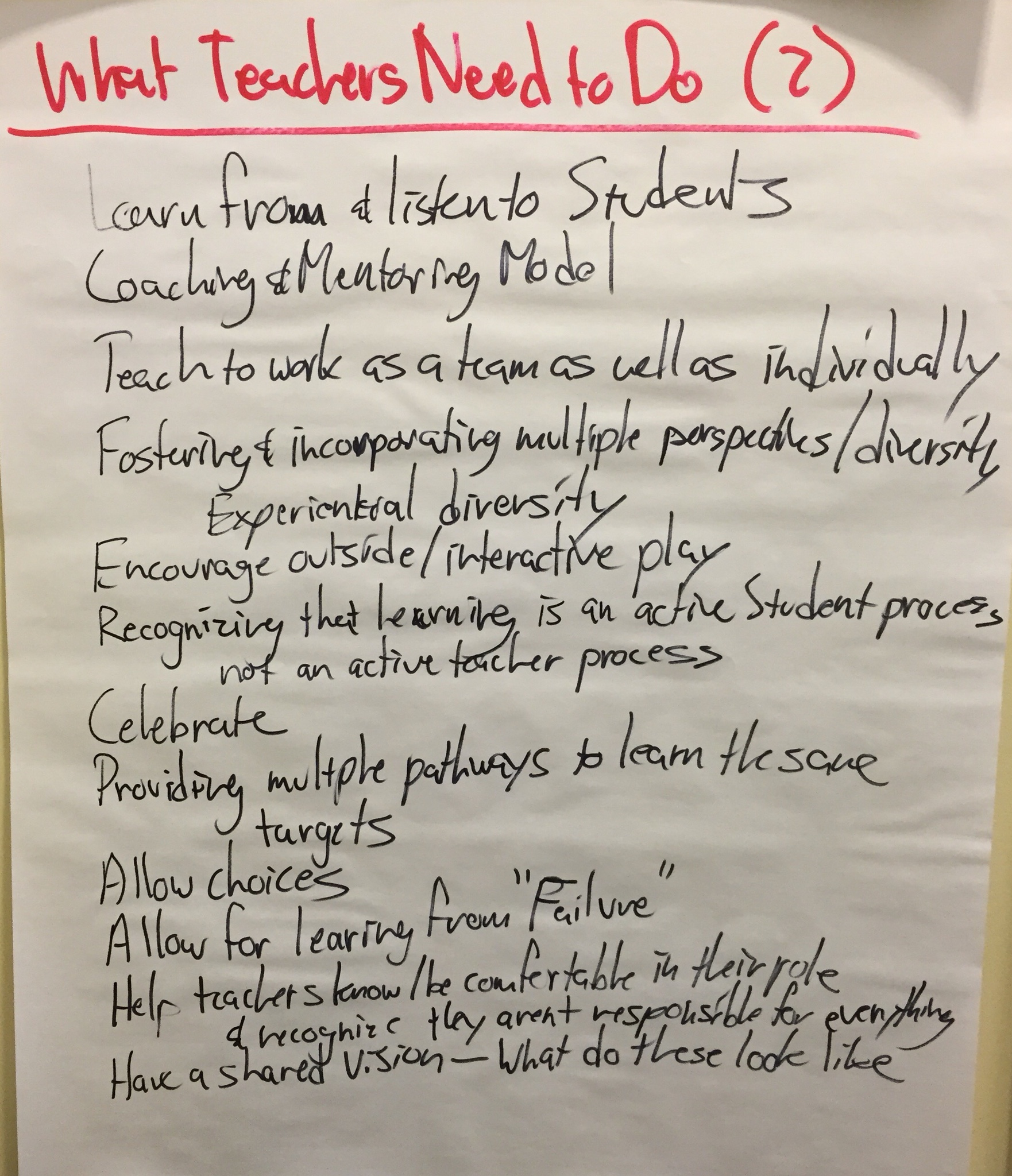
So, if this is what we believe students need to start doing today to get ready for the Preferred Future, what do do we believe teachers need to do, so students can do what they need to? Our thoughts:

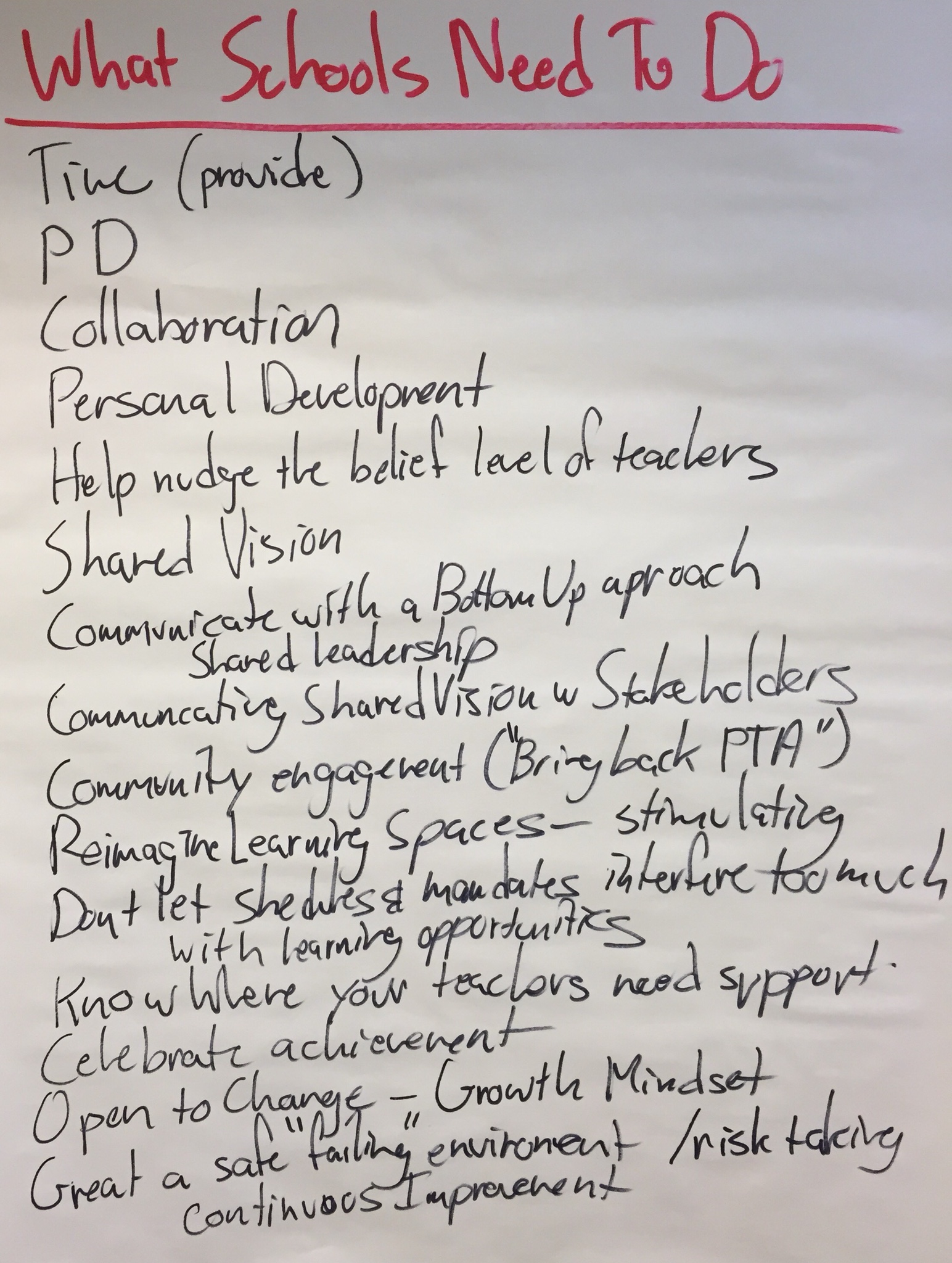
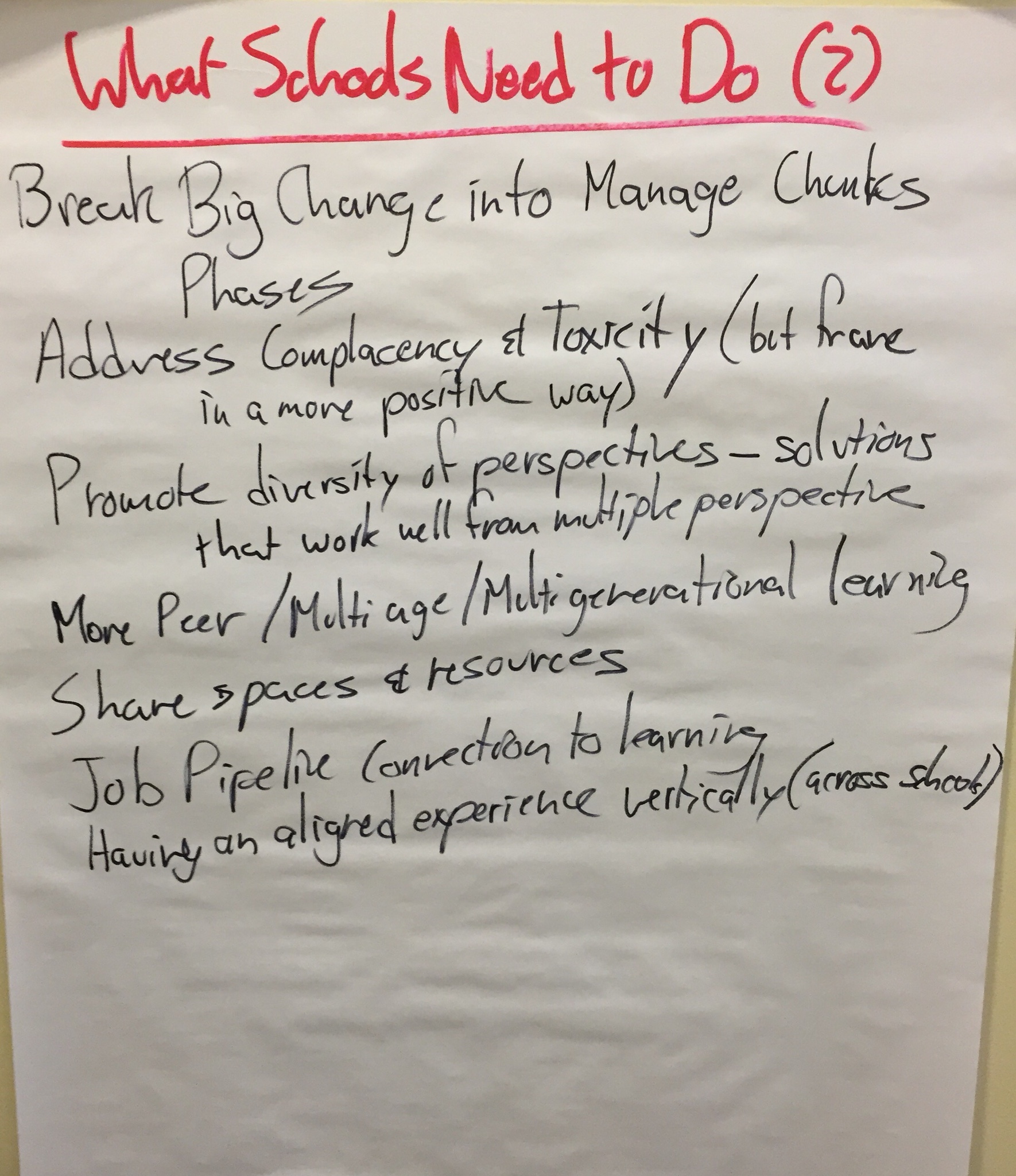
And then, what do we believe schools (principals, tech directors, district administration, etc.) need to do so teachers and students can do what they need to? The Team’s lists:

These charts represent what we hope teachers and schools might adopt as their strategic plan.

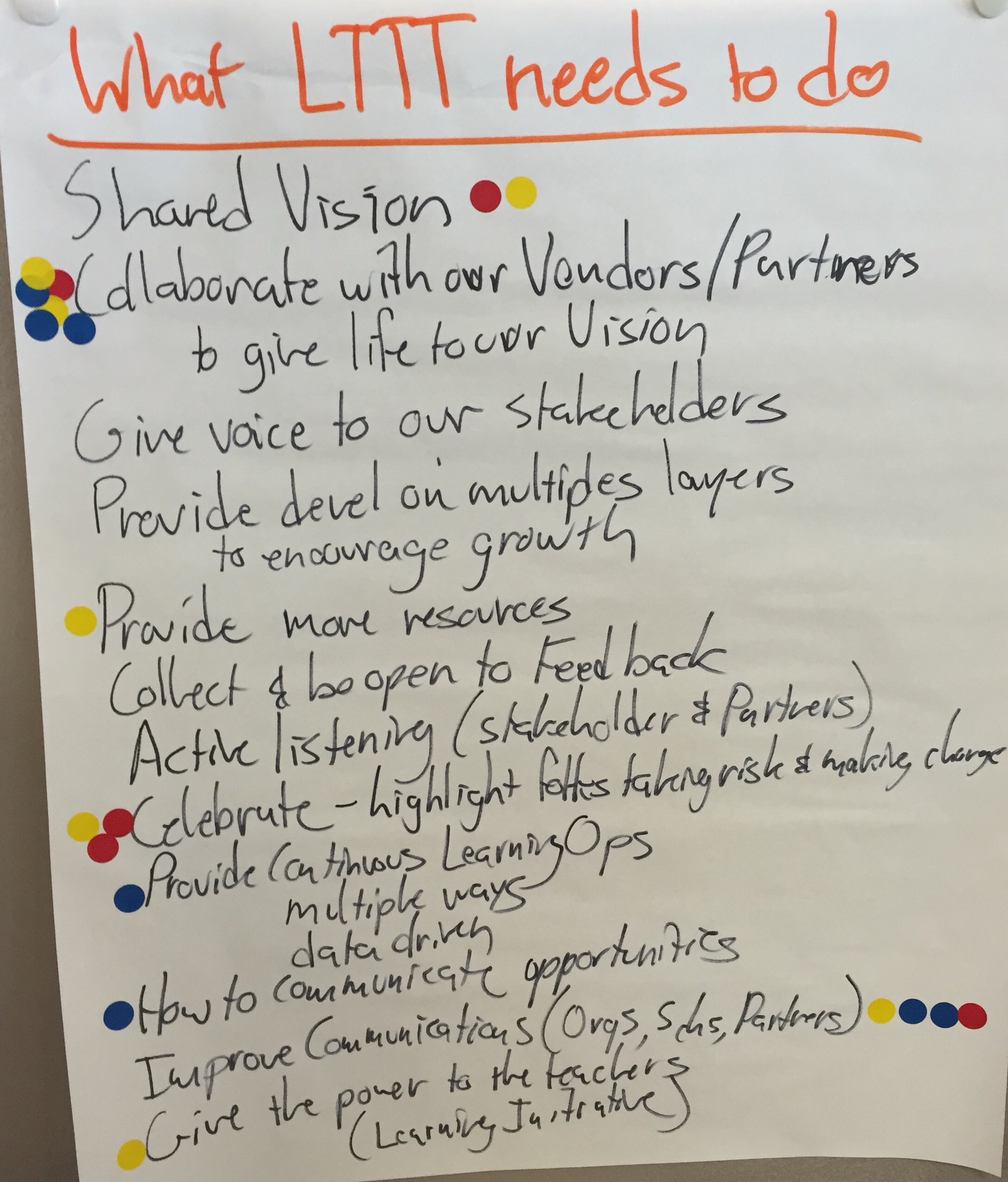
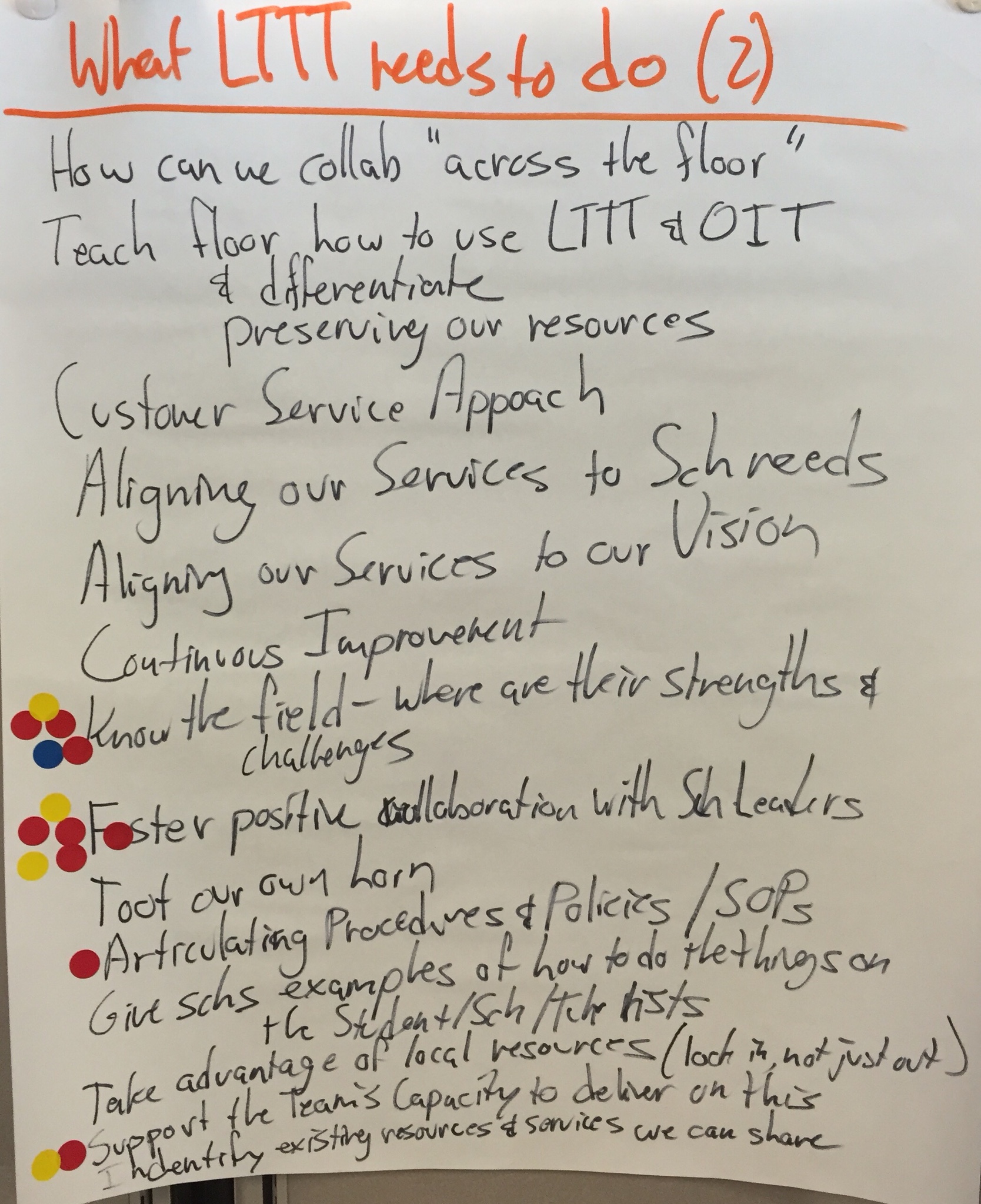
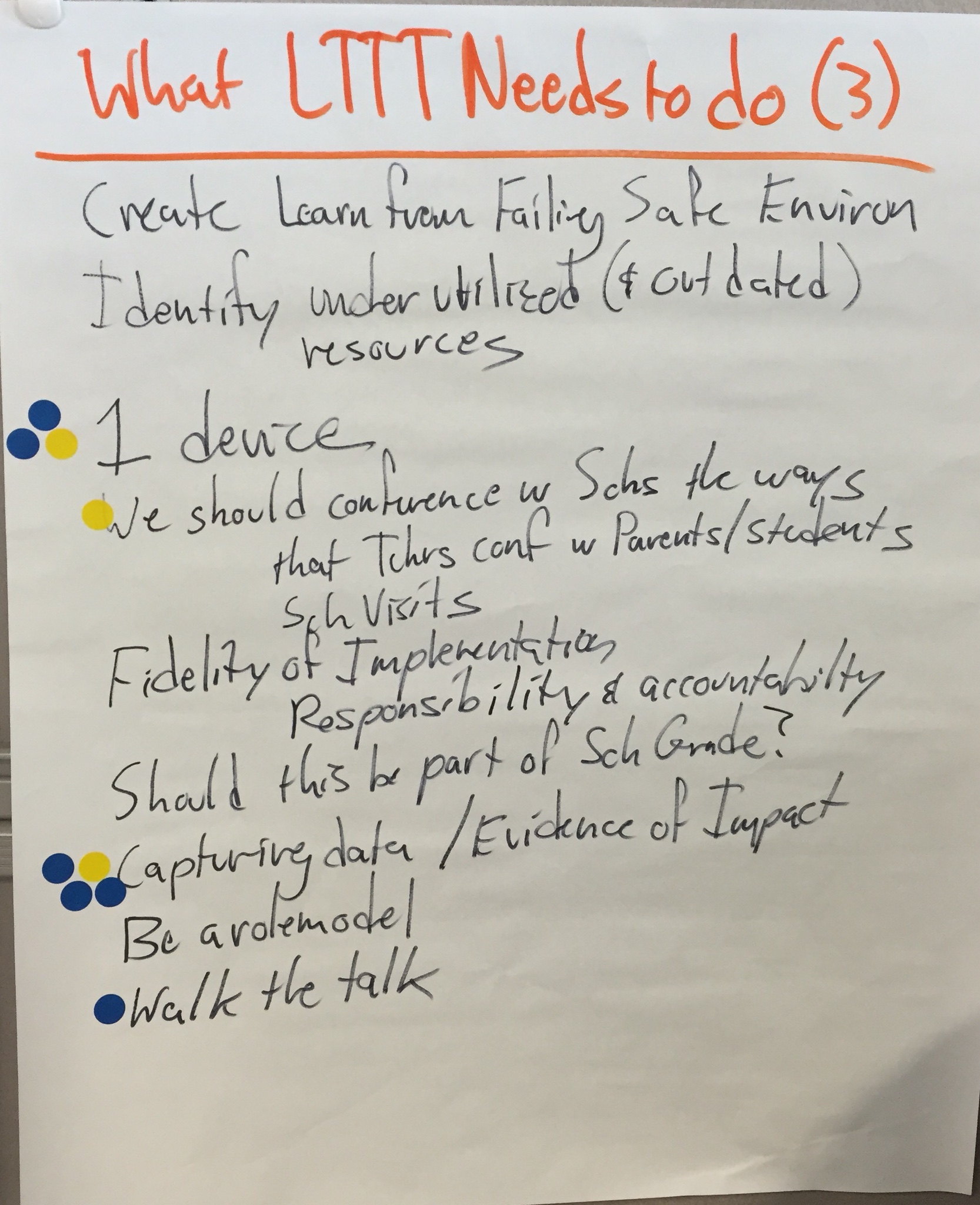
But they also lead us to think about our own work and responsibility for making our Vision for Learning a reality. What does the Learning Through Technology Team need to do to support the work of students, teachers, and schools?

Prioritizing

Accomplishing 3 pages of strategic steps is a daunting task! (Actually, self defeating! We need a little focus!) I gave each Team member 6 dots to place on the charts. The prompt was, “Which are the most important pieces for us to work on right now.” All of them are important, and should be tackled as some time, but we needed to identify where to start. Team members could distribute their dots in an way they wanted (all 6 on one item, or spread out across items, etc.), but they each only had the 6 dots.

You can see where they placed their dots above.

That translates into the following as the Learning Through Technology Team’s Strategic Plan for the coming year:

  • Collaborate with our Vendors/Partners to give life to our Vision
  • Foster Postive Collaboration with School Leaders
  • Know the Field – where are their successes and challenges?
  • Improve Communications (Organizations, Schools, Partners)
  • Capturing data / Evidence of Impact

Where We’ll Go Next

It’s not enough to capture a Vision on paper. It needs to be used as a filter and a compass.

In order to do that, we’ll have to polish our Vision for Learning into a shareable document (it’s a little too rough for sharing in this current form), and create a mission statement. Then we can put together a “Compass and Filter” document (that includes our vision, mission, and strategic plan goals). We will use it to help us decide how to prioritize and do our work, and help us decide which new opportunities to take on. We can also share it with the schools, organizations, and other partners we work with (or might start working with) to see where there is alignment between our work and theirs.

But I’ll save that for future blog posts…

10 Professional Learning Curriculum Buckets for Teaching and Learning with Tech

(Note: This is cross posted at the Distributed PD Project, where Auburn School Department, and friends, are rethinking how we can provide training and support to teachers.)

As we think about our teachers becoming highly skilled at teaching and learning with iPads, we could certainly generate a very long list of skills, approaches, tools, apps, strategies, and other competences we'd like them to get good at.

But if we consider how we might group that very long list into categories, I think we have 10 buckets that would make up our professional learning curriculum.

10 Curric Buckets

Three of those buckets focus on teachers' being able to use the technology themselves and create the conditions in the classroom for students to use the technology for learning.

  1. Personal Use: Can teachers use the device themselves as their own productivity and learning tool?
  2. Classroom Management for Tech: How can teachers insure that students are focused and on-task when using technology in the classroom?
  3. Managing the Tech: How do teachers organize the technology (or collaborate with students to organize the technology) so it works and is available to be used for learning in the classroom?

And 7 of those buckets are the pedagogical approaches that make up the 7 Powerful Uses of Technology (notice that they focus on educational goals, not technology tools):

  1. Tech for Foundational Knowledge: How can we help students learn the basics?
  2. Tech for Using Knowledge: How can we contextualize learning and make learning engaging and meaningful? How can students use their knowledge? What is the role for creating and creativity, and for project-based learning?
  3. Tech for Learning Progress Management: How do we keep track of student learning? Promote a transparent curriculum? Make learning progressions clear? Help students navigate their learning? Maintain evidence of mastery?
  4. Tech for Personalizing Learning: How does technology help us tailor the learning to the student?
  5. Tech for Supporting Independent Learning: How can technology help the student do more on their own and need the teacher less?
  6. Tech for Assessment: How can technology help us capture what students know and can do?
  7. Tech for Home/School Connection: How can technology help us stay better connected to parents?


Does Technology Improve Learning – No! A Keynote

I recently had the honor of keynoting at the Illinois Computing Educators (ICE) conference.

My message was that technology alone will not improve learning; only teachers improve learning. But technology can be wonderful tool for teachers and for students under the guidance of teachers.

Watch the keynote here. And related resources are down below.


If we want to leverage technology well for learning, then these are the components we should attention to:

  • Focus on Learning
  • Deliberate, Shared Leadership
  • Community Engagement
  • How You REALLY Protect Stuff
  • Support the Heck Out of Folks

Resources

Technology:

Learning:

Leadership:

Community Engagement:

Supporting Educators (Professional Development):


Is Our Phases of iPad Integration Ready?

(Note: Cross posted to the Distribute PD Project)

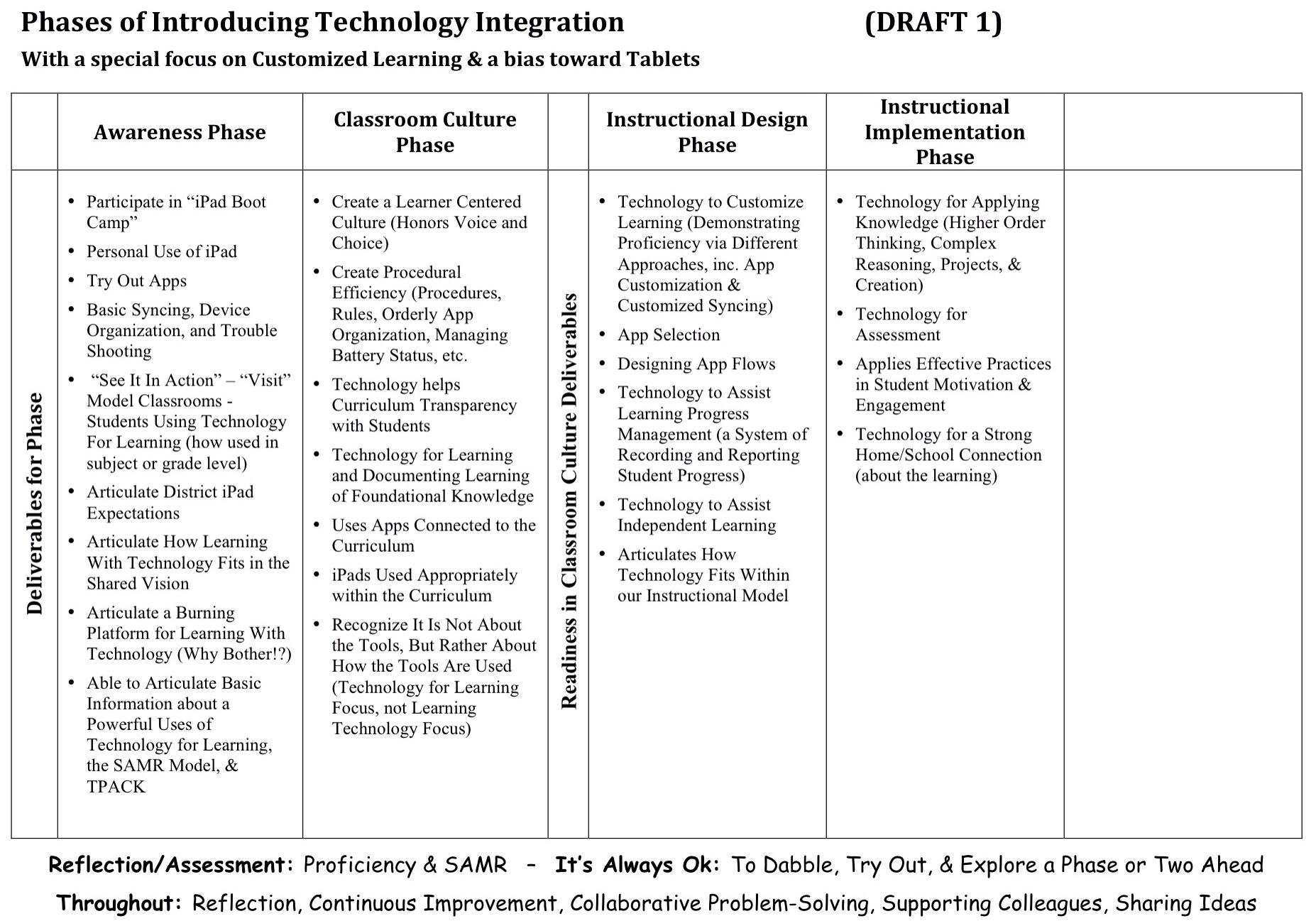
Last August, one of our Auburn-and-friends work groups developed a draft Phases of Tech integration.

Draft Phases of iPad Integration

We wanted to think about developing teachers’ skills at leveraging iPads for teaching and learning beyond just googling topics and word processing. Beyond just projecting material. Beyond just thinking about getting good at various tools. Beyond just using apps connected to the curriculum.

We wanted to think about technology as a tool to help us customize learning. We wanted to focus more on pedagogical goals than technological goals. And we wanted to think about where technology could take us that we couldn’t easily go without technology.

So we set up our professional learning continuum, our phases of implementing technology integration, to be similar to our Phases of Implementing Customized Learning, and how such a structure helps support plementation and teachers. (Driver 1)

And we based it on our current thinking about powerful uses of technology for learning. (Driver 2)

And we tried to think about how the SAMR Model might inform our work. (Driver 3)

Now, we don’t believe any of our work is permanent. We know that as we get better at what we do, we’ll figure out how to improve our models. After we use this Phases of Technology document for a while, it will be ready for a revision.

But right now, we’re wondering if our draft is developed enough to be the one we live with for 12-18 months before we revise it again…

So, as you look at our draft,

  • Does the document adequately reflect our three drivers?
  • Does the sequence of the phases seem right? Does the progression make sense?
  • Does each phase seem to have the right elements for demonstrating mastery and moving on to the next phase? Does it adequately outline advancement (recognizing there will be plenty of support documents)?
  • Is anything missing? What should be added?
  • What needs to be edited or revised?
  • How do we make it better before living with it for a while?

We don’t need “perfect.” We’ll learn a lot by living with the model for a while. But we want to kick the tires on this version a little, and insure it is “good enough” to live with for a while.

So, what do you think?


Is the Problem Your Students, the Device, or Your Vision for Learning?

There has been a mixed bag of results for technology in schools lately. You certainly hear about districts creating exciting learning opportunities for their students by leveraging technology. But you also read about LA Unified's problems with their iPad initiative, or Miami-Dade schools putting their initiative on hold because of the troubles in LA and in North Carolina.

The blame for the failures in these districts is pointed in lots of directions, but includes students as “hackers” (although there was no hacking, just clever students figuring how how to make locked down devices function as designed), or lack of keyboards (don't get me started on how stupid that issue is – it comes from adults who haven't sat with a tablet long enough to know how easy the virtual keyboard is to use). Diane Ravich points to overly agressive timelines, poor project management, poor contract management, and a failure to evaluate curriculum resources, especially against district curriculum standards.

But I believe there is a much deeper problem at the root of these disasterous educational technology initiatives.

Let me come at this from a different direction… Recently a friend contacted me, saying she was working with a district that was trying to decide what device to invest in. Tablets? Chromebooks? Laptops?

Based on 13 years of working with 1to1 initiatves and all the lessons learned, my reply was to ask, “What's their vision for learning? Frankly, without such a vision, I'm not sure it would matter what they bought; it will be equally unsuccessful…”

How do you know what you want technology for if you haven't decided what learning should look like in your classrooms? A tool bought for no other purpose than to have the tool (or because you believe it is good to have the tool) fulfills its purpose by simply being there. Yet, later, purchasers are surprised that amazing things haven't happened by simply being in the tool's presence…

Or maybe you have what I have come to think of as a “default learning vision.” In the absence of a vision for learning driving the instructional use, the instuctional use becomes the vision for learning. The vision defaults to what you do when what you do isn't informed by a vision.

So, what may be the default vision for learning in these initiatives?

I look at these three well-publicized initiatives and I see a vision of learning that boils down to this: electronic workbooks.

There is no doubt that access to digital content and resources should be one slice of how schools leverage technology for learning. But workbooks (of any variety!) have always been wholely insufficient for quality learning programs. (If they were sufficient, we would have the best educational system in the world by simply dropping a box of textbooks and workbooks at each student's home each year…).

Or as Diane Ravich points out about this problem:

…the content of the tablets must allow for teacher creativity, not teacher scripting… The time will come when tablets replace the bulky, puffed-up textbooks that now burden students’ backpacks. The time will come when tablets contain all the contents of all the textbooks, as well as a wealth of additional resources, in multiple subjects. But they must encourage exploration and inquiry, not fidelity to a packaged program. Customized and individualized must become a reality, not a sales pitch for programmed learning.

Is it any wonder that these technology initiatives are a train wreck, given their vision for learning?


We Need Keyboards With Our iPads. Not!

This past summer, Maine's schools got the choice for the first time to purchase tablets as part of the statewide 1to1 learning with “laptop” initiative (MLTI). It has spotlighted an interesting demand related to tablets: we need to get keyboards so students can use the tablets.

I kind of understand why people might think this. The virtual keyboard on the iPad does take a little getting used to, especially if you're a pretty good typer on a regular, physical keyboard. Also, adults and students hear other adults say, “we need keyboards for our tablets.” And the idea is reinforced by the TV ads for some tablets that state theirs come with a keyboard “so you can do real work.” Locally, we even have an owner of a call center claiming (while pounding his fist on the table…) he won't hire any of our graduates because they won't be able to type on a physical keyboard.

My own experience with a full sized iPad is that it took me a couple weeks to get used to the virtual keyboard, but now I type on it as fast or faster than I do on a physical keyboard. And I have heard similar stories of parents or community leaders in other districts demanding keyboards because of the hard time they personally are having typing on the onscreen keyboard, but a couple weeks later saying “never mind” when they have developed familiarity with it.

Admittedly, if I'm doing any quantity of writing on my iPad mini, such as writing this post, I do use a bluetooth keyboard. My hands are just too big to do anything more than a modified hunt and peck on the smaller keyboard. But the core of this debate is not about the size the keyboards on the (smaller) screens, but rather about onscreen vs physical keyboards.

I do believe that some folks really do need a different keyboard or sometimes need a physical keyboard. MLTI provided keyboards in something like a 1-to-10 or 1-to-7 ratio to the number of student iPads. We have put those in a keyboard lending program in our school libraries (students can check them out as needed), and a few students with a specific need have one permanently assigned to them. We even have students and families who have bought their own keyboards or keyboard cases (but that was a personal choice rather than a universal demand).

But the real issue that keeps coming up is the question, does everyone (or even just most students) need a keyboard? Districts in Maine that have experience with 1to1 iPad initiatives had interesting things to say when the question of keyboards was posed on the state technology email list.

The Cape Elizabeth tech director reported:

In our high school, we bought around 40-50 iPad keyboards for use in English and Social Studies, and also in our Library. This was in response to concerns from teachers, rather than from students, and although they did get used, they got used primarily because the teachers wanted them to be used rather than students needing to use them. They certainly got used less and less as the year went on and even teachers who borrowed them stopped using them as they ended up finding the onscreen keyboard just more practical.

The high school in RSU 57 has had a 1to1 iPad initiative in place for about 2 years. Their tech person talked about the keyboard cases they had provided students:

This was based on concerns from the administration and staff that student's would need a keyboard especially for typing long papers. Two years later and (my opinion) most students do not use the physical keyboards. Last year's class used it less than the previous class. What I am seeing is that the more the iPad and its virtual keyboard become mainstream the more the students are used to virtual typing before they are ever issued an iPad. Had we stayed with our original plan, I was not going to purchase keyboards this year.

In South Portland, the high school has had a 1to1 initiative for about 3 years, involving about 400 iPads. They have had “almost zero 'real' keyboard use/demand for the few we had purchased to allay concerns.”

Similarly, folks from Falmouth shared:

We bought 50 keyboards for our Elementary School iPads when we started the program 2 years ago. The thought was that 5th graders were going to need them to be able to type papers. 48 of the keyboards are still sitting in a closet unopened because they just have not been needed. The other two I have loaned out to staff but they always bring them back because they don't use them.

Foxcroft Academy has had one of the first high school 1to1 iPad initatiives in Maine. Their Assistant Head of School for Academics pointed out:

We're beginning year 3 of our 1:1 iPad program for all of our grade 9-12 students. We bought a few keyboards in year 1…They've received almost no use. There are plenty of barriers to student writing, but I can assure you that the virtual keyboard is not a substantive one. And, with built-in speech-to-text on these fancy new MLTI iPads, the virtual keyboard is even less a barrier. In short – buy a few (no more than a handful) if you must, to show that you're listening, but know that they are very likely to gather dust.

The Tech Integrator from Bar Harbor responded this way:

We plan to disallow external keyboards for iPads in school, unless the school determines that a student needs one. The thinking is that students will learn the iPad quickly enough, and that we don't want to set up for “have's and have-nots,”…. also the experience of our teachers using iPads, is that even an adult can learn to process text on an iPad.

That educator went on to say that when parents inquire, they have been referencing the articles here and here.

The issue is primarily an adult issue. Surprisingly, much of the demand for keyboards came before any of the schools even had their iPads! As one educator stated in the online discussion:

Some can't understand how you can interact in an educational setting with a device that does not have a keyboard with keys on it. An English teacher here, who was using Edmodo, had a student submit a lengthy paper the student had “thumb typed” on their iPhone!! Don't worry, the kids are all ready there or they will adapt very quickly. We just need to get out of the way.

I am empathetic to folks having fears and concerns about “new” technology they have only a cursory understanding of. This keyboard issue is a common perception about iPads.

But being a common perception does not mean that we have to respond to it, especially if we have adequate reason to believe it is a MISperception. (Nor do we have to respond to a concern just because it is stated repeatedly, or loudly, or with confidence, or by condemning those who disagree, etc.)

It is on us to make the argument (politely and diplomatically) about what works (not what is perceived or guessed or intuited or philosophized…) and provide the evidence that it works (such as through the stories that have been shared here).

 

The Need for a Quality, Distributed Professional Development System

Maybe you're experiencing something similar…

We really noticed it last year when we introduced iPads to first grade.

We now had double the classrooms with iPads (having introduced iPads to kindergarten the year before), but still only one Elementary Tech Integrator, had access to half as many early release Wedensdays as the year before, and had a new K-12, district-wide initiative (Customized Learning) drawing on our PD and support resources, support people, and time…

One of our team did help us implement a Workshop Model/Study Group Model approach where teachers chose topics of interest and collaborated in study groups to learn about the topic and create a video or other product to teach others what they learned. It was well implemented, yielded nice results, got good reviews in teacher follow up surveys, but still proved insufficient for meeting our training and support needs.

It was made clear again last week as we worked on planning our workshop day for the Wedensday before Thanksgiving. Teachers requested so many topics (related to both iPads and Customized Learning) and we only have a couple hours in the afternoon. We can't even afford the time to bring all the 2nd grade teachers into the same room to make sure they know how to properly download their apps (a combination training and technical difficulty we've been having lately), or the growing list of other challenges/needs we're struggling to address. And when I talked with the Tech Director about the breakout sessions he would lead, he (justifiably) responded, “Only 45 minutes per session? That's hardly enough time to get started.”

And, frankly, we face the same issue with middle school and high school where we switched from 1to1 laptops to 1to1 iPads, and they're finding the work flows are different, and we probably have to revisit integrating technology in engaging ways before students get too far down the path of using them as “weapons of mass distraction.” (Hat tip to Tom March for coining the term.)

Our philosophy is that if you are asking teachers to do things that they have never experienced themselves as students (like leveraging technology for learning), we have the moral obligation to support the heck out of them.

The question quickly becomes, if we don't have enough tech integrators to go around, and we have hardly any “everyone in the same room” professional development time available to us, and a growing list of challenges and things we're noticing our teachers don't know how to do (because we haven't taught them), how the heck do we support the heck out of them…?

So, we will be working this year on building a quality, distributed professional development system. Our idea is to build a system where teachers can get the support they need pretty much when they need it, developed and maintained by a large group of contributors, so it doesn't all fall on the shoulders of a few. We have some ideas on how to make this happen, but it's a little too early to share them (You know we will, when they're ready!).

Here's what we're pretty sure the system will need to include:

  • A professional learning curriculum & continuum – What are the (clearly articulated) knowledge and skills we want our educators to become proficient in and what scopes and sequences make sense?
  • A system for collecting and sharing examples, models, and exemplars – The system would include artifacts such as photos, articles, and videos, to help educators answer the question “But what does this piece look like in action?”
  • Learning modules built around that professional curriculum – The learning needs to be “chunked” into manageable pieces.
  • Multiple approaches to deliver those modules – Workshops, articles, videos, iTunesU courses, iBooks, etc. What ever systems we use, they should allow us to easily update the resources and push the updates to our teachers using them (things do change and evolve quickly in this business).
  • A system to “certify” teachers – The system certifies what teachers become proficient at as they move through their professional learning and keeps track of their “certifications.”
  • A system for soliciting educators to help us build and deliver the PD system – We need a team of teachers and other school leaders, both within and without our school district, to be valued contributors. We need people to help us build the professional learning continuum, the modules and related resources, and to certify teachers as they develop proficiency in the professional learning. The work needs to be developed by or borrowed from multiple people, not just the tech team.

We find it all a little scary. It does mean giving up some control. We have to trust others to help us do this work. If it is a piece that the tech integrators, the Tech Director, or I feel strongly about, then clearly we need to be part of the team that develops that piece. Otherwise, we need to trust the teachers who develop it. We can certainly review drafts of their work and offer feedback, but frankly there aren't enough of us to go around, and there is more work to do than we can actually do by ourselves.

Have any of you done some of this work? What have you tried? How'd it go? What worked and what didn't so well? What's your advice to us?

And so this chapter of our journey begins…


Not All Screen Time Is Created Equal – Young Children and iPads

Having a 1to1 iPad initiative in Kindergarten for almost 3 years (and currently in 1st & 2nd, as well), it's not surprising that we have heard a lot of comments and questions from parents about screen time.

The concern, of course, is that by having iPads in the primary grades (and especially 1to1, not just shared) young students are getting too much screen time.

It's understandable given the screen time research that has been around for a couple decades, mostly focused on children's television watching habits.

But in 2010, David Kleeman, President of the American Center for Children and Media, wrote, “A Screen Is a Screen Is a Screen'” Is a Meme, putting forth the idea that not all screen time is the same. Kleeman comments on at least two distinguishing factors. The first is the quality of the content. Certainly watching Sesame Street is of a different value than watching Tom & Jerry cartoons.

The second is how active (mentally or physically) the screen time is. Using educational or creation/productivity apps might be a better use of screen time than watching certain videos or playing certain games. Or as Kleeman points out, “David Pogue says, 'You can't play Kinect sitting down, and that's a plus.'” Kleeman refers to these as “lean forward” and “lean back” screen time. Lean back screen time is passive, while lean forward is active.

In fact, most of the screen time research and position papers seem to predate any significant introduction of the iPad, it's child-friendly touch interface and the plethora of educational and creation/creativity oriented apps (e.g. Kaiser Family Foundation 2010; American Academy of Pediatrics 2010; Common Sense Media 2011). It is easy to forget just how new an educational device the iPad really is!

There is a more recent position statement, jointly from the National Association for the Education of Young Children (NAEYC), and the Fred Rogers Center for Early Learning and Children’s Media, which brings a balanced (or at least timely) view to the potential role of technology in educating young children.

The paper includes these position statements:

“Effective uses of technology and media are active, hands-on, engaging, and empowering; give the child control; provide adaptive scaffolds to ease the accomplishment of tasks; and are used as one of many options to support children’s learning.”

And…

“When used appropriately, technology and media can enhance children’s cognitive and social abilities.”

To be clear, no one is arguing that there is no need to be thoughtful about how we leverage iPads for young student learning, nor is anyone arguing that iPads should replace hands-on, active learning (both are fears I sometimes hear expressed).

But I do want to state explicitly that the current screen time research does not contradict the (thoughtful) use of iPads with primary grades students, and in fact, there are productive, educative, developmentally appropriate uses.


I want to add as an aside the importance of training and professional development for teachers and other school leaders, if we are going to make primary grades iPads work. If the secret is “thoughtful” use of iPads as a learning tool, and where this post is directed to those who may want to respond to (erroneous) claims that screen time research suggests that young children should not be using iPads, I want to also share another position statement from the NAEYC paper. Educational leaders who recognize the educational value of primary grades iPads need to fully support teachers striving to meet that vision:

“Early childhood educators need training, professional development opportunities, and examples of successful practice to develop the technology and media knowledge, skills, and experience needed to meet the expectations set forth in this statement.”


Thanks to Sue Dorris for her contributions to this post.

The Series on the New MLTI: Choice, Auburn, and Learning

Maine has long had the first (and, unfortunately, only) 1to1 learning with technology initiative: MLTI.

The MLTI contract was up for renewal this year, and, for the first time, Maine is allowing each district to choose from 5 finalist proposals, producing a lot of conversation about the choices and how to choose.

Below is the series of blog posts I have written about the MLTI renewal, Auburn's choice and choice process, and my interest that MLTI selection focus on learning:


Strengths of the Early MLTI Program – Let’s Keep Them Going

Maine's learning with technology initiative (MLTI) is going through changes this year:

  • The contract renewal framed it not as a Maine contract, but as a multi-state contract, in hopes of making it easier for other states to do their own statewide initiatives.
  • When our governor announced the new contract award, it wasn't for our 12-year partner, Apple, but rather for HP.
  • The governor is allowing districts to select from any of the 5 finalist (Apple is included).

I'm not sure how all these changes will play out. My hope is that Maine's educators will rise to he occasion and take MLTI to the next level. My fear is that this will eventually kill what has been an internationally recognized learning program.

But it has made me think back on MLTI and what we identified that made the early MLTI such a powerful initiative. I found a couple old articles that address that question:

What we identified then as the strengths of this initiative include:

  • Access to technology
  • A focus on learning
  • A focus on leadership
  • Context-embedded professional development
  • Technology as a tool, not a curriculum area
  • Thinking how technology can change/improve teaching and learning

I hope Maine's educators, including the DOE and MLTI staff, continue to place an emphasis on these areas, and, despite the changes to program, MLTI continues to be the strong impactful initiative we had 8-10 years ago.


Is the iPad a Viable Solution for the High School?

As districts are deciding which MLTI solution they would like to choose, there have been a lot of questions asked about if the iPad is a viable solution for high schools.

Note 1: I'm not trying to convince folks to choose iPads, but there have not been the same kinds of questions about viability for the HP laptop or the MacBook Air, so I am simply trying to address the question at hand.

Note 2: For folks outside of Maine, MLTI is primarily focused on 7th & 8th grade (the State pays for those two grades), but districts can buy into MLTI for other grade levels at their own cost, most commonly at the high school level.

Two high schools, recognized for their 1to1 iPad initiatives, would seem to be evidence the iPad is a viable device for high school:


What We Want from Technology – MLTI, Customized Learning, and School Vision

There have been many discussions around Maine since the Governor announced schools would have choice over which solution they select for MLTI for the next four years. But most of those conversations have focused on the device, or its capabilities, or why it is “my preferred device,” or why people are worried that the device they aren't that familiar with will not be sufficient for the task at hand…

I wish so much more of those conversations had instead been about school visions for learning, and what we hope to get from technology for learning. What role can technology play in learning? What is your school's or district's vision (ours is here), and what is the role of technology in fulfilling that vision?

And for Auburn, as I would guess for other districts in the Maine Cohort for Customized Learning, we are concerned about technology's role in helping us succeed with implementing Customized Learning (such a critical part of our vision).

Here is what we think the roles for technology are for learning, especially for Customized Learning:

  • Instructional Resources for Building Foundational Knowledge
  • Instructional Resources for Using Knowledge, Creating, Complex Reasoning, and Projects
  • Learning Progress Management
  • Supporting Independent Learning
  • Assessment
  • Home School Connection
  • Student Motivation

How are you currently using technology for each of these? What are teachers doing (maybe in your district, but maybe in another) that shows you exciting ways technology could be used for each of these? What is best technology practice for each of these roles?

But much more importantly, as Maine's districts think about selecting a solution for MLTI, how does each proposed solution measure up against each of these roles for technology?

You don't have to be interested in Customized Learning to be interested in these roles. But I don't beleive a school can make a satisfactory decision about which solution to select if they are only thinking about the device or the operating system…


What Did Auburn Choose for MLTI and Why?

Auburn chose the Apple Primary Solution (iPads for students; MacBook Airs and iPad Minis for teachers) for MLTI.

Here is a two-page FAQ document we prepared for our teachers and community. Among other things, it explains our rationale for making this choice.

(Again, we aren't asking anyone to choose what we choose, but rather we're trying to share about our process and how we chose.)


Schools Have MLTI Choice, But Compare the Solutions!

When Maine's Governor announced that he was awarding HP the contract for the Maine Learning Technology Initiative (MLTI), and not to Apple (who had been Maine's partner in MLTI for the last 12 years), he also told schools that they could choose from any of the 5 finalist proposals. Schools had flexibility to decide which solution matched their needs best.

But many of the discussions that have followed seem to have focused almost exclusively on the device (mostly the HP laptop, the MacBook Air, and the iPad). I think because of the focus on devices (and the passion techies have for their devices!), the conversations seem to have bordered on “Platform Wars” at times (with the vim and vigor that all religious wars have!)

But MLTI was never supposed to be about platform, nor the specific device, and not even “job skills.” It was always supposed to be about tools for learning. And I wish schools would discuss learning tools more, and less about device, OS, and job preparedness.

Not even the proposals are about the device. The device (laptop or tablet) is only one component of a whole solution: device, network, software, tech support, projection, professional development, etc. (Supposedly, in support of learning…)

So I'm hoping that schools are looking hard at their school visions for learning, thinking about technology supporting teaching and learning, but also doing a side by side comparison of the solutions as they work to make their decisions.

Any of you who are involved with Customized Learning may have participated in the Complex Reasoning training. In that training, we learned that Decision Making happens effectively when you identify criteria, rate the possible choices against those criteria, and then choose based on the ratings and analysis.

I encourage each of us, as we think about what direction we are going to go, to think not primarily about our preferred OS or device, or “job prep,” but rather about comparing the full solutions:

  • How does the PD compare? (And is it focused on teaching and learning, or on the device and the software? Does it focus on leadership for implementing 1to1 and for school change?)
  • How does the software compare? Is it just productivity tools or is it a good set of software for teaching and learning (including productivity tools)?
  • How much technical support can we expect? Repairs? Imaging? Set up?
  • What about data storage? How much? How easy? What happens after the contract?
  • What about the device? Appropriate for student use? Battery life? Quality of network? How well does their projection solution work, not just for teachers, but for kids?
  • What is the provider's experience with education? (Not simply providing tech, but in helping schools use their tech for teaching and learning – how well do they understand teachers' context?)

Auburn has a good idea of what choice we are selecting, but I'm not arguing that you choose what we choose. I am arguing that you look closely at comparing the 5 solutions against all these criteria. If you and your decision makers do that, and you choose something different that we did, that's great! At least you compared all elements of the solution.

I would just be disappointed if you chose based on “one criterion” (e.g. OS, favorite platform, or “it's the device I use”) or used criteria that don't match the vision and purpose of MLTI (e.g. used “job prep” instead of “learning tool” for your purpose), even if you end up making the same choice we do.

The State has provided a side by side comparison document (available here).

You don't have to use the point scores from the Review.

Do your own rating, but compare the solutions against all those criteria.


Maine Announces State Technology Contract Award – But Not Apple (Kind Of)

We're in the middle of (a contentious) budget season, and I haven't been able to blog as much as I would like lately…

But things took an interesting turn last Saturday, and even though I still really don't have time to blog, I need to get some of this out there…

Saturday, Gov. LePage announced that the MLTI contract would go to HP, not Apple. Apple has been the state's partner in MLTI, Maine's learning with laptop initiative, for the last 12 years.

This was a shock to Maine's educators, because the RFP Evaluation Team had identified 5 finalists and the HP solution had an RFP evaluation rating almost 14 points lower than the top proposal, coming in 4th, and costing almost $20 more per seat than the highest rated solution…

The Governor stated that it was the least expensive solution, but his spokesperson clarified later that he meant to say “least expensive laptop solution.” Also, he made his belief clear that a Windows-based laptop was the best choice for preparing students for work (despite the fact that MLTI is supposed to be a learning initiative, not a job training program).

The really interesting thing, however, is that the Governor also said that districts could choose from any of the 5 finalist proposals, but (for 7th and 8th grade, that the State pays for) would only cover the cost up to what the State would pay for the HP solution. If a school chose a more expensive solution, then they would have to pay the cost difference. (Auburn is likely to choose the iPad solution, the “Apple (Primary)” proposal, which costs less than the HP solution.)

Schools can also buy into MLTI for non-middle grades (high school and elementary school) at their own cost.

There are still lots of questions and lots of concerns, and I'm going to try to blog about some of them over the next day or two…

But in the meantime, here are some resources:


How Does Auburn Select Apps?

Ever since we started Advantage 2014, our primary grades literacy and math initiative that includes 1to1 iPads in Kindergarten and 1st Grade, we’ve had educators and parents ask us what apps we’re using. (We have an apps page on our web site with 2 links, one to just our list of “district recommended” apps and one with the correlation of those apps to our curriculum – at least for one academic area…)

But occasionally, I’ll be asked how we select our apps.

For the most part, teachers guide our selection.

Teachers are free to use what ever apps they would like (especially free ones), but they are responsible for organizing their app library and syncing the devices in their classroom. This, by itself, eventually leads to teachers being more selective about which (and how many) apps they use! (One kindergarten teacher spent a couple weeks taking home a few iPads each night to spend the evening deleting the couple hundred apps she no longer wanted on the iPads!). 🙂

In general, we made “educational resource selection” part of our professional development. We didn’t want app selection to be some centralized function, and we wanted teachers to get good (and deliberate) about how they selected the resources they used with their students (which never happens if “someone else” is responsible for deciding which resources are ok for teachers to use). In a post about our professional development, I referred to our it as using a Constructivist approach:

As we thought about designing PD for our teachers, we didn’t want to just hand teachers information or resources; for example, we didn’t just want to hand them “approved” apps. We wanted teachers to have an intimate understanding of various components of the initiative they were on the front lines of implementing, including app (educational resource) selection. We decided to take a constructivist approach. For example, we had our teachers start by simply exploring apps. They had a limited budget for apps, but could also download as many free apps as they wanted. Then teachers made recommendations for apps that they thought would be the “core collection” of apps, those apps the district would purchase for every classroom. We would give teachers two similar apps and ask, “which one’s better?” to get them thinking about criteria for app selection; this eventually was developed into a rubric. Finally, we correlated apps to our kindergarten curriculum. The constructivist approach insures a deeper understanding based on their own experience.

We decided we didn’t like the term “district approved” apps, and now refer to them as “district recommended” apps.

Also, with teacher input, we revised our app selection rubric a couple times. Then we came across Tony Vincent’s work with iPads and his fabulous resources. We now use his rubric, since we think it captures our thinking about app selection better than we did. (Here are some other recommendations by Tony Vincent on how to evaluate/select apps.) Now, when a teacher requests that an app be installed on all the classroom iPads, we start by asking how it faired against Tony Vincent’s rubric.

In all cases, we tried to focus app selection (and teacher practice with iPads) on our goals for the program. From our PD post:

Content of Professional Development – All of our PD and training has focused on a couple of topics. We wanted to expand our teachers’ skill at applying literacy best practice, and to insure that our teachers and specialists working with kindergarten students had the capacity to select and apply appropriate apps directly toward student academic needs, as well as how to manage the iPads and work within the unique demands of this initiative.

Through our professional development, we also worked with teachers to create expectations for iPad use in the classrooms (which further helped us with app selection):

iPad Use – Minimum Requirements

  • iPads are used daily during centers.
  • iPads are used daily during whole group and/or small group instruction.
  • iPads are used as an intervention tool with below benchmark students.
  • iPad apps reviewed by the district are used.

This year, recognizing that we need to address both instruction for low-level thinking and higher-level thinking, we have some teachers exploring “Using iPads for Projects, Problem-Solving, and Creating.” So even with new explorations, we are working to link app selection to the best practices.

I haven’t really talked about how we pay for apps (mostly district volume purchase program vouchers, and iTunes cards purchased by various groups), and I recognize that budget does have an impact on app selection, and when a district purchase is involved, we involve the Tech Director in the decision (or the Special Ed Director, if it is a Special Education related purchase). But as much as possible, we try to give the teachers the lion’s share of the say in what apps we get. Leadership’s job isn’t to tell them which apps are ok to use or what best practice is, but rather to support their individual and collaborative work toward becoming their own experts in best practice and educational resource selection.

Why We Must Embrace Disruptive Technology

There is more to Sustaining and Disruptive uses of educational technology than the opportunity to improve education and to reach more students. There are risks involved. But this isn't from embracing Disruptive uses, but rather from not embracing them. David Thornburg:

When kids who are that fluent with these tools encounter an educational system that is predominantly driven by the awesome power of a sheet of slate and a stick of chalk, then they're in trouble. Or the teacher is in trouble, more appropriately, because the student will just tune [the teacher] out and do this project at home. [He'll say,] “It's not worth my time to try it here, I don't have access to the resources. I'll just get through the day.”

In fact, the whole Sustaining/Disrupting idea comes from the world of business and the writings of Clayton Christensen, who “focuses on the critical distinction between sustaining technologies that enhance current trends in an industry and disruptive technologies – innovations that herald the wave of the future.” He argues that even well managed companies fail if they don't respond to innovation in a timely manner. It is adaptive organizations that survive and thrive in the presence of disruptive technologies. (See a summary here.)

That doesn't mean that it's easy. In fact it can generate a lot of fear. That's because Disruptive uses can fundamentally threaten well established practices. When graphing calculators first came out in the late 1980's, I bought one because I knew they represented great potential for teaching math. I showed it to a close friend, who was also a math teacher. Her first words were, “Wow! This is great!” But, without missing a beat, she went on to say, “I hope none of my students have one!”

David Thornburg had this to say about 1-to-1 computing, perhaps the biggest disruptive innovation facing schools in along time:

There's a realization that when you go below 4 to 1, as an educator, your world changes. I think that the teachers and administrators who are resistant to one-to-one computing definitely do understand the implications. These are very bright people. They know that the world of education as they know it will end. …

How can we help schools adapt to disruptive technologies? And more importantly, how can we take advantage of the “wave of the future” to improve schools and reach more students?


Keep the MLTI RFP focused on Learning: Talking Points

I have had some great conversations and email exchanges with many of you since posting my concerns about keeping the new MLTI RFP focused on learning. Some of you have asked if you wanted to reach our to the Commissioner to express similar views, what might you say?

Here are my talking points:

  • Instead of tech specs, the RFP should describe what we would like to do with the devices (what is the change in learning that we would like to see?)
  • Technology is expensive, and we should not invest in it if we are simply going to use it to do what we do without it (what is the change in learning that we would like to see?)
  • Looking at the work in Maine, perhaps that change in learning should be Customized Learning and the Education Evolving recommendations
  • In keeping with the components of Customized Learning, the learning activities described should include both those for low level learning and for high level learning.
  • Low level activities (recall, understanding, simple application) could include the following: access to online resources, information gathering, note taking, communicating, studying, accessing online educational tools, etc.
  • High level activities (non-routine application, analysis, evaluation, creating) could include the following: creating simulations, project-based with multimedia, coding and programming, writing for a purpose and audience, digital storytelling, engineering and design, etc.