Shared Visioning in Action

I recently started a new job: Policy Director of the Learning Through Technology Team (LTTT) at the Maine Department of Education. It’s essentially the state tech director position, and its largest responsibility is managing the Maine Learning Technology Initiative (MLTI – 1to1 in 7th & 8th statewide – since 2001! – and making it easy for districts to buy in at other grades), and supporting schools as they think about how technology can support learning.

I have a small (but awesome!) team of 7 colleagues that help make all this happen. If you follow this blog, you already know I’m a strong believer in “Leading Beside” which includes both shared leadership and working from a shared vision. So it won’t surprise you that one of the first things I did with my new team was set aside a morning for us to build a shared vision.

We used the same process that Bette Manchester introduced to districts at the very beginning of MLTI: To think of a preferred future for young people we care about (the Preferred Future), then think about about what students need to start doing today to get ready for that Preferred Future (the Vision for Learning), then think about what teachers, schools – and the Learning Through Technology Team – need to do today so students can do what they need to do (the Strategic Plan). (A process Bette would credit to Bruce Wellman’s work.)

Building a Preferred Future

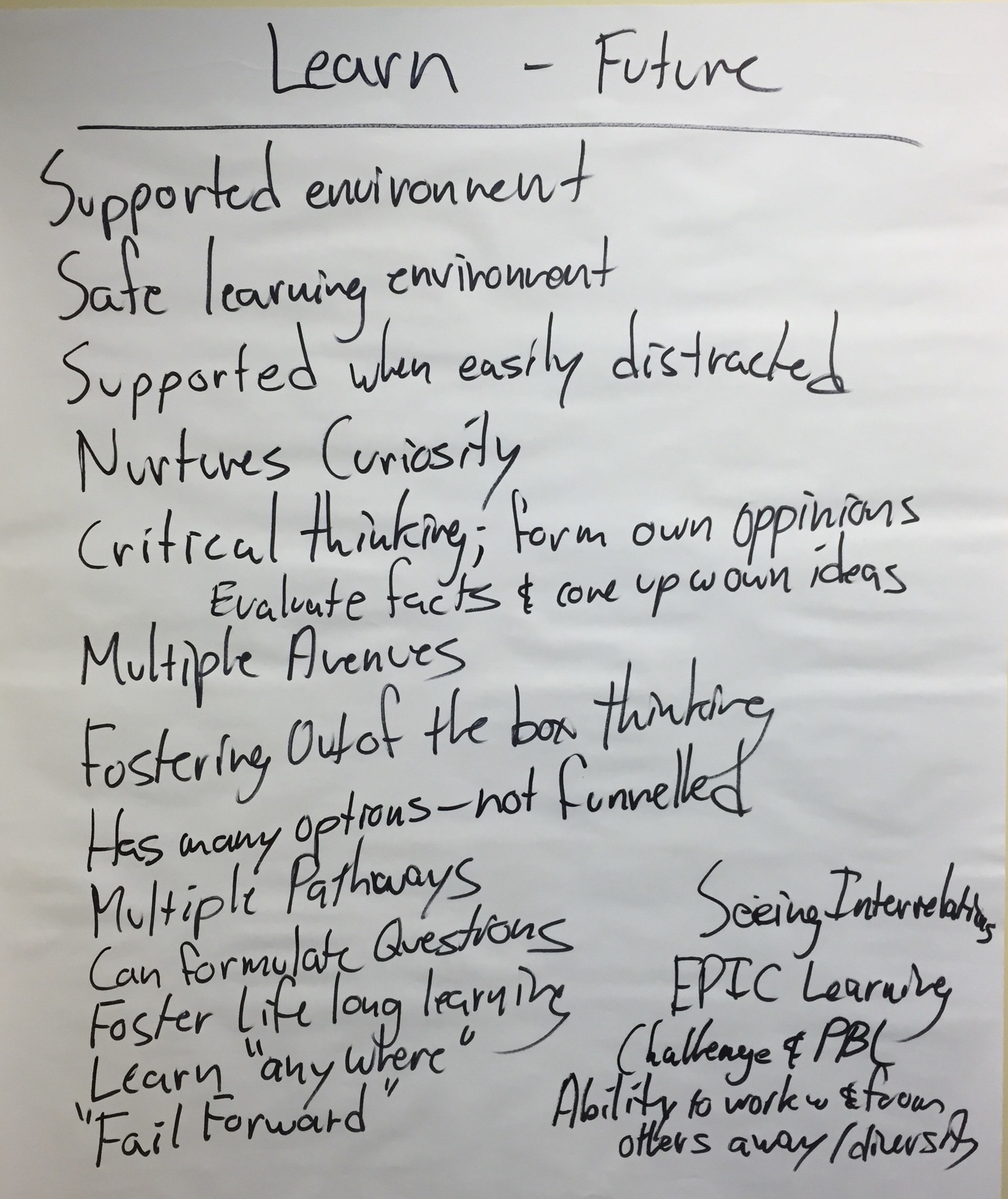
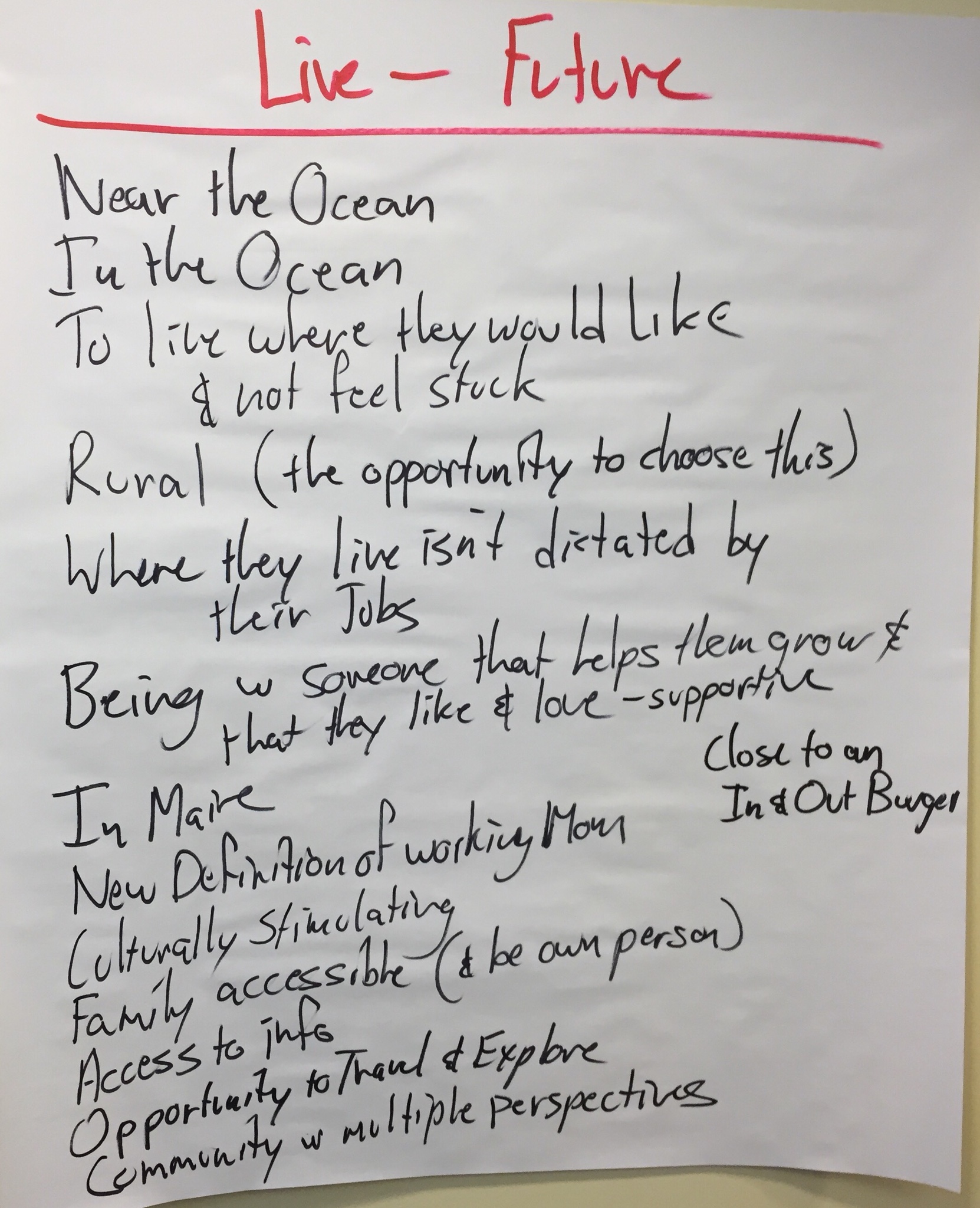
We started by thinking about a young person we care deeply about. Then thought out into the future, beyond middle school, beyond high school, beyond college or job training or military, and then a few more years, until that person was getting settled in their jobs and, perhaps, their family.

And then we thought about three questions:

  • Where would we like them to be able to work?
  • Where would we like them to be able to live?
  • Where would we like for them to be able to learn?

Here’s what the team generated:
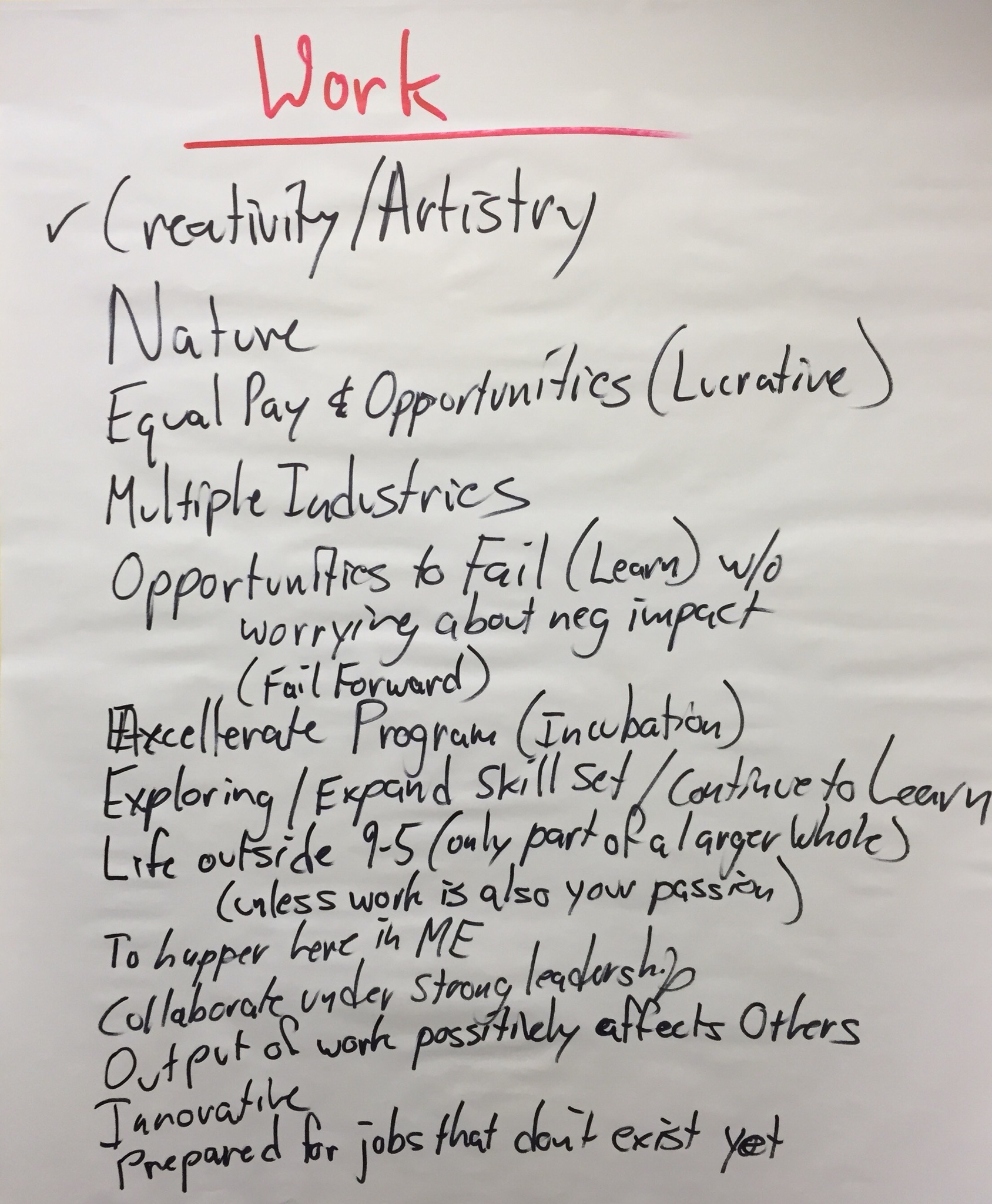
These charts represent the Team’s Preferred Future.

Identifying Our Shared Vision Vision for Learning

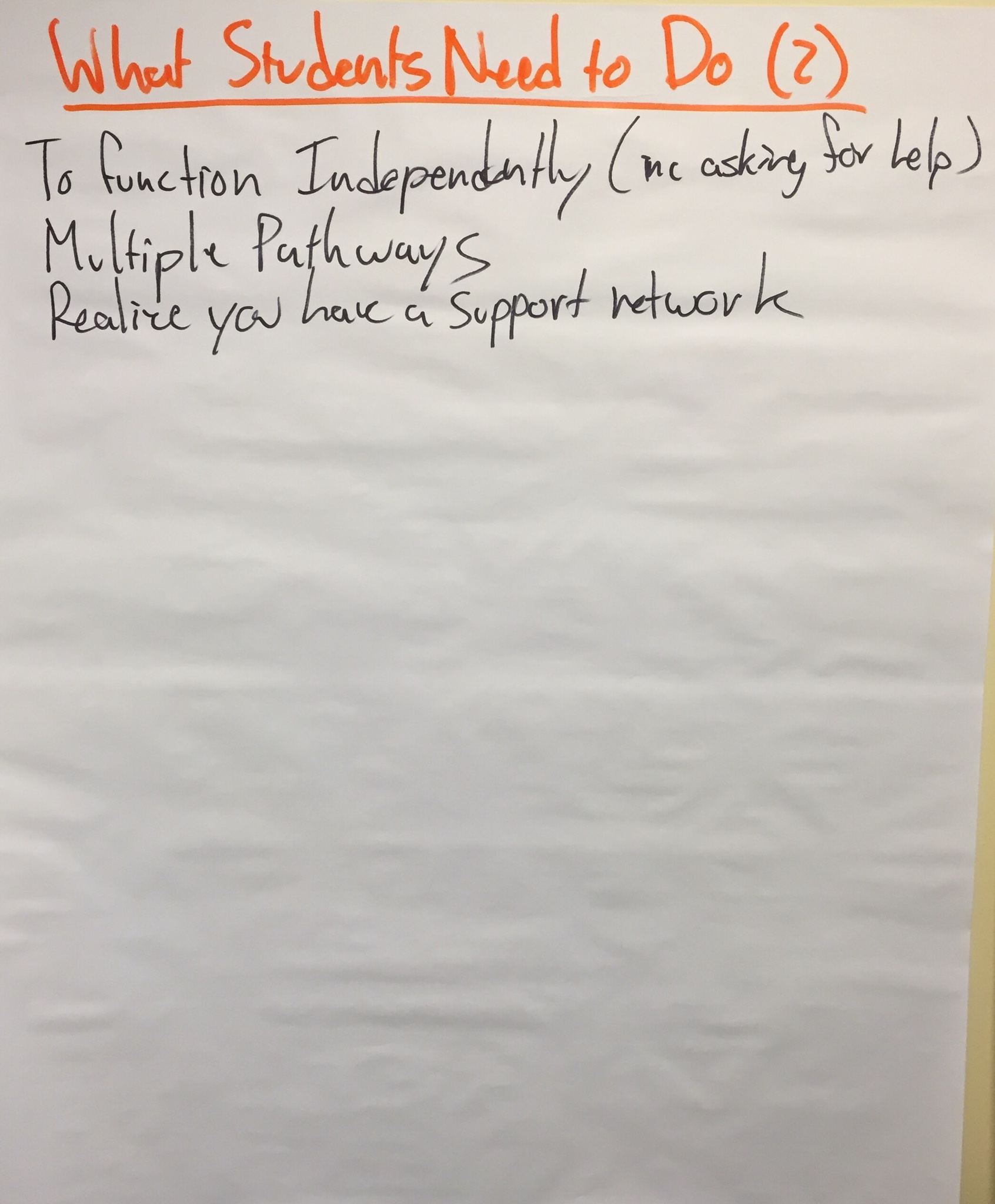
The next step was to think about these same students today. If the charts above represent our preferred future for these young people, what do they need to do today to get ready for it?

Here is what we generated:
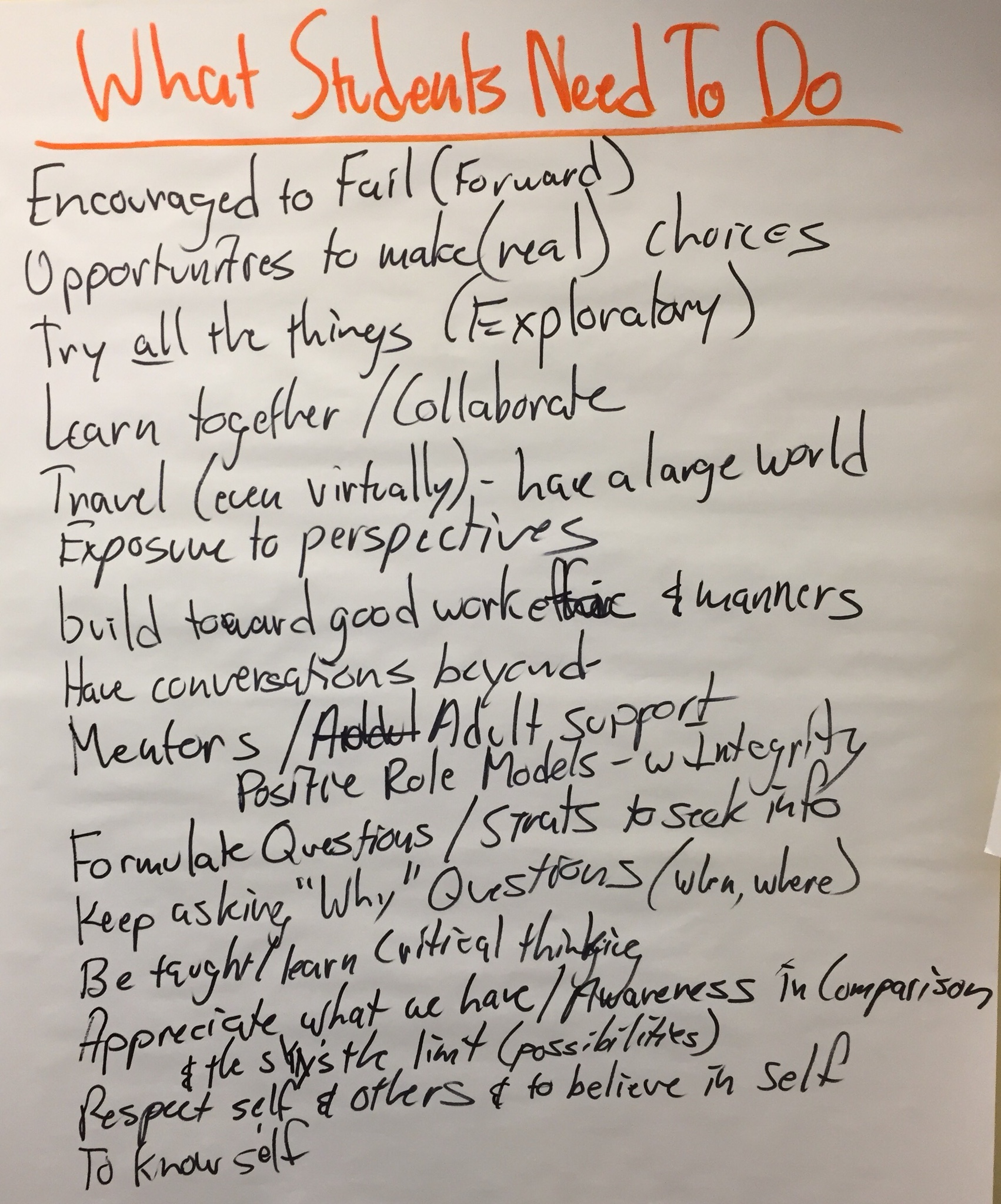
So, these charts represent the Team’s Vision for Learning.

Creating Our Strategic Plan

So, if this is what we believe students need to start doing today to get ready for the Preferred Future, what do do we believe teachers need to do, so students can do what they need to? Our thoughts:
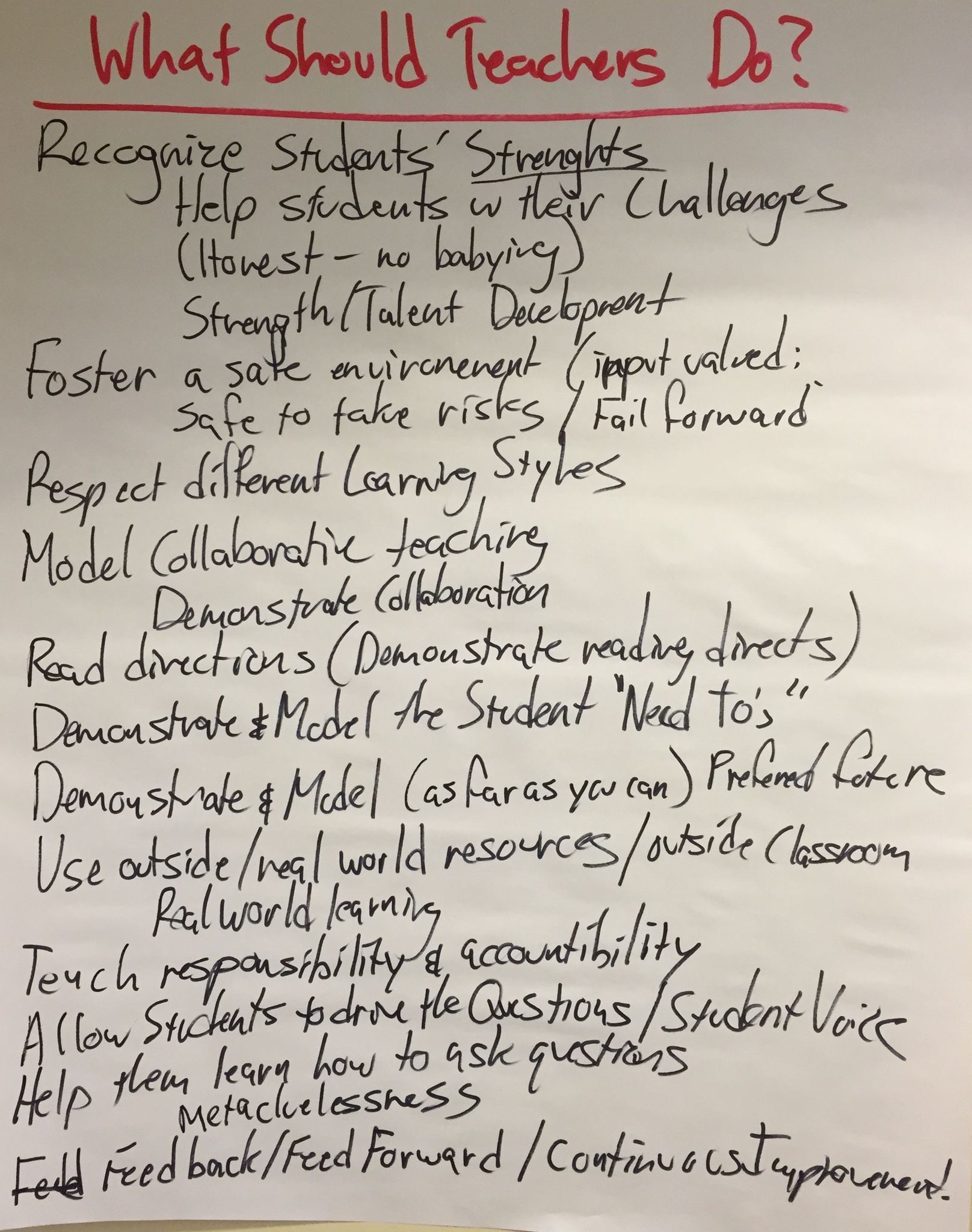
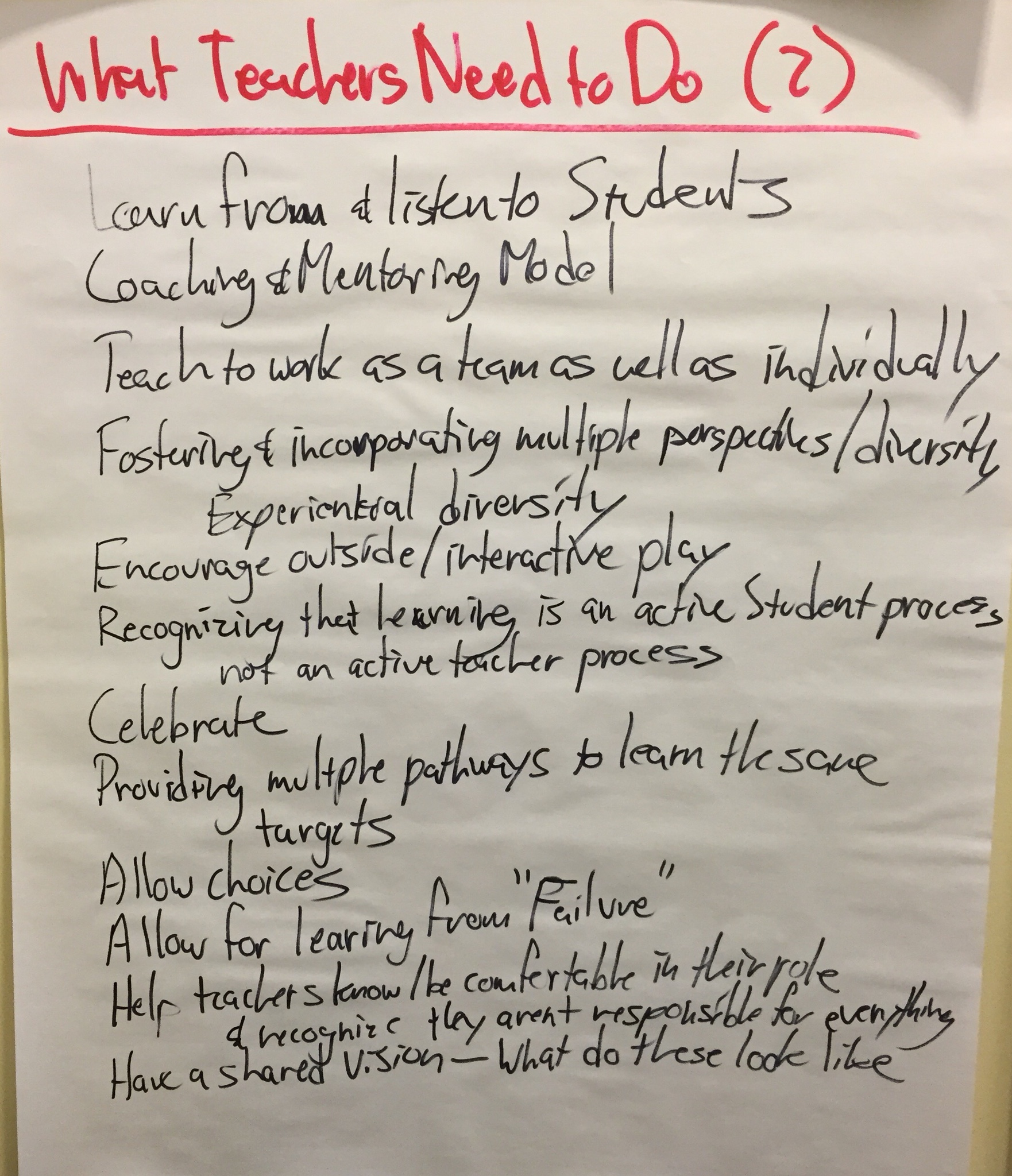
And then, what do we believe schools (principals, tech directors, district administration, etc.) need to do so teachers and students can do what they need to? The Team’s lists:
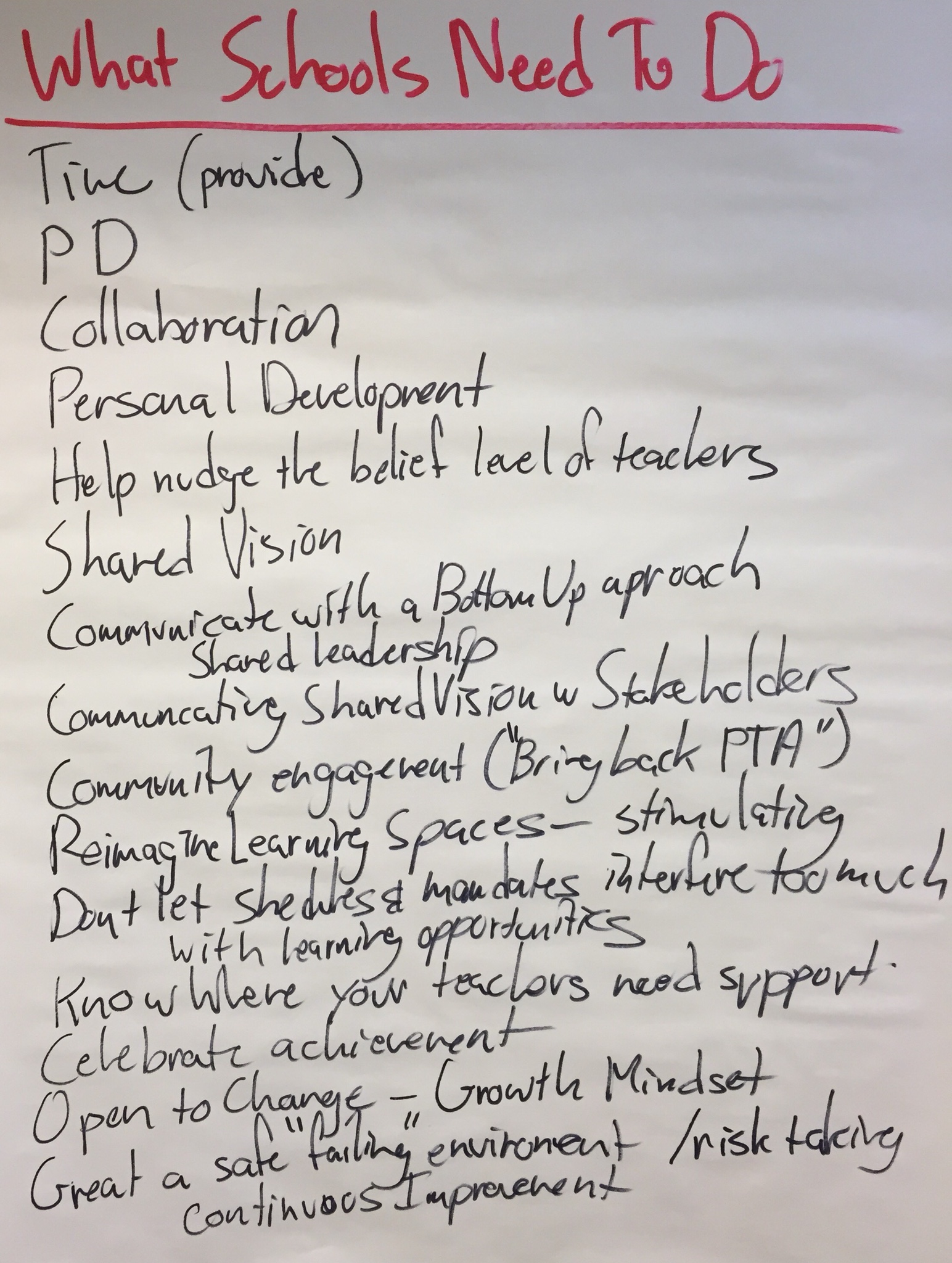
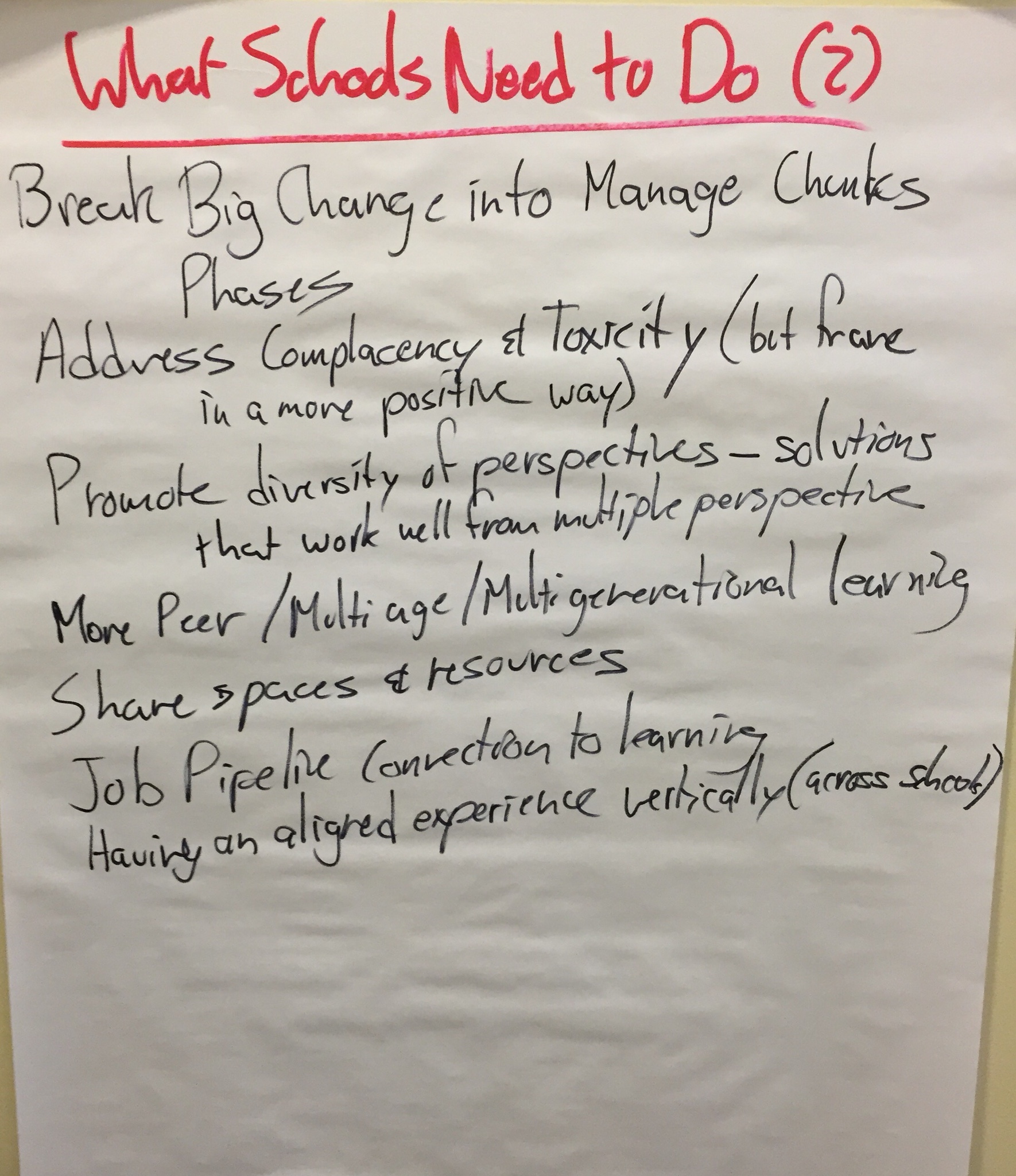
These charts represent what we hope teachers and schools might adopt as their strategic plan.

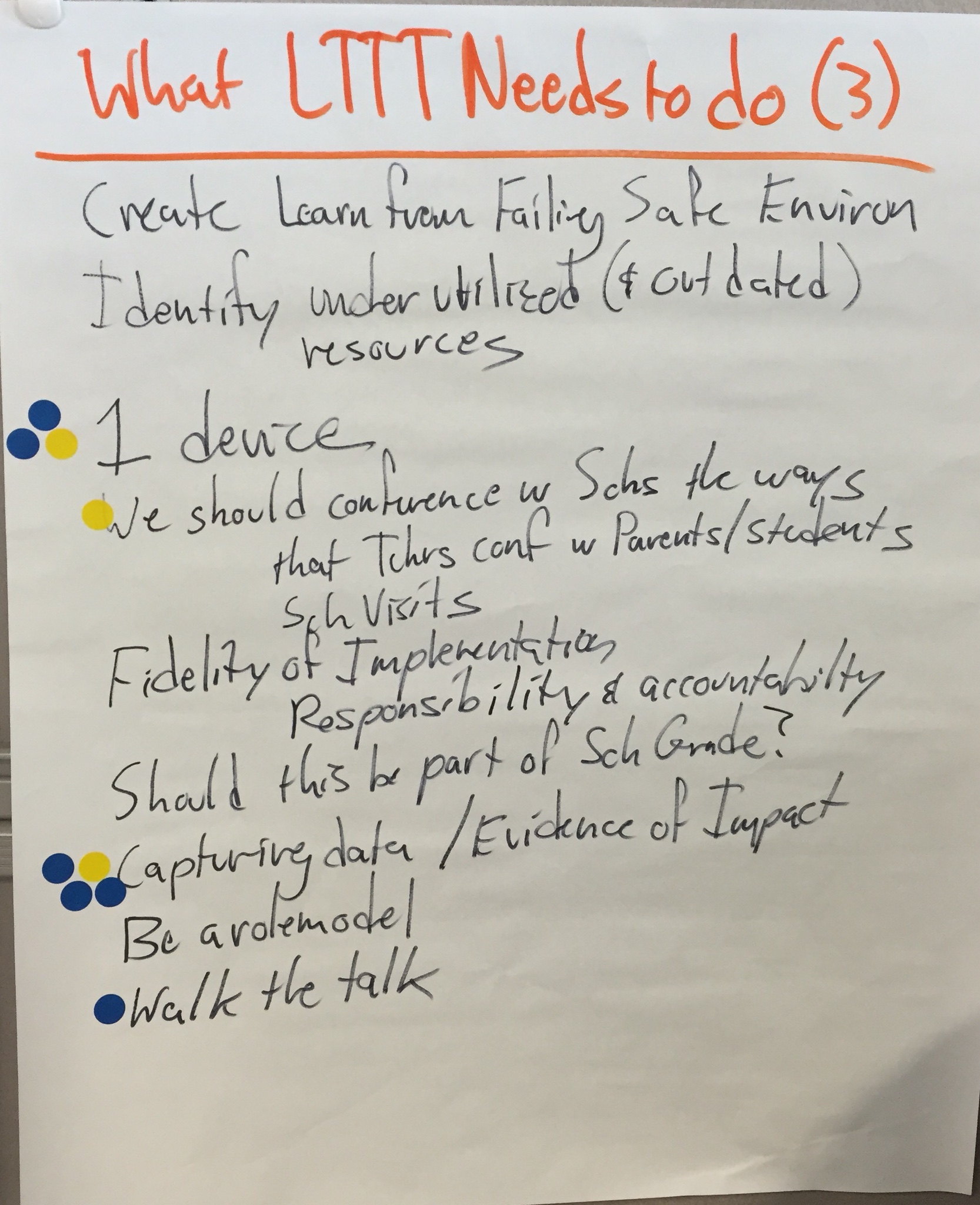
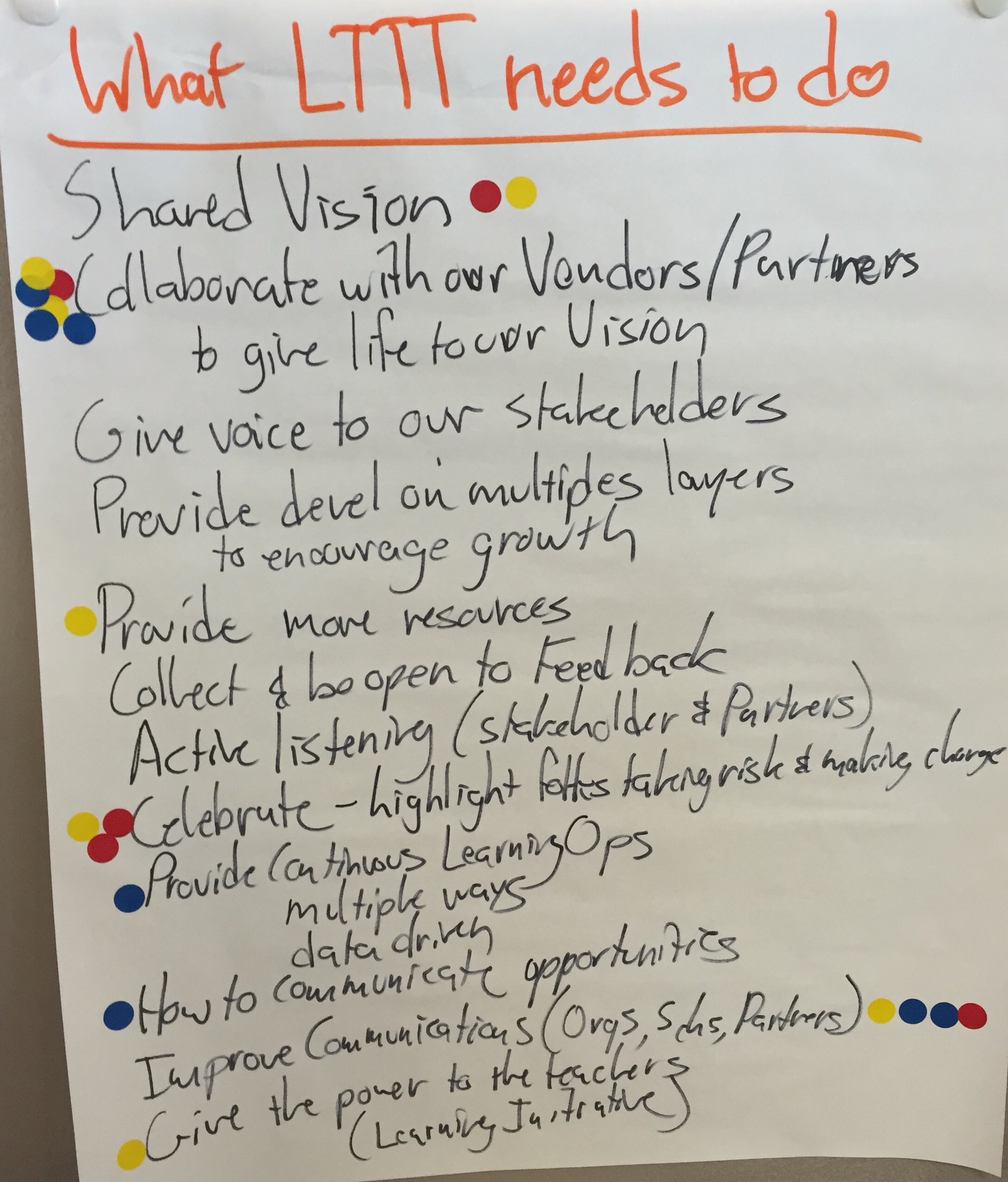
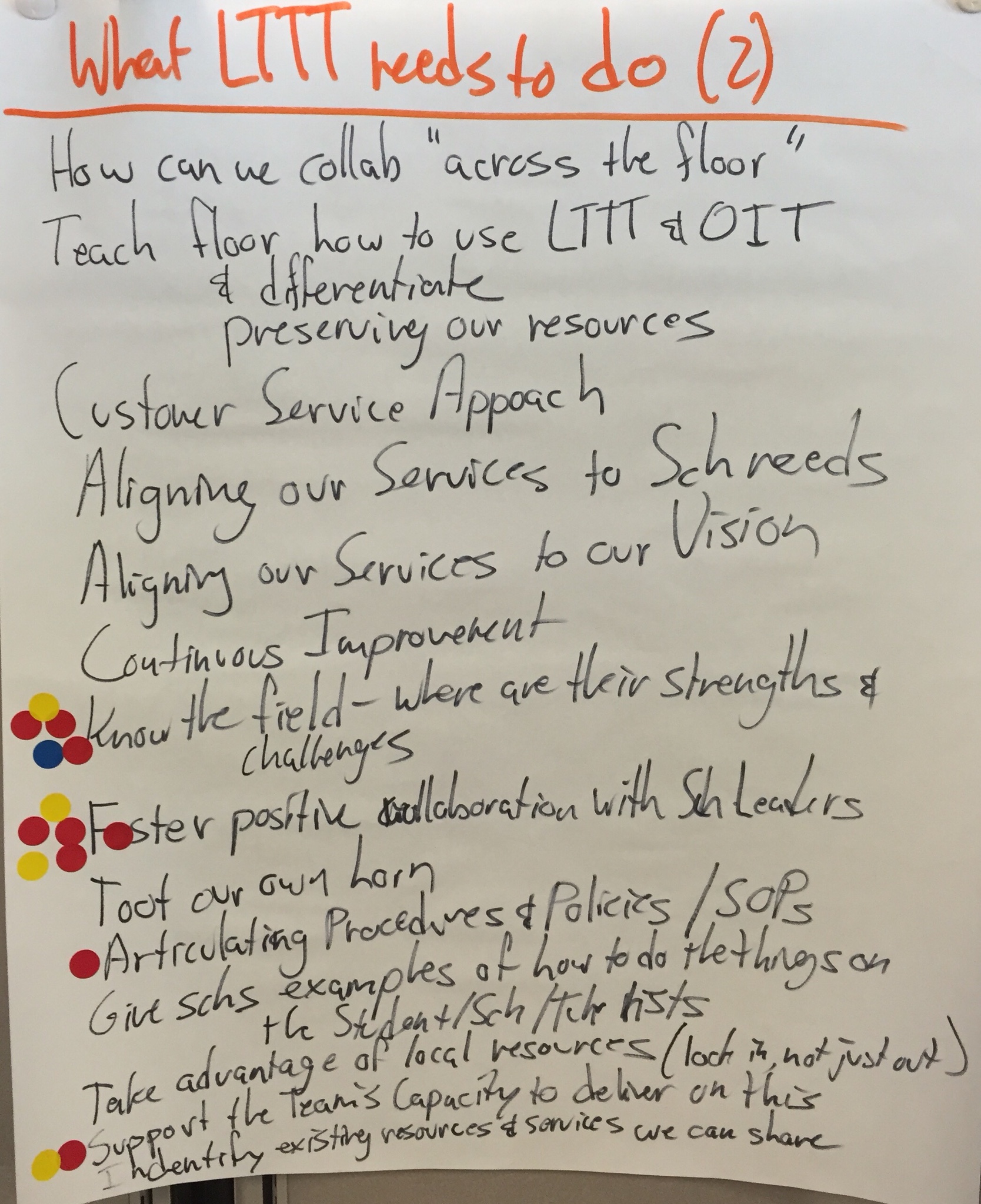
But they also lead us to think about our own work and responsibility for making our Vision for Learning a reality. What does the Learning Through Technology Team need to do to support the work of students, teachers, and schools?
Prioritizing

Accomplishing 3 pages of strategic steps is a daunting task! (Actually, self defeating! We need a little focus!) I gave each Team member 6 dots to place on the charts. The prompt was, “Which are the most important pieces for us to work on right now.” All of them are important, and should be tackled as some time, but we needed to identify where to start. Team members could distribute their dots in an way they wanted (all 6 on one item, or spread out across items, etc.), but they each only had the 6 dots.

You can see where they placed their dots above.

That translates into the following as the Learning Through Technology Team’s Strategic Plan for the coming year:

  • Collaborate with our Vendors/Partners to give life to our Vision
  • Foster Postive Collaboration with School Leaders
  • Know the Field – where are their successes and challenges?
  • Improve Communications (Organizations, Schools, Partners)
  • Capturing data / Evidence of Impact

Where We’ll Go Next

It’s not enough to capture a Vision on paper. It needs to be used as a filter and a compass.

In order to do that, we’ll have to polish our Vision for Learning into a shareable document (it’s a little too rough for sharing in this current form), and create a mission statement. Then we can put together a “Compass and Filter” document (that includes our vision, mission, and strategic plan goals). We will use it to help us decide how to prioritize and do our work, and help us decide which new opportunities to take on. We can also share it with the schools, organizations, and other partners we work with (or might start working with) to see where there is alignment between our work and theirs.

But I’ll save that for future blog posts…

Benefits of Attending Auburn’s Leveraging Learning iPad Institute

Auburn Schools (ME), an early adopter of 1to1 iPads in primary grades, hosts the annual Leveraging Learning Institute on the topic. Registration for the Nov 12-14 Institute opens at noon (ET) on August 21.

Dr. David Murphy, RSU 44 Superintendent (Bethel, ME), has sent a team to the Institute every year. In this video, he discusses both what his district has gotten from attending the Institute, and the benefits of sending a team of teachers, administrators, tech integrators, and technicians.


Registration is limited to 135, so be sure to register early. Districts are encouraged to send teams, and the Institute is structured to support teamwork (but individuals are welcome, too!).

This year, we are expecting the Institute to be internationally rich! More than a third of our participants are likely to be educators from outside the United States. What a great opportunity to share your experiences and learn from educators from across the country and around the world!

Learn more by visiting the Leveraging Learning Hold the Date Page.  We hope to see you at the Institute!


Is Our Phases of iPad Integration Ready?

(Note: Cross posted to the Distribute PD Project)

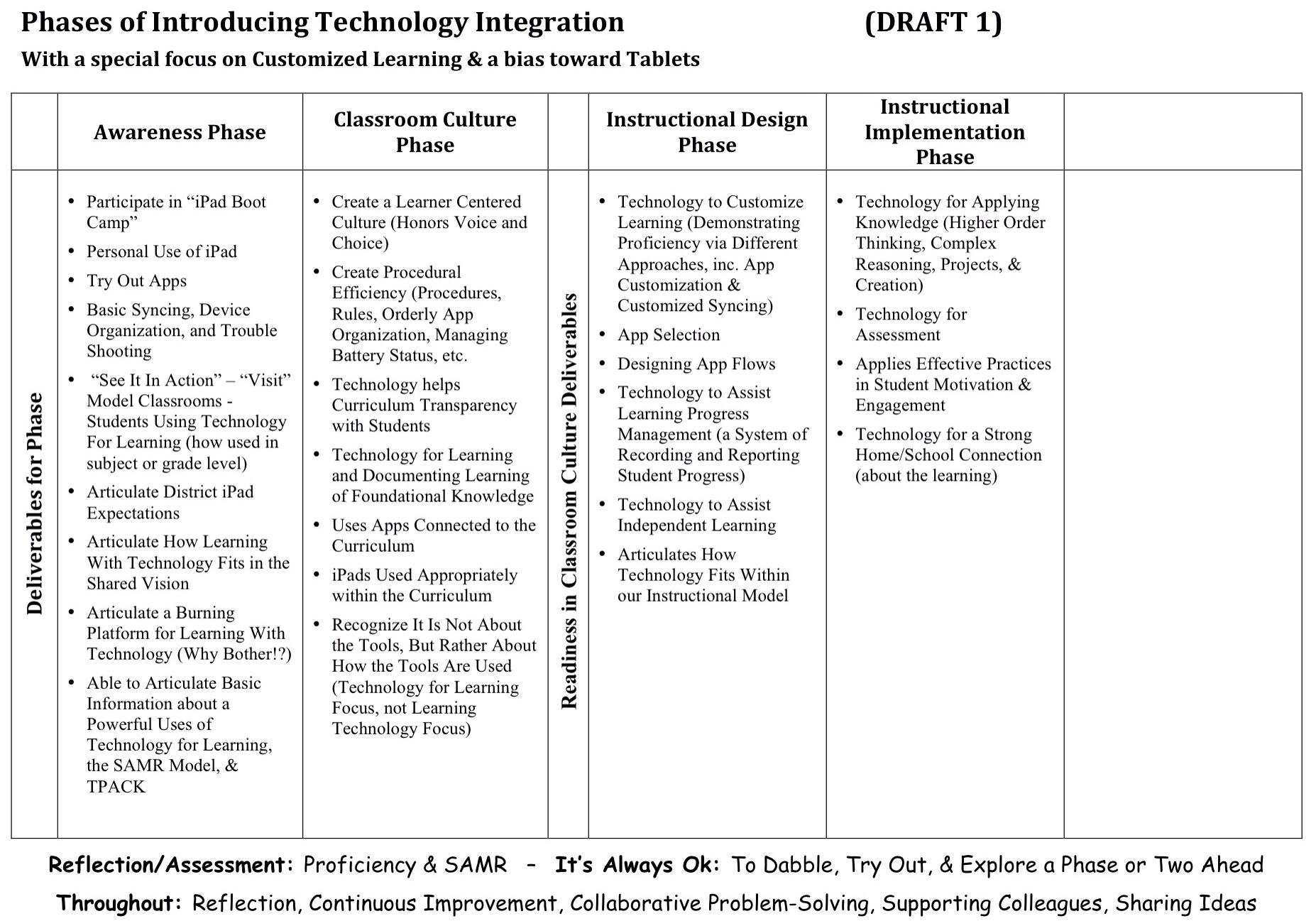
Last August, one of our Auburn-and-friends work groups developed a draft Phases of Tech integration.

Draft Phases of iPad Integration

We wanted to think about developing teachers’ skills at leveraging iPads for teaching and learning beyond just googling topics and word processing. Beyond just projecting material. Beyond just thinking about getting good at various tools. Beyond just using apps connected to the curriculum.

We wanted to think about technology as a tool to help us customize learning. We wanted to focus more on pedagogical goals than technological goals. And we wanted to think about where technology could take us that we couldn’t easily go without technology.

So we set up our professional learning continuum, our phases of implementing technology integration, to be similar to our Phases of Implementing Customized Learning, and how such a structure helps support plementation and teachers. (Driver 1)

And we based it on our current thinking about powerful uses of technology for learning. (Driver 2)

And we tried to think about how the SAMR Model might inform our work. (Driver 3)

Now, we don’t believe any of our work is permanent. We know that as we get better at what we do, we’ll figure out how to improve our models. After we use this Phases of Technology document for a while, it will be ready for a revision.

But right now, we’re wondering if our draft is developed enough to be the one we live with for 12-18 months before we revise it again…

So, as you look at our draft,

  • Does the document adequately reflect our three drivers?
  • Does the sequence of the phases seem right? Does the progression make sense?
  • Does each phase seem to have the right elements for demonstrating mastery and moving on to the next phase? Does it adequately outline advancement (recognizing there will be plenty of support documents)?
  • Is anything missing? What should be added?
  • What needs to be edited or revised?
  • How do we make it better before living with it for a while?

We don’t need “perfect.” We’ll learn a lot by living with the model for a while. But we want to kick the tires on this version a little, and insure it is “good enough” to live with for a while.

So, what do you think?


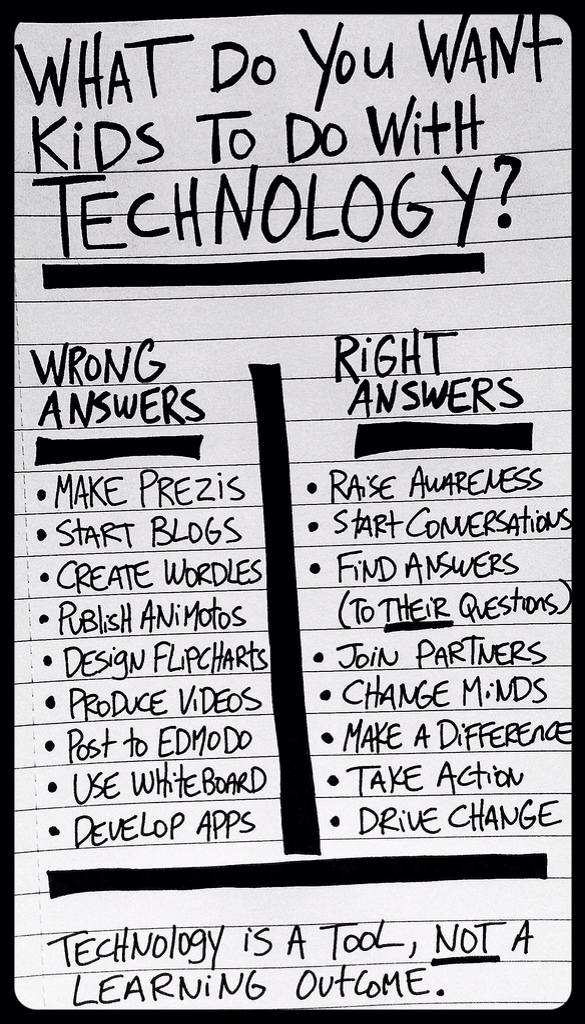
The Real Power of Technology in Schools – Focusing on the Right Thing

I worry when I hear schools talking about their (often new) technology, and simply describe the tools (word processors, blogs, social networks, apps, etc.) that they are teaching their students to use.

And I fear that they have wasted their money, because they have totally missed the point about technology's role (and potential!) in school.

The true value of technology lies not in learning to use the technology, but in using the technology to learn.

Early on in MLTI, Maine's 13 year old statewide, middle grades 1to1 initiative, there was a discussion about the focus of our PD. Should we have workshops on spreadsheets, for example. But we decided, instead, that we would do a data collection and analysis session, and participants would leave also knowing how to use spreadsheets.

After all, why bother creating spreadsheets? Certainly not just for the sake of creating spreadsheets. They are a tool in service to some other purpose.

As an aside, I have heard some make the “prerequisite argument,” that is, the need to learn spreadsheet creation in order to be able to analyze data. But that's using logic when we should be applying psychology. Because the irony is that people learn better, understand better, can apply better, and remember longer skills they learn in the context of some immediate, authentic need, rather than in the absence of any context other than the abstract (and uncertain) “you'll need it in the future.” I have had to reteach too many lessons when the students now had an actual need to know, that I had already taught once “in case” they needed to know in the future… How'd that work for me? “Need” first, “tool” second, not the other way around.

So I am thankful to kindred spirits, such as the author of Technology Is a Tool, Not a Learning Outcome, (and is credited with the image in this post) who also work to insure that we focus on the right thing when we bring technology into our schools.

So I wonder, when districts struggle with their technology, like LA Unified has recently, if they are focusing on the right thing…


Screen Time Revisited

Recently, I posted about screen time. It seems to have become an even larger concern since the introduction of tablets, perhaps because they are becoming even more ubiquitous than laptops; perhaps because they are being used widely with young learners…

But, in my view, it is largely a misplaced concern. It is worrying about the wrong thing.

And I recently came across this article that seems to have similar views.

The article's author, Lisa Nielsen, is frustrated by recent research focused more on the devices than on the teaching strategies:

Conducting device-focused research makes as little sense as doing research on pens, papers, folders, book-binding, and three-ring notebooks. Where are the papers, studies and statistics on the negative impact of chalk dust, calling for blackboards to be limited? We must understand that it’s not about “the thing;” It is about what we do with the thing and what the thing can do for us.

She takes on several of the supposed concerns about screen time and students using technology, including childhood obesity:

It’s not the screentime that causes obesity! When we have kids locked up in classrooms all day, and locked inside with homework at night, how can we possibly blame the screens? If we want our kids to be fit, we can rethink homework, bring back significant recess, and let kids go out and play.

Much more in the full article, here.


Not All Screen Time Is Created Equal – Young Children and iPads

Having a 1to1 iPad initiative in Kindergarten for almost 3 years (and currently in 1st & 2nd, as well), it's not surprising that we have heard a lot of comments and questions from parents about screen time.

The concern, of course, is that by having iPads in the primary grades (and especially 1to1, not just shared) young students are getting too much screen time.

It's understandable given the screen time research that has been around for a couple decades, mostly focused on children's television watching habits.

But in 2010, David Kleeman, President of the American Center for Children and Media, wrote, “A Screen Is a Screen Is a Screen'” Is a Meme, putting forth the idea that not all screen time is the same. Kleeman comments on at least two distinguishing factors. The first is the quality of the content. Certainly watching Sesame Street is of a different value than watching Tom & Jerry cartoons.

The second is how active (mentally or physically) the screen time is. Using educational or creation/productivity apps might be a better use of screen time than watching certain videos or playing certain games. Or as Kleeman points out, “David Pogue says, 'You can't play Kinect sitting down, and that's a plus.'” Kleeman refers to these as “lean forward” and “lean back” screen time. Lean back screen time is passive, while lean forward is active.

In fact, most of the screen time research and position papers seem to predate any significant introduction of the iPad, it's child-friendly touch interface and the plethora of educational and creation/creativity oriented apps (e.g. Kaiser Family Foundation 2010; American Academy of Pediatrics 2010; Common Sense Media 2011). It is easy to forget just how new an educational device the iPad really is!

There is a more recent position statement, jointly from the National Association for the Education of Young Children (NAEYC), and the Fred Rogers Center for Early Learning and Children’s Media, which brings a balanced (or at least timely) view to the potential role of technology in educating young children.

The paper includes these position statements:

“Effective uses of technology and media are active, hands-on, engaging, and empowering; give the child control; provide adaptive scaffolds to ease the accomplishment of tasks; and are used as one of many options to support children’s learning.”

And…

“When used appropriately, technology and media can enhance children’s cognitive and social abilities.”

To be clear, no one is arguing that there is no need to be thoughtful about how we leverage iPads for young student learning, nor is anyone arguing that iPads should replace hands-on, active learning (both are fears I sometimes hear expressed).

But I do want to state explicitly that the current screen time research does not contradict the (thoughtful) use of iPads with primary grades students, and in fact, there are productive, educative, developmentally appropriate uses.


I want to add as an aside the importance of training and professional development for teachers and other school leaders, if we are going to make primary grades iPads work. If the secret is “thoughtful” use of iPads as a learning tool, and where this post is directed to those who may want to respond to (erroneous) claims that screen time research suggests that young children should not be using iPads, I want to also share another position statement from the NAEYC paper. Educational leaders who recognize the educational value of primary grades iPads need to fully support teachers striving to meet that vision:

“Early childhood educators need training, professional development opportunities, and examples of successful practice to develop the technology and media knowledge, skills, and experience needed to meet the expectations set forth in this statement.”


Thanks to Sue Dorris for her contributions to this post.

Another Wonderful iPads in Primary Grades Institute Completed

It has been a (VERY) busy fall, but the (wonderful!) culmination of it all was last week's Leveraging Learning Institute.

This was Auburn School Department's third year running the institute focused on lessons learned from our first-in-the-country iPads in primary grades initiative. We had about 130 participants, mostly from across Maine, but also from North Carolina, New York, Pennsylvania, and Massachusetts.

We had some nice press coverage:

Look over the whole Institute website here, but you might be especially interested in the resource documents from this year's sessions (we're still posting resources, so check back in a week or so to see what other resources are shared) or info about our presenters.

We don't have any details for you yet, but we have already started planning the next Leveraging Learning Institute…

We Thought We Were Pretty Good Tech Integrators, Until We Met Jennie

Our team of technology integrators is very experienced and does great work. At least we thought so, until we met Jennie Magiera. 😉

Jennie works with teachers in Chicago Public Schools on leveraging technology to engage and motivate students, as well as strengthen their learning. We were fortunate enough to have her join us for last year's Leveraging Learning Institute: iPads in Primary Grades. She not only keynoted, but led several sessions, collaborated with participants, and worked closely with our middle grades twitter reporters. She even convinced us all (in the middle of the Institute!) that a panel of our student reporters should do one of the evening keynotes! (We took her advice, and the kids were great!)

Her energy and positive attitude are contagious (although there is a chance that the Energizer Bunny is exhausted by having her around!), and her great ideas about teaching with technology are so numerous, you just can't try them all at once.

But that's ok. Take your time. It's worth the investment of practice and the effort to make them part of your repertoire.

This is her keynote from last year. Her slides are here. I hope you get as much out of it as we did.


The Leveraging Learning Institute highlights Auburn's experience and “lessons learned” from the country's first district-wide 1to1 iPads in primary grades initiative, and helps participants learn how to successfully design and implement an iPad initiative to customize learning for students. This year's Institute is Wednesday Nov. 13 through Friday November 15, and registration is currently open.


QR Codes & Fostering a Strong Home/School Connection

Mauri Dufour is one of our kindergarten teachers in Auburn, an early adopter of iPads in primary grades, and is an Apple Distinguished Educator. Over the past year, Mauri has explored the role of QR codes in her classroom.

Last March, she took some time to tell me about how she uses QR codes to connect with her students’ families.

Highlights from Mauri’s video:

  • Each Friday, her students each make a video for his or her family about that week’s literacy center
  • Students must explain the “why” of the lesson, as well as, what they did in the center
  • The QR code makes it easy to share the weekly video with the family
  • This has helped foster a strong Home/School connection
  • Mauri describes how she worked with parents to make this happen

Despite working in a high poverty school, the QR codes have helped create much stronger parent involvement and communication than might otherwise be expected.

What Do Veteran Teachers Think of iPads in the Primary Grades: The Series

Veteran teachers and teachers who are at first skeptical of an initiative may have a more balanced view of how an initiative is going. Our own School Board had heard plenty from our Advantage 2014 leaders and “shining star” teachers, and wanted to know what our veteran teachers thought of the initiative.

Last March, I interviewed 4 of those teachers and captured their thoughts in three videos:


iPads in Primary Grades: What Veteran Teachers Think – Stephanie

This is the third installment in a series of interviews with veteran teachers to get their perspective on our iPads in primary grades initiative, Advantage 2014. Is the initiative really having the impact our early adopters would have you believe? Would our more cautious or hesitant teachers agree? Here are the first and second posts in the series.

Stephanie Hathaway teaches kindergarten. Here are her thoughts on the initiative.

Highlights from Stephanie’s interview:

  • She felt there was a lot of pressure to succeed, which she found daunting, since she wasn’t familiar with iPads before the initiative.
  • But the district provided lots of professional development
  • Impact: Assessment (time 0:48)
  • Impact: Like having 18 teachers in the room – interventions & individualization (time 2:18)
  • Impact: Motivation factor and creativity factor (time 4:07)
  • Also supports the learning of handwriting.

iPads in Primary Grades: What Veteran Teachers Think – Sheila

We’re all used to some teachers being enthusiastic about a relatively new initiative. It’s no different with Advantage 2014, Auburn’s iPads in primary grades initiative. But the “enthusiastic teacher” view might not sell decision makers, since it’s probably not a representative perspective (and keeping in mind that not necessarily all decision makers are fans of any initiative). “What do veteran teachers think?” is the question whose answer is more likely to sway decision makers.

So last March, I interviewed some of our veteran teachers to get their perspective. This is the second in my series of three such interviews (the first is here).

Sheila Ray teaches first grade, and was admittedly skeptical of using iPads with students, when the program was introduced. She shares her perspective after her first year of teaching with iPads, especially for reading and math. She notes that not only did using the iPads contribute to greatly improved test scores, but parents also noted student enthusiasm.

iPads in Primary Grades: What Veteran Teachers Think – Jean & Chris

Auburn has had some real success with Advantage 2014, our iPads in primary grades initiative. Although many folks like hearing about the enthusiastic teachers who have done many inventive things with the iPads and their students, others wonder what veteran teachers might think; teachers who may not be so enthusiastic.

In March of 2013, I interviewed a handful of such teachers to see what their perspective was. This is the first in a series highlighting the veteran teachers' perspective of teaching and learning with iPads in kindergarten and first grade.

Both Christine Gagne and Jean Vadeboncoeur have taught first grade “for a long time,” as Chris says. Both were skeptical of having to use the iPads with students, and Jean admits that she is not a “pro screen kind of person.” In this video, Chris and Jean talk about their experience in the first year of using the iPads, and the impact the iPad, apps, and their professional development had on their students.


Highlights of their comments:

  • By March, all their students were meeting or exceeding standards.
  • The apps and using the iPads generated a lot of excitement in the students.
  • They saw students try harder and work more diligently to figure out the work on their own.
  • They were surprised at this year's students' progress compared to previous years.
  • They thought the amount of practice and the immediate feedback were secrets of the success.


Deliberate Leadership for School Change: an Overview of the Lead4Change Model

Large-scale school change often involves both complex systems (lots of different people, schools, organizations, etc.), as well as, things that teachers have never experienced themselves.

That's why schools need a model of deliberate leadership for school change. One such model is Lead4Change.

Lead4Change grew from early learnings from the Maine Learning Technology Initiative (MLTI) about what strategies successful schools were using, and were often missing at schools having less success. Working with a variety of schools designed to motivate students, it became clear that the lessons generalized nicely to all kinds of school change, not just 1to1 laptop and tablet initiatives.

This 16 minute video provides an overview of the model.

My school district is applying this model to our technology initiatives, MLTI & Advantage 2014, and several districts, including mine, is using it to help shape our work around Customized Learning.


Hold the Date for Auburn’s 3rd iPads in Primary Grades Conference!

Did you miss out on the first two, or were you one of the educators that was able to impact your own iPad initiative by participating in this conference? According to Will Burrows, Special Education Director in RSU 4, “We were able to take what we had heard in sessions and look at our practices from a new perspective. We are now more confident that we have a plan to move forward in a more efficient and effective manner.”

From the Instiute website:

In their Leveraging Learning institutes, the Auburn School Department helps participants learn how to successfully design and implement an iPad initiative to customize learning for students. The institute’s local and national experts will present their progress to date along with their strategies for success. The institute will provide participants with opportunities to network and learn from others. While Auburn’s Advantage 2014 will be a kindergarten, Grade 1, and Grade 2 implementation in the 2013-14 school year, the Institute is designed to support all elementary iPad implementations.

So, plan on joining us this year for Auburn's 3rd Annual Leveraging Learning Institute: iPads in Primary Grades.

The conference will be held November 13-15, 2013, at the Hilton Garden Inn in Auburn, Maine. Registration will open on Thursday, August 22, 2013 at 12:00 noon EST.


Auburn on Bloomberg EDU: Tablets in K-12 Education

The May 17th episode of the Bloomberg EDU radio focused on tablets in K-12 education. I shared Auburn's experience. Here is the description of the episode:

Educators Discuss the Use of Tablets in K-12 Education (Audio)

Sara Schapiro, director of the League of Innovative Schools at Washington, D.C.-based Digital Promise, Mark Sullivan, principal of Burlington High School in Massachusetts, Michael Muir, leader of Multiple Pathways for Maine's Auburn School Department and Linda Clark, superintendent of Idaho's Meridian Joint Schools District No. 2 discuss the use of iPads and other tablets in K-12 education. They talk with Jane Williams on Bloomberg Radio's “Bloomberg EDU.”]

Listen to the podcast here.


Auburn’s Data Shows (Again) The Positive Impact of iPads

Our School Committee wants to know if there has been an impact of having iPads in the primary grades classrooms, and there has been!

In fact, we recently presented those findings to the School Committee.

All our primary grades students participate in CPAA testing (Children's Progress Academic Assessment). It is a test meant to be used as formative assessment to let teachers know where their students are in their literacy and math learning, giving them information about student mastery of specific concepts, helping inform teachers' instruction.

As we look back over the CPAA data from past years, and compare to the cohorts of students who have had iPads, we found that a larger percentage of students have reached proficiency, and have reached it sooner, than in the years before we had iPads. For kindergarten, this is true for 6 out of 8 concepts. For first grade, it is true for 5 out of 7 concepts.

We know it hasn't just been the iPads. We have done a ton of professional development on literacy best practices, math best practices, and educational technology best practices.

But what this data does tell us, is that when we combine teachers with professional development and 1to1 iPads, then our students learn more, faster.

In other words, Advantage 2014, our literacy, math, and iPad initiative, is having a positive effect on student achievement.

So when we ask for iPads for second grade, we aren't just asking for tech or gadgets. We are asking for a proven educational resource that helps our students learn better.

How Does Auburn Select Apps?

Ever since we started Advantage 2014, our primary grades literacy and math initiative that includes 1to1 iPads in Kindergarten and 1st Grade, we’ve had educators and parents ask us what apps we’re using. (We have an apps page on our web site with 2 links, one to just our list of “district recommended” apps and one with the correlation of those apps to our curriculum – at least for one academic area…)

But occasionally, I’ll be asked how we select our apps.

For the most part, teachers guide our selection.

Teachers are free to use what ever apps they would like (especially free ones), but they are responsible for organizing their app library and syncing the devices in their classroom. This, by itself, eventually leads to teachers being more selective about which (and how many) apps they use! (One kindergarten teacher spent a couple weeks taking home a few iPads each night to spend the evening deleting the couple hundred apps she no longer wanted on the iPads!). 🙂

In general, we made “educational resource selection” part of our professional development. We didn’t want app selection to be some centralized function, and we wanted teachers to get good (and deliberate) about how they selected the resources they used with their students (which never happens if “someone else” is responsible for deciding which resources are ok for teachers to use). In a post about our professional development, I referred to our it as using a Constructivist approach:

As we thought about designing PD for our teachers, we didn’t want to just hand teachers information or resources; for example, we didn’t just want to hand them “approved” apps. We wanted teachers to have an intimate understanding of various components of the initiative they were on the front lines of implementing, including app (educational resource) selection. We decided to take a constructivist approach. For example, we had our teachers start by simply exploring apps. They had a limited budget for apps, but could also download as many free apps as they wanted. Then teachers made recommendations for apps that they thought would be the “core collection” of apps, those apps the district would purchase for every classroom. We would give teachers two similar apps and ask, “which one’s better?” to get them thinking about criteria for app selection; this eventually was developed into a rubric. Finally, we correlated apps to our kindergarten curriculum. The constructivist approach insures a deeper understanding based on their own experience.

We decided we didn’t like the term “district approved” apps, and now refer to them as “district recommended” apps.

Also, with teacher input, we revised our app selection rubric a couple times. Then we came across Tony Vincent’s work with iPads and his fabulous resources. We now use his rubric, since we think it captures our thinking about app selection better than we did. (Here are some other recommendations by Tony Vincent on how to evaluate/select apps.) Now, when a teacher requests that an app be installed on all the classroom iPads, we start by asking how it faired against Tony Vincent’s rubric.

In all cases, we tried to focus app selection (and teacher practice with iPads) on our goals for the program. From our PD post:

Content of Professional Development – All of our PD and training has focused on a couple of topics. We wanted to expand our teachers’ skill at applying literacy best practice, and to insure that our teachers and specialists working with kindergarten students had the capacity to select and apply appropriate apps directly toward student academic needs, as well as how to manage the iPads and work within the unique demands of this initiative.

Through our professional development, we also worked with teachers to create expectations for iPad use in the classrooms (which further helped us with app selection):

iPad Use – Minimum Requirements

  • iPads are used daily during centers.
  • iPads are used daily during whole group and/or small group instruction.
  • iPads are used as an intervention tool with below benchmark students.
  • iPad apps reviewed by the district are used.

This year, recognizing that we need to address both instruction for low-level thinking and higher-level thinking, we have some teachers exploring “Using iPads for Projects, Problem-Solving, and Creating.” So even with new explorations, we are working to link app selection to the best practices.

I haven’t really talked about how we pay for apps (mostly district volume purchase program vouchers, and iTunes cards purchased by various groups), and I recognize that budget does have an impact on app selection, and when a district purchase is involved, we involve the Tech Director in the decision (or the Special Ed Director, if it is a Special Education related purchase). But as much as possible, we try to give the teachers the lion’s share of the say in what apps we get. Leadership’s job isn’t to tell them which apps are ok to use or what best practice is, but rather to support their individual and collaborative work toward becoming their own experts in best practice and educational resource selection.

Where Can I Learn More about iPads in Elementary Schools

I get asked regularly, besides my writing about our iPad initiative, who else writes about iPads in elementary education.

Here are some of the folks I read:

  • Sidwell Friends School (the primary grades iPad initiative at the school the Obama girls attend)
  • Fraser Speirs (Scottish tech integrator. Has great posts about iPads in elem sch)
  • Tony Vincent (great info on teaching and learning with mobile tech, especially iPads)
  • Jennie Magiera (amazing tech coach in Chicago, was one of our keynotes at our Leveraging Learning Institute – not exclusively iPads but on the nose about pedagogy with tech)
  • And this blog isn’t about iPads, but we see our iPad initiative as how we implement Customized Learning in the Primary Grades and Mark Davis is a teacher who writes about his experience with customized learning. Very nice, concrete writing about implementation…

More Indications of Positive Results from Auburn’s iPads

We’ve had iPads in our Kindergarten classrooms for more than a year now. This fall, we also rolled out iPads to our 1st grade students. All in the name of improving students’ mastery of literacy and math.

We know that we have too many students who aren’t demonstrating proficiency, so for several years, we’ve been making sure that teachers are getting quality training in literacy and math instruction, and we’re hopeful that, combined with the access to educational resources made possible through iPads, that we’ll increase that level of proficiency.

And when we examined gains made by last year’s kindergarten students, that’s what we found. Our kindergarten students had made more gains than in years past, leading our Curriculum Director to proclaim that taxpayers’ money is well spent.

Read more about our gains in the Sun Journal article Educators Say iPads Help Scores, and the MPBN radio story Auburn Educators Tout Benefits of iPads for Kindergartners (sorry iPad users; you need flash to listen to the story, but you can still peruse the article).